Creating Trade Tickets
Trade tickets are used to group deals to facilitate buying and selling multiple deals simultaneously. The Trade Tickets component is similar to the deal capture pages. Refer to the previous topics in this section that provide field descriptions for the deal capture pages.
This topic discusses how to enter trade detail information.
Page Used to Create Trade Tickets
| Page Name | Definition Name | Usage |
|---|---|---|
|
TRD_DETAIL_TR |
Enter trade detail information. |
Trade Detail Page
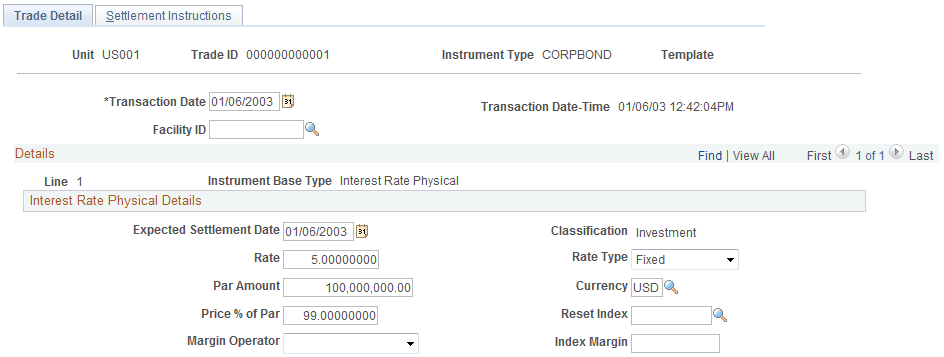
Use the Trade Detail page (TRD_DETAIL_TR) to enter trade detail information.
Navigation:
This example illustrates the fields and controls on the Trade Detail page (1 of 2). You can find definitions for the fields and controls later on this page.
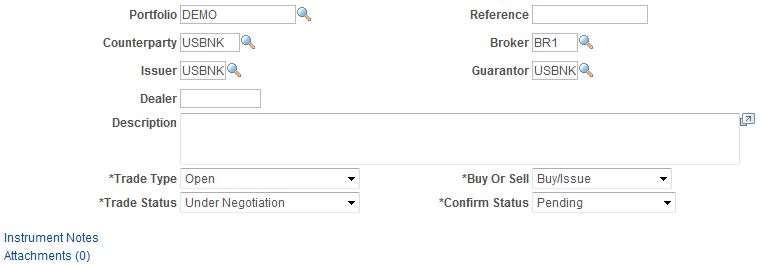
This example illustrates the fields and controls on the Trade Detail page (2 of 2). You can find definitions for the fields and controls later on this page.
| Field or Control | Description |
|---|---|
|
Transaction Date |
Enter the transaction date of the trade if it differs from the system date. |
|
Trade Type |
Select one of the following options:
|
|
Trade Status |
Select Deactivated, Open, or Under Negotiation. |
|
Confirm Status (confirmation status) |
Select Pending, Approved, or Rejected. |