Managing Deals and Portfolios
This topic discusses how to group and view deal portfolios, and manage and maintain deal portfolios.
Pages Used to Manage Deals and Portfolios
| Page Name | Definition Name | Usage |
|---|---|---|
|
TRX_PORTFOLIO_FAV |
Group deals into portfolios. |
|
|
Update My Portfolios Page |
TRX_PORTFLIO_FAV_A |
Select additional portfolios to add to the My Portfolios page. See the My Portfolios Page for more information. |
|
TRX_PORTFOLIO_DTL |
Monitor groups of portfolios. |
|
|
TRX_PORTFOLIO_DEFN |
Create a portfolio. Add new and view existing deals in a specified portfolio. |
My Portfolios Page
Use the My Portfolios page (TRX_PORTFOLIO_FAV) to group deals into portfolios.
You can group deals into portfolios and add new deals to the portfolio. Use the Portfolio Manager page to manage deals and their associated information from a central location.
Navigation:
| Field or Control | Description |
|---|---|
|
Update My Portfolios |
Click to add portfolios to your grouping of portfolios on the Update My Portfolios page (TRX_PORTFLIO_FAV_A). |
|
Portfolio ID |
Click to navigate to the content of a particular portfolio. |
|
Create a Portfolio |
Click to create and add a portfolio to the page. |
|
Search for a Portfolio |
Click to access the Portfolio Manager page. |
Portfolio Manager Page
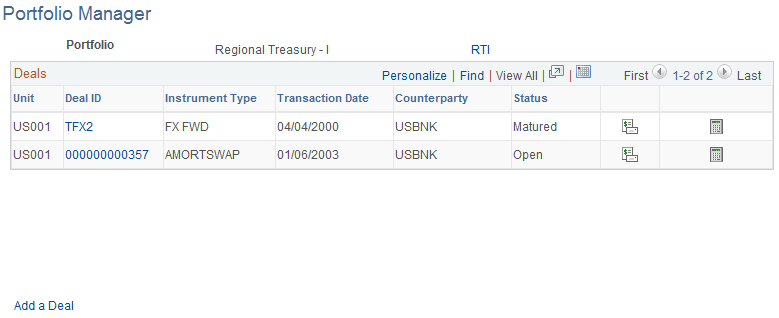
Use the Portfolio Manager page (TRX_PORTFOLIO_DTL) to monitor groups of portfolios.
Navigation:
This example illustrates the fields and controls on the Portfolio Manager page . You can find definitions for the fields and controls later on this page.
| Field or Control | Description |
|---|---|
|
Portfolio |
Click this link to access the Deal Portfolios page and edit the deal portfolio definition. |
|
Deal ID |
Click these links to access detailed information about specified deals that you grouped on the My Portfolio page. |
|
|
Click the Display Cash Flows icon to view the Cash Flows page for the specified deal ID. |
|
|
Click the Accounting Summary icon to search and view accounting information for the specified deal ID. |
|
|
Click the Analytics of the Deal icon to view analytics information for the specified deal ID. |
|
Add a Deal |
Click this link to increase the holdings of the portfolio. |


Deal Portfolios Page
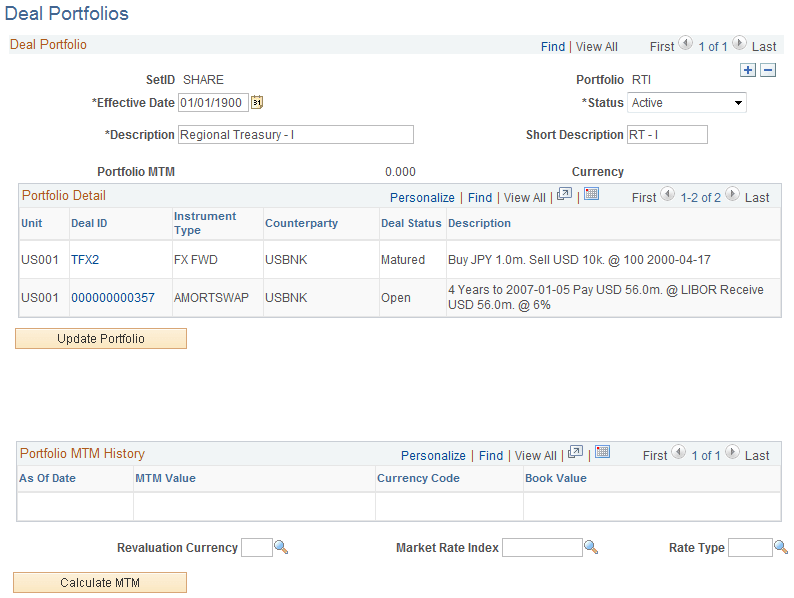
Use the Deal Portfolios page (TRX_PORTFOLIO_DEFN) to create a portfolio.
Add new and view existing deals in a specified portfolio.
Navigation:
This example illustrates the fields and controls on the Deal Portfolios page. You can find definitions for the fields and controls later on this page.
| Field or Control | Description |
|---|---|
|
Update Portfolio |
Click to search and add additional deals to a particular portfolio. Select the check box for a deal and click Update. |
|
Calculate MTM (calculate mark-to-market) |
Click to calculate the mark-to-market value of the entire portfolio. |
|
Revaluation Currency |
If the deals in the portfolio are of disparate currencies, specify a currency to which the deals can be revalued. Note: The MTM value for the portfolio cannot be calculated if the portfolio contains deals of disparate currencies and a revalue currency is not specified. |