Repurchasing an IRP Deal
This topic discusses repurchasing an interest rate physical deal.
Page Used to Repurchase an IRP Deal
| Page Name | Definition Name | Usage |
|---|---|---|
|
TRX_REPO |
Record data related to repurchases in holdings. |
Repurchase Agreements Details Page
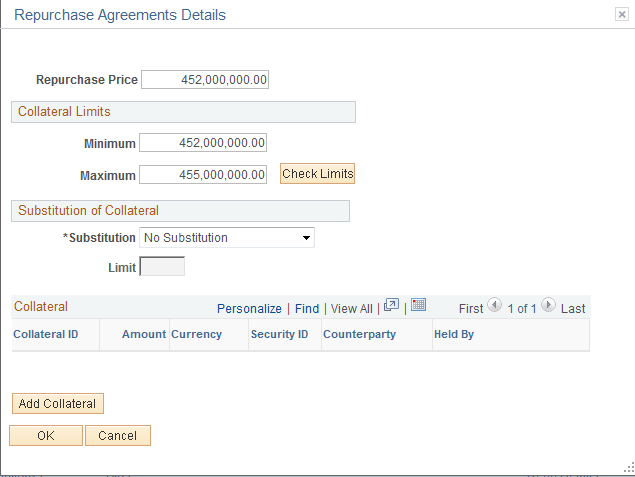
Use the Repurchase Agreements Details page (TRX_REPO) to record data related to repurchases in holdings.
Navigation:
Click Repo Details on the Deal Detail page.
This example illustrates the fields and controls on the Repurchase Agreements Details page. You can find definitions for the fields and controls later on this page.
Note:
This page is accessible only if the Is a Repo check box is selected on the Instrument Detail page.
| Field or Control | Description |
|---|---|
|
Repurchase Price |
Enter the deal repurchase price. |
|
Collateral Limits |
Enter the Minimum and Maximum amounts. Click Revalue to verify if the value of the collateral falls between the minimum and maximum allowed range. |
|
Substitution of Collateral |
Select No Substitution, Substitution with Limits, or Unlimited Substitution. If you select Substitution with Limits, enter the limit amount. |
|
Add Collateral |
Click to add the displayed collateral to the repo deal. |