Understanding Inbound and Outbound Flat File EDI Transaction Processes
This overview section provides information about:
-
Inbound flat file EDI transactions using the PeopleSoft format.
-
Inbound flat file EDI transactions using X.12 EDI format.
-
Outbound flat file EDI transactions using the PeopleSoft format.
-
Outbound flat file EDI transactions using X.12 EDI format.
Processing Inbound Flat File EDI Transactions Using the PeopleSoft Format
A flat file that uses the PeopleSoft format can be generated by a third-party system in this PeopleSoft format or generated by a third-party system and then converted to the PeopleSoft format by a middleware product. A flat file could also come from another PeopleSoft system. The PeopleSoft inbound file publish utility converts the data from a flat file to an XML file using the PeopleSoft format. The inbound data is then placed in the message queue, checked for errors, and then moved to the inbound staging tables to be processed by the individual PeopleSoft application.
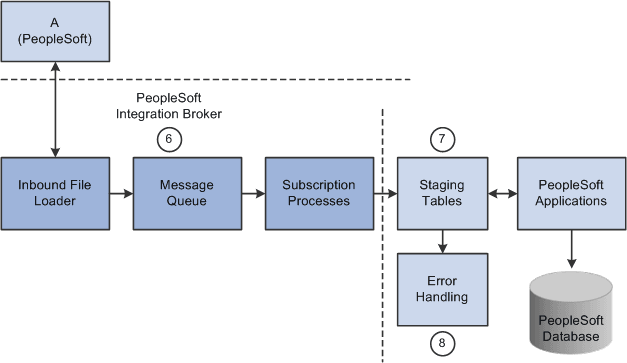
The following diagrams 1 and 2 illustrate the inbound flat file EDI transaction process using the PeopleSoft format. The transaction process is initiated from a business process and is completed once the data is loaded into the PeopleSoft application database. Diagram 1:
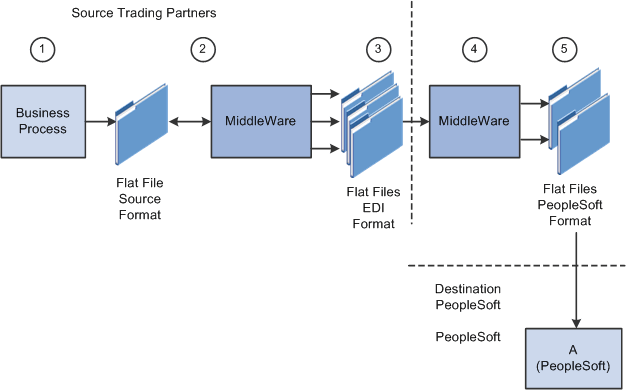
Diagram 2:
To process inbound flat file EDI transactions:
-
The source trading partner initiates a process that generates a flat file containing EDI transactions in the sources format.
-
The file is passed to a middleware translation tool that generates an outbound file in the appropriate EDI format (X.12, EDIFACT and so on).
Depending on the relationship with various trading partners' data mapping, transformations may occur at this point to meet trading partner-specific mapping requirements. The formatted file is then sent on to the source trading partner's VAN—a private network used for exchanging EDI transactions. However, networks can also be the Internet, a dedicated link, or a sole-source provider.
-
The source trading partner's VAN distributes the flat file to the destination trading partner's VAN.
The source trading partner and destination trading partner can use the same VAN.
-
The destination trading partner receives the flat file from the VAN.
A middleware tool is used to convert the source file into the appropriate PeopleSoft Business Document file format. This process includes a conversion from the sources EDI format (X.12, EDIFACT and so on). Additional translation requirements may be required if the source trading partner is sending a generic file that does not meet the destination trading partner's data requirements.
-
The destination trading partner performs the Inbound File Publish process that changes the flat file transactions to XML and then writes them to a message queue.
The Inbound File Publish process inputs the electronic data flat file, translates the data using the PeopleSoft File Layout Definition and rules, and then publishes the data to the PeopleSoft Integration Broker as XML transactions.
-
PeopleSoft Integration Broker subscription processes (OnNotify Handlers) are automatically executed that retrieve the data from the message queue and write it to stage tables.
-
PeopleSoft applications then read the transactions from the staging tables, perform validations, and load the data to the actual PeopleSoft application database.
If any errors are found in the transactions, use error handling to fix the errors and to resubmit the transactions.
Processing Inbound Flat File EDI Transactions Using X.12 EDI Format
An inbound flat file can be generated by a third-party system in this X.12 EDI flat file format or generated by a third-party system and then converted to the X.12 EDI flat file format by a middleware product. An EDI flat file could also come from another PeopleSoft system. Once received by your PeopleSoft system, the PeopleSoft Integration Broker uses transforms to convert the data from an X.12 EDI flat file format to the PeopleSoft format. The inbound PeopleSoft-formatted XML data is then placed in the message queue, checked for errors, and then moved to the inbound staging tables to be processed by the individual PeopleSoft application.
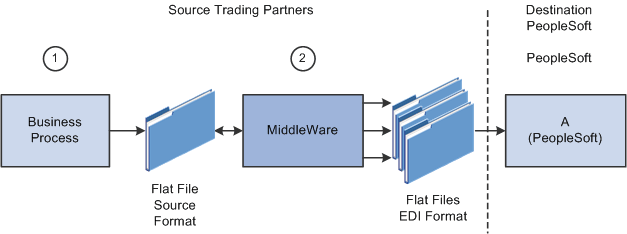
The following diagrams illustrate the inbound flat file EDI transaction process using the X.12 EDI format.
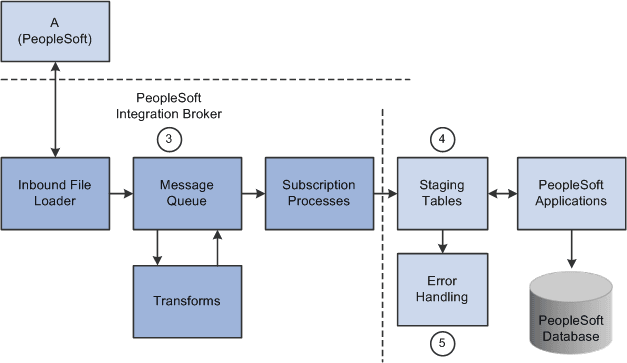
The following diagrams illustrate the inbound flat file EDI transaction process using the X.12 EDI format.
To process inbound flat file EDI transactions:
-
The source trading partner initiates a process that generates a flat file containing EDI transactions in the sources format.
-
The source trading partner's VAN distributes the flat file to the destination trading partner's VAN.
The source trading partner and destination trading partner can use the same VAN.
-
The destination trading partner performs the Inbound File Loader process which changes the X.12 EDI formatted flat file to an X.12 EDI formatted XML transaction and publishes it to the Integration Broker. A pre-defined file layout definition is used by the Inbound File Loader when generating the X.12 EDI XML transaction. The Integration Broker, using pre-defined transform routines then generates an XML transaction in PeopleSoft's format.
Pre-defined file layout definitions and Transformation examples are provided for the inbound 840 (Sales Quote Load) and 850 (Sales Order Load) X.12 EDI formats.
Note:
These examples require customizations for individual trading partner requirements. Other inbound X.12 EDI transactions can be supported by creating transforms using the same concepts provided in the example transform programs.
-
PeopleSoft Integration Broker subscription processes (OnNotify Handlers) are automatically executed that retrieve the data from the message queue and writes the data to stage tables.
-
If any errors are found in the transactions, use error handling to fix the errors and to resubmit the transactions.
Processing Outbound Flat File EDI Transactions Using the PeopleSoft Format
PeopleSoft can generate a PeopleSoft-formatted flat file. This flat file can be received by a third-party system or processed by a middleware product and then received by a third-party system.
The following diagrams 1 and 2 illustrate the outbound flat file EDI transaction process using the PeopleSoft format. The transaction process includes the retrieval of the data from the PeopleSoft database and the processes involved until the flat file is loaded into the business application system. Diagram 1:
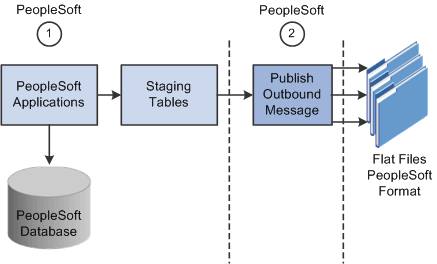
Diagram 2:
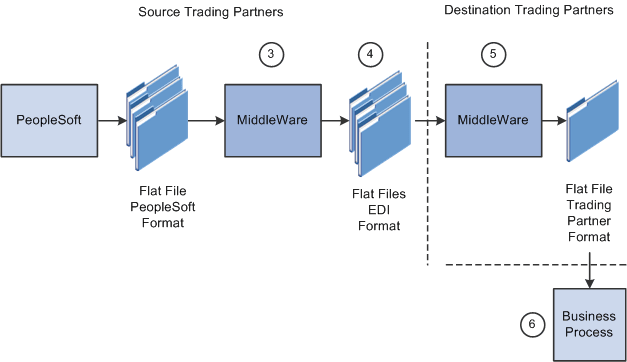
To process outbound flat file EDI transactions using the PeopleSoft format:
-
The source trading partner initiates a PeopleSoft application process that retrieves the transactional data from the PeopleSoft application database tables and loads those EDI transactions into PeopleSoft staging tables, or prepares the data so it can be picked up by the Publish Outbound Message process.
-
The source trading partner performs the Publish Outbound Message process that retrieves the transactions from the staging tables or application tables and creates a flat file.
The Outbound File Publish process reads the staging tables, translates the data using the PeopleSoft File Layout Definition and rules, and generates a flat file. The flat file is then sent to the VAN.
-
The file is passed to a middleware translation tool that generates an outbound file in the appropriate EDI format (X.12 EDI, EDIFACT and so on).
-
The source trading partner's VAN distributes the flat file to the destination trading partner's VAN.
-
The destination trading partner receives the flat file from the VAN.
A middleware tool is used to convert the source file into the format required for the destination trading partner's business application software.
-
The destination trading partner loads the flat file into its business application system.
Processing Outbound Flat File EDI Transactions Using X.12 EDI Format
PeopleSoft can generate a X.12 EDI formatted flat file.
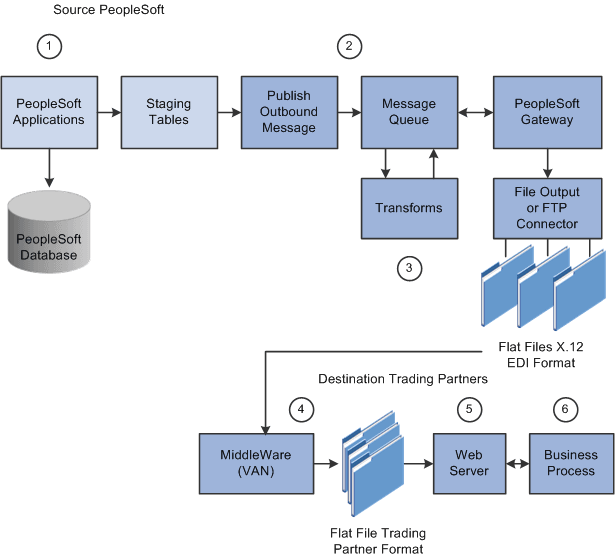
The following diagrams illustrate the outbound flat file EDI transaction process using the X.12 EDI format.
To process outbound flat file EDI transactions using X.12 EDI format:
-
The source trading partner initiates a PeopleSoft application process that retrieves the transactional data from the PeopleSoft application database tables and loads those EDI transactions into PeopleSoft staging tables, or prepares the data so it can be picked up by the Publish Outbound Message process.
-
The source-trading partner performs the Publish Outbound Message process that reads the staging tables or application tables, and publishes the data as XML to the Integration Broker, based on the options set in the batch publish rules (XML options).
-
The Integration Broker then transforms the data as specified on the active routings for the service operation and delivers the transformed data using the connector designated on the routing or node. For X.12 EDI data, this connector will often write a file to a directory or FTP server, but could be sent directly to a trading partner's gateway.
Transformation examples are provided for the outbound 810 (Billing Invoice), 845 (Sales Quote Notice), 855 (Sales Order Acknowledgement), and the 856 (Advanced Shipping Notice).
Note:
These examples require customizations for individual trading partner requirements. Other outbound X.12 EDI transactions can be supported by creating transforms using the same concepts provided in the example transform programs.
-
The source trading partner's VAN distributes the flat file to the destination trading partner's VAN.
-
The destination trading partner receives the flat file from the VAN. A middleware tool is used to convert the source file into the format required for the destination trading partner's business application software.
-
The destination trading partner loads the flat file into its business application system.