Understanding Inbound and Outbound XML-Based EDI Transaction Processes
This overview section provides information about:
-
Inbound XML-based EDI transactions using the PeopleSoft format.
-
Inbound XML-based EDI transactions using the X.12 format.
-
Outbound XML-based EDI transactions using the PeopleSoft format.
-
Outbound XML-based EDI transactions using the X.12 format.
In a perfect world, the source trading partner and the destination trading partner would use the exact same format for the XML (EDI transactions) that they exchange between themselves, whether the XML is inbound or outbound. In this case, no mapping of the XML to the other trading partner's format would be required. XML would be exchanged between trading partners utilizing their web servers.
In a more realistic scenario, trading partners would still use XML to exchange information between each other, but one side would have to perform a transformation of the XML using their middleware product, such as that traditionally provided by VANs or, starting with PeopleSoft 9, using the mapping capabilities provided with the PeopleSoft Integration Broker.
In either of the scenarios above, the processing of EDI transactions utilizing XML eliminates a lot of system processing and offers a more direct exchange of information. The XML method provides for quicker turn around of information between trading partners and reduces logistics and control issues inherent in flat file processing.
Processing Inbound XML-Based EDI Transactions Using the PeopleSoft Format
An XML file can be generated by another PeopleSoft system, generated by a third-party system in this PeopleSoft XML format, or generated by a third-party system and then converted to the PeopleSoft XML format by a middleware product. Once received by your PeopleSoft system, the inbound data is placed in the message queue, checked for errors and then moved to the inbound staging tables to be processed by the individual PeopleSoft application.
The following diagram illustrates the inbound XML-based EDI transaction process using the PeopleSoft format.
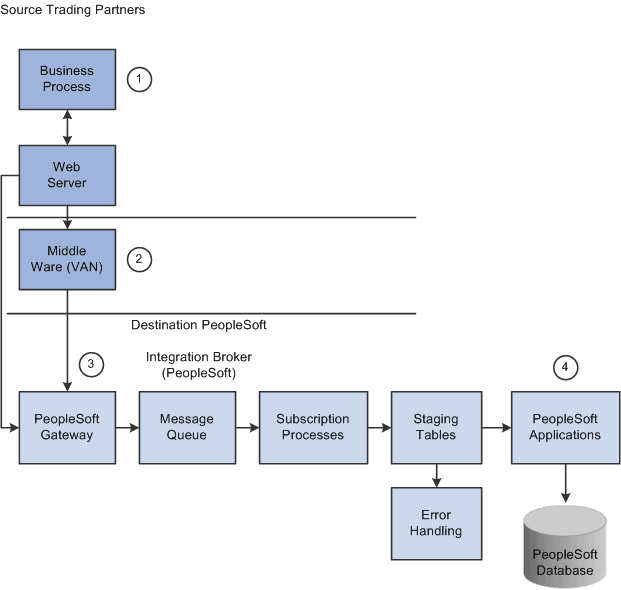
To process inbound XML transactions using PeopleSoft format:
-
The source trading partner publishes data to PeopleSoft's Integration Broker Gateway.
If one of the industry standard connectors compatible with PeopleSoft's Integration Broker Gateway is being used and the data is compatible with PeopleSoft's XML format, then it may be sent directly from the source site's gateway to the destination's (PeopleSoft system) gateway. If a compatible connector is not available then communications must be made using a middleware supplier that provides this connector. Also, if the data is not in PeopleSoft's XML format a transformation (data mapping) to PeopleSoft's XML format must be made either at the source site or at the destinations site.
Note:
Transformations to and from the trading partner formats can be performed using the PeopleSoft Integration Broker.
-
If a middleware transformation is being performed, transform the source XML format to the destination PeopleSoft system's XML format.
Note:
Many middleware products can convert from standard EDI formats (X.12 EDI or EDIFACT) to XML and then post to the PeopleSoft system. When using these products, you can still eliminate the use of flat files coming in and out of the PeopleSoft system even when working with trading partners that are not ready to move to the new technology. When utilizing this approach, flat files would still be used between the middleware product and the trading partner.
-
PeopleSoft subscription processes (OnNotify Handlers) are automatically executed that retrieve the XML from the message queue and then load the information into staging tables.
-
Different PeopleSoft applications read the transactions from the staging tables and load the data to the actual PeopleSoft application database.
Processing Inbound XML-Based EDI Transactions Using the X.12 Format
An XML file can be generated by a third-party system in this X.12 EDI XML format or generated by a third-party system and then converted to the X.12 EDI XML format by a middleware product. An EDI XML file could also come from another PeopleSoft system. Once received by your PeopleSoft system, the PeopleSoft Integration Broker uses transforms to convert the data from X.12 EDI format to the PeopleSoft format. The inbound PeopleSoft-formatted XML data is then placed in the message queue, checked for errors, and then moved to the inbound staging tables to be processed by the individual PeopleSoft application.
The following diagram illustrates the inbound XML-based EDI transaction process using the X.12 EDI format.
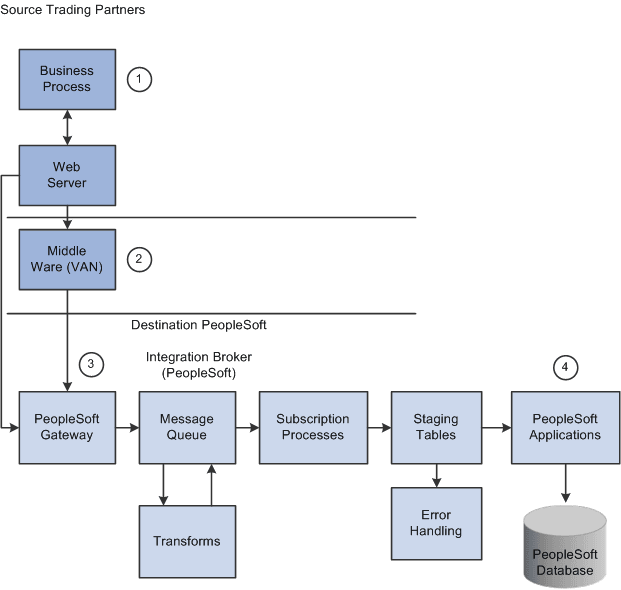
To process inbound XML transactions using X.12 EDI format:
-
The source trading partner publishes data to PeopleSoft's Integration Broker Gateway.
If one of the industry standard connectors compatible with PeopleSoft's Integration Broker Gateway is being used and the data is formatted in a compatible X.12 EDI format, then it may be sent directly from the source site's gateway to the destination's (PeopleSoft system) gateway. If a compatible connector is not available, communications must be made using a middleware supplier that provides this connector. Also, if the data is not in an X.12 EDI format, a transformation (data mapping) to an X.12 EDI format must be provided using a middleware product.
-
If a middleware transformation is being performed, transform the source XML format to X.12 EDI XML format.
-
PeopleSoft Integration Broker processes the data.
Using pre-defined transformations, the PeopleSoft Integration Broker will convert the source trading partner's X.12 EDI XML format to a PeopleSoft XML format, leaving the final product in the message queue.
People Soft subscription processes (On Notify Handlers) are then automatically executed to retrieve the data from the message queue and load it into staging tables.
Inbound transformation examples are provided for the 840 (Sales Quote Load) and 850 (Sales Order Load) X.12 EDI transaction set formats.
Note:
These examples require customizations for individual trading partner requirements. Other inbound X.12 EDI transactions can be supported by creating transforms using the concepts provided in the example transform programs.
-
Different PeopleSoft applications initiate processes that read the transactions from the staging tables and load the data to the actual PeopleSoft application database tables.
Processing Outbound XML-Based EDI Transactions Using the PeopleSoft Format
PeopleSoft can generate a PeopleSoft-formatted XML file to be received by another PeopleSoft system, such as CRM, or a third-party system with or without conversion by a middleware product.
The following diagram illustrates the outbound XML-based EDI transaction process using the PeopleSoft format.
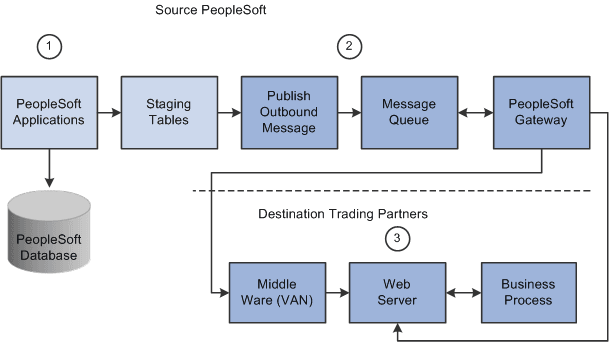
To process outbound XML-based EDI transactions using the PeopleSoft format:
-
The source trading partner initiates a PeopleSoft application process that retrieves the transactional data from the PeopleSoft application database tables and loads those EDI transactions into PeopleSoft staging tables, or prepares the data so it can be picked up by the Publish Outbound Message process.
-
The source trading partner performs the Publish Outbound Message process that retrieves the transactions from the staging tables or application tables, and publishes the data as XML to the Integration Broker, based on the options set in the batch publish rules (XML options).
If one of the industry standard connectors compatible with PeopleSoft's Integration Broker Gateway is being used and the destination's XML format is compatible with PeopleSoft's XML format then it may be sent directly from the source site to the destination's gateway. If a compatible connector is not available then communications must be made using a middleware supplier that provides this connector. Also, if the data is not in PeopleSoft's XML format a transformation (data mapping) "from" PeopleSoft's XML format must be made either at the source site, a middleware site or at the destinations site.
Note:
Transformations to and from the trading partner formats can be performed using the Integration Broker. In this situation the Integration Broker can perform the transformation and then with the correct connector can post directly to the destination trading partner's system.
-
If a middleware transformation is being performed, transform the PeopleSoft XML format to the destination's XML format.
If a middleware connector is required the middleware product will post to the destinations gateway or will create a flat file to be received by the trading partner through their VAN.
Note:
Many middleware products can convert from the PeopleSoft XML format to standard EDI formats (X.12 or EDIFACT) required by trading partners. When using these products you can still eliminate the use of flat files coming in and out of the PeopleSoft system even when working with trading partners that are not ready to move to the new technology. When utilizing this approach flat files would still be used between the middleware product, VAN and the trading partner.
Note:
See PeopleTools documentation for information about PeopleSoft XML formats, PeopleSoft listening connectors, and PeopleSoft target connectors.
Processing Outbound XML-Based EDI Transactions Using the X.12 EDI Format
PeopleSoft can generate an EDI X.12-formatted XML transaction to be received by a third-party system with or without conversion by a middleware product. As delivered, the outbound EDI service operation routings convert the PeopleSoft-formatted XML data into a X.12 EDI formatted flat file using transform programs; first by converting to an EDI XML format and then to a flat file format. However, by removing the second transform program from the routing you can change the system to output X.12 EDI data using XML.
The following diagram illustrates the outbound XML-based EDI transaction process using the X.12 EDI format.
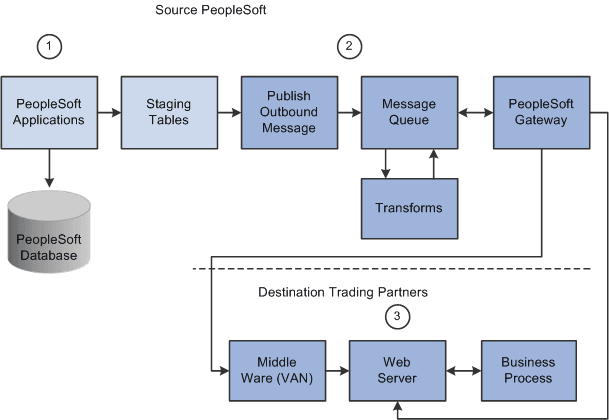
To process outbound XML-based EDI transactions using X.12 EDI format:
-
The source trading partner initiates a PeopleSoft application process that retrieves the transactional data from the PeopleSoft application database tables and loads those EDI transactions into PeopleSoft staging tables, or prepares the data so it can be picked up by the Publish Outbound Message process.
-
The source-trading partner performs the Publish Outbound Message process that retrieves the transactions from the staging tables or application tables, and publishes the data as XML to the Integration Broker, based on the options set in the batch publish rules (XML options).
-
The PeopleSoft Integration Broker then transforms the data as specified on the active routings for the service operation and delivers the transformed data using the connector designated on the routing or node.
The Integration Broker posts the X.12 EDI XML to the trading partner's gateway. If the trading partner requires transformations of the X.12 EDI XML into their proprietary format, they will use a middleware product at this point. Otherwise the XML is posted directly into their application system.
Transformation examples are provided for the outbound 810 (Billing Invoice), 845 (Sales Quote Notice), 855 (Sales Order Acknowledgement), and the 856 (Advanced Shipping Notice).
Note:
These examples require customizations for individual trading partner requirements. Other outbound X.12 EDI transactions can be supported by creating transforms using the same concepts provided in the example transform programs.