Setting Up Integration with a Marketplace
This section provides an overview of the Integration Broker between a Marketplace and eProcurement and discusses how to set up nodes, activate routings, and activate service operations.
Pages Used to Set Up Integration with a Marketplace
| Page Name | Definition Name | Usage |
|---|---|---|
|
IB_SERVICE |
Activate service operations. |
|
|
IB_ROUTINGDEFN |
Activate the routing that is used with the node. PeopleTools: Integration Broker, "Managing Routing Definitions". |
Understanding the Integration between a Marketplace and eProcurement
PeopleSoft integrates to a Marketplace to:
-
Enable companies to easily register with Marketplaces.
-
Create requisitions within eProcurement, while viewing catalogs in the Marketplace.
-
Enable suppliers to send Purchase Order Acknowledgements (POA).
-
Enable suppliers to send Advanced Shipment Notifications (ASN).
-
Generate receipts when Advanced Shipment Receipts (ASR) are received.
-
Enable suppliers to send invoices to the company, if you are using PeopleSoft Payables.
-
Create vouchers for inbound invoices.
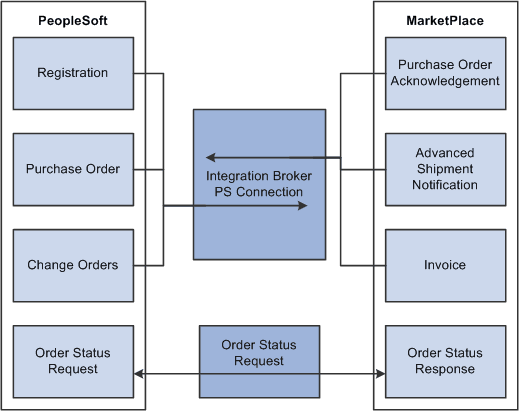
This diagram illustrates the flow of information from PeopleSoft, through the Integration Broker, and to the Marketplace. Data such as registration, purchase orders, and change orders flow from PeopleSoft to Marketplace. Data such as PO acknowledgements, advanced shipment notices, and invoices flow from MarketPlace to PeopleSoft. Order status requests can flow between PeopleSoft and MarketPlace:
This diagram illustrates the flow of information from PeopleSoft, through the Integration Broker, and to the Marketplace.
Understanding Setup Steps for Marketplace Integration
This section lists the steps that are required to integrate with a Marketplace:
To utilize the purchase order acknowledgement, advanced shipment notification, and invoice transaction capabilities, the administrator needs to configure the Integration Broker. These elements need to be set up:
-
Activate the service operation.
-
Activate the routing.
Integration Broker works within the PeopleSoft system to send and receive information to and from external systems, such as the Marketplace. In this case, the job of the Integration Broker is to send and receive documents that come to and from the Marketplace. The purpose of the Integration Broker is to aid in the translation of the xCBL 3.0 documents used by the Marketplace into the PSXML format that the PeopleSoft system recognizes. Integration Broker accomplishes this translation by using a combination of nodes, routings, and service operations.
| Integration Broker Component | Purpose |
|---|---|
|
Service Operation |
The service operation is a template for the data that the application sends and receives. |
|
Routing |
The route tells the system how the Marketplace works with PeopleSoft eProcurement. Details include what service operation to use for the two systems to communicate, and what Application Engine translation to use to translate the format from xCBL 3.0 to the PeopleSoft format. |
Activating Service Operations
PeopleSoft delivers service operations in PeopleSoft Integration Broker with a default status of Inactive. You must activate each service operation before attempting to send or receive data from a third-party source or another PeopleSoft system, such as CRM.
To setup this service operation use the information in this table and refer to the setup instruction in PeopleSoft Supply Chain Management Integration: Setting Up Service Operations .
| Service Operation | Direction and Type | Handlers | Chunking Available? | Integrates With |
|---|---|---|---|---|
|
PV_AVAIL_CHECK_REQ |
Outbound Synchronous |
No |
third-party system |
|
|
PV_AVAIL_CHECK_RESP |
Inbound Asynchronous |
No |
third-party system |
|
|
PV_MS_RESP_MSG |
Inbound Asynchronous |
PvMsRespMsg |
No |
third-party system |
|
PV_ORDER |
Outbound Asynchronous |
No |
third-party system |
|
|
PV_ORDER_REQ |
Outbound Synchronous |
No |
third-party system |
|
|
PV_ORD_STS_REQ |
Outbound Synchronous |
No |
third-party system |
|
|
PV_ORD_STS_RESP |
Inbound Asynchronous |
No |
third-party system |
|
|
PV_PRICE_CHECK_REQ |
Outbound Synchronous |
No |
third-party system |
|
|
PV_PRICE_CHECK_RESP |
Inbound Asynchronous |
No |
third-party system |
PeopleTools: Integration Broker
Routing Definitions Page
Use the Routing Definitions page (IB_ROUTINGDEFN) to activate the routing that is used with the node.
Navigation:
-
eProcurement, Administer Procurement, Maintain Supplier Integration, Integration Broker Routing Definitions
-
PeopleTools, Integration Broker, Integration Setup, Routings
This section discusses how to Activate Marketplace routings.
Activating Marketplace Routings
Activate the Marketplace routings.