Cleaning Up Proposals
This section discusses how to clean up proposals.
Page Used to Cleanup Proposals
| Page Name | Definition Name | Usage |
|---|---|---|
|
EM_PRO_CLEANUP |
Delete expired proposals. |
Cleanup Proposals Page
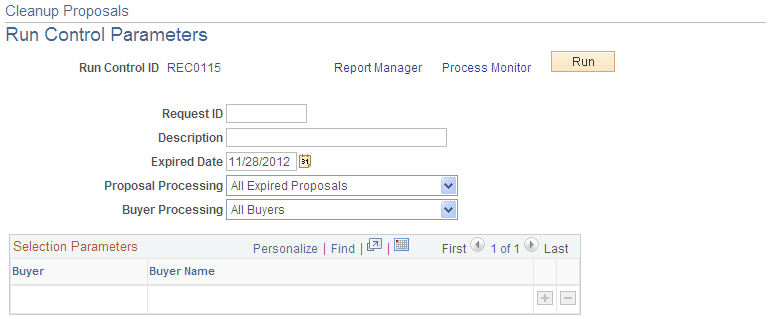
Use the Cleanup Proposals page (EM_PRO_CLEANUP) to delete expired proposals.
Navigation:
eSettlements, Batch Processes, Cleanup Proposals
This example illustrates the fields and controls on the Cleanup Proposals page. You can find definitions for the fields and controls later on this page.
| Field or Control | Description |
|---|---|
|
Expired Date |
Enter the expired date for the proposals. The system deletes all expired or cancelled proposals with dates after this date. |
|
Proposal Processing |
Select the proposals you want to clean up. Select All Expired Proposals to delete all proposals with expired dates after the date entered or Cancelled Only to delete proposals with a cancellation date after the date entered. |
|
Buyer Processing |
Select All Buyers to clean up proposals for all buyers or select Specific Buyer to clean up proposals for specific buyers. |