PeopleSoft Purchasing Default Hierarchy
This section discusses the purchasing default hierarchy at the purchase order header and line levels.
Note:
The Buyer Direct model uses the PeopleSoft Purchasing default hierarchy for processing purchase orders and receipts.
Purchase Order Header Defaults
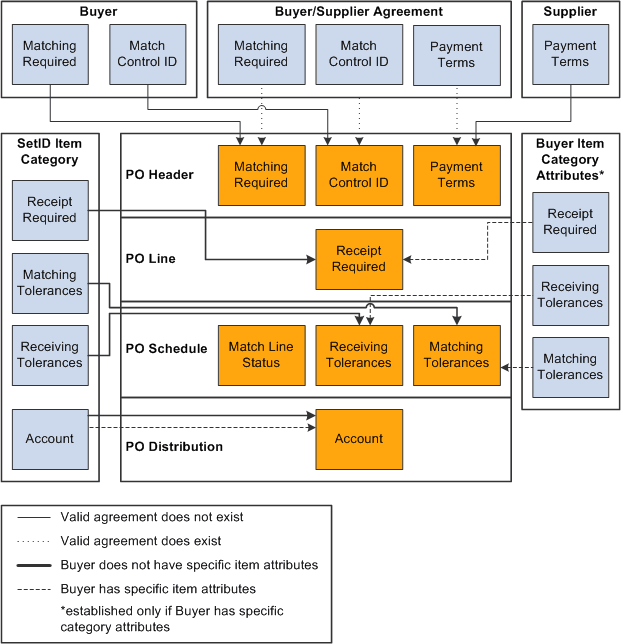
The Business Service Provider model uses the buyer and supplier agreements for match control and payment term defaults for PO header data. If no valid agreement exists, the system uses the buyer and supplier registrations.
The host administrator defines the match rule control during the global PeopleSoft setup. The buyer administrator then specifies the match rule control ID during buyer registration. This ID is used as the default value on agreements, although it can be changed there as well.
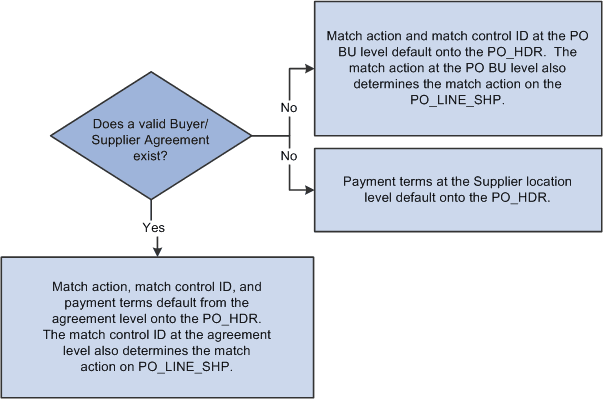
The supplier administrator defines payment terms either during supplier registration or agreement registration. When a valid agreement exists between a buyer and supplier, default matching and payment terms from the buyer and supplier agreement information pages appear on the purchase order header and schedule details. The values for the default supplier location are obtained from the agreement.
When purchase orders are created prior to the existence of a valid agreement, default matching information appears from buyer registration settings, and default payment terms information appears from the supplier location registration settings.
This diagram illustrates the purchase order default hierarchy when an agreement does and does not exist.
The following diagram illustrates how the existence of an agreement affects subsequent default values.
Note:
These diagrams are valid only for the Business Service Provider model.
Purchase Order Line Defaults
The Business Service Provider model uses item category attributes defined at the business unit level for PO, PO schedule, and PO distribution line defaults. If no attributes exist, the system uses the defaults from the item category SetID level. The system always obtains the account defaults from the item category SetID level. You can override all defaults at the purchase order level.
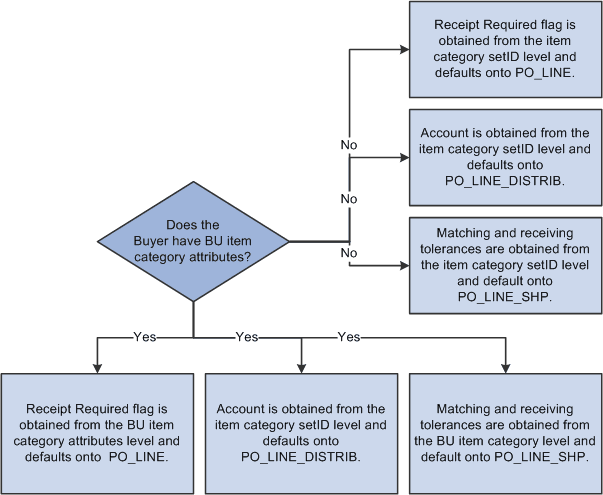
The following diagram illustrates the processing logic used to obtain correct item category attribute information.
Note:
This diagram is valid only for the Business Service Provider model.
If the buyer has item category attributes defined at the business unit level, the system:
-
Obtains the Receipt Required value from the buyer (business unit) item category attributes level.
This value appears automatically on the purchase order line (PS_PO_LINE).
-
Obtains the account from the item category SetID level, because the account field does not appear at the business unit level of the item category.
-
Obtains matching and receiving tolerances from the buyer item category level.
These controls are used as default values on the purchase order schedule (PS_PO_LINE_SHIP).
If the buyer does not have item category attributes at the business unit level, the system:
-
Obtains the receipt required value from the item category SetID level.
This value is used as the default on the purchase order line.
-
Obtains the account from the item category SetID level.
-
Obtains matching and receiving tolerances from the item category SetID level.
These tolerances are used as default values on the purchase order schedule.
Related Topics