Defining Buyer Item Categories
The host administrator defines item categories at the buyer (business unit) level, including preferences for matching tolerances and receiving controls. Because item categories are a way to group items together, and because item categories are determined by SetID, the attributes defined at the SetID level for an item category are the same for all buyers. Use document association rules to group items for matching when you use descriptions on the purchase orders instead of item IDs.
To define buyer item categories, use the Maintain Item Categories (EM_ITEM_CATEGORIES) and Document Association Rules (AP_ASSOCIATION) components.
This section provides an overview of item category processing for business units and discusses how to:
Pages Used to Define Buyer Item Categories
| Page Name | Definition Name | Usage |
|---|---|---|
|
EM_CATEGORY_TBL |
Define and maintain item categories. |
|
|
AP_ASSOCIATION |
Define how the Matching Application Engine process (AP_MATCH) associates vouchers with purchase orders and receivers. |
|
|
CATEGORY_TBL2 |
View, define, and maintain item category matching tolerances and receiving controls used in the Matching Application Engine process (AP_MATCH). You can define matching tolerances and receiving controls for each item category at the SetID level, providing all buyers with access to the same set of values, or at the individual buyer level. |
|
|
EM_ITM_CAT_BU |
Define matching tolerances and receiving controls for item categories at the business unit level. If buyers have different tolerances and controls from those defined at the SetID level, enter values on this page. |
Understanding Item Category Processing for Business Units
Using item categories is a way to group items together. PeopleSoft eSettlements processes item categories in much the same way as PeopleSoft Purchasing. However, in PeopleSoft eSettlements, you can add attributes to item categories at the buyer (business unit) level and at the SetID level. Attributes defined at the buyer item category level override those defined at the SetID level.
You can establish buyer item category attributes on the Item Categories - Buyer Specific Attributes page, but this is not required for purchase order and receipt processing. When you create a purchase order, the system verifies whether buyer item category attributes are already established for that buyer. If so, then the purchase order is automatically populated with the selected receipt required, receiving details, and matching and receiving tolerances . If no buyer item category attributes are available, the defaults are derived from the SetID item category attributes.
Fields not shown on the Item Categories - Buyer Specific Attributes page are automatically populated from the SetID level. These same attributes are used during the Matching Application Engine process (AP_MATCH).
Note:
Before you can interface purchase orders, you must set up item categories.
Item Categories - Category Definition Page
Use the Item Categories - Category Definition page (EM_CATEGORY_TBL) to define and maintain item categories.
Navigation:
This example illustrates the fields and controls on the Item Categories - Category Definition page.
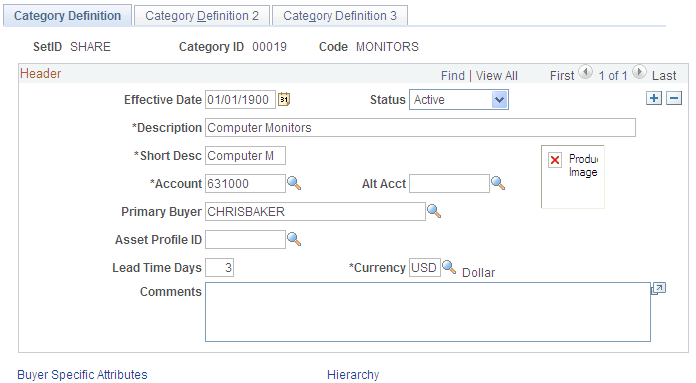
Enter an effective date, status, description, short description, and account for this category.
Document Association Rules Page
Use the Document Association Rules page (AP_ASSOCIATION) to define how the Matching Application Engine process (AP_MATCH) associates vouchers with purchase orders and receivers.
Navigation:
This example illustrates the fields and controls on the Document Association Rules page.
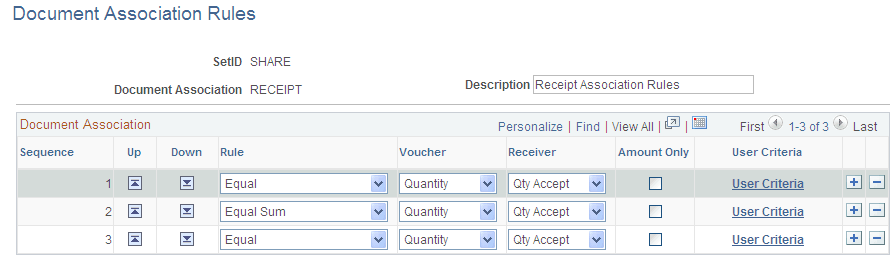
To enable receipt summarization on orders that have only an item category and a description, use the delivered Receipt document association rules. Use this configuration if you are ordering by description and are not using items on the purchase orders.
Item Categories - Category Definition 2 Page
Use the Item Categories - Category Definition 2 page (CATEGORY_TBL2) to view, define, and maintain item category matching tolerances and receiving controls used in the Matching Application Engine process (AP_MATCH).
You can define matching tolerances and receiving controls for each item category at the SetID level, providing all buyers with access to the same set of values, or at the individual buyer level.
Navigation:
This example illustrates the fields and controls on the Item Categories - Category Definition 2 page. You can find definitions for the fields and controls later on this page.
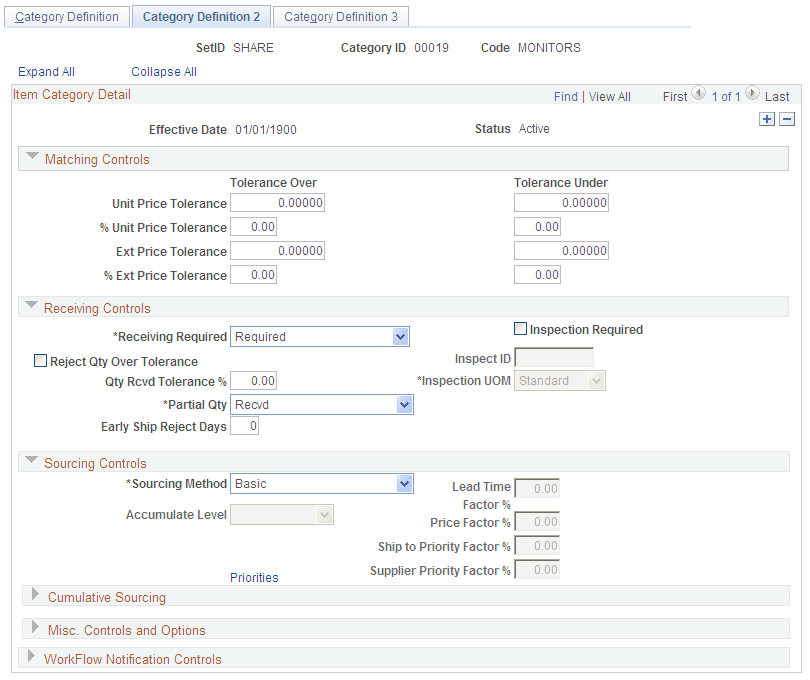
Matching Controls
| Field or Control | Description |
|---|---|
|
Tolerance Over and Tolerance Under |
Specify default price tolerances for the fields in these two columns. When an item category is specified for a purchase order line, these are the default tolerance values used in the Matching process. Note: If you leave a tolerance field blank or set to 0 (zero), the system interprets it to mean zero tolerance. |
Receiving Controls
| Field or Control | Description |
|---|---|
|
Receiving Required |
Select to require receipts for purchase order lines. Selecting this option results in the Matching process performing three-way matching (voucher, purchase order, and receipt). |
|
Inspection Required |
Select to require inspections on receipts. Selecting this option results in the Matching process performing four-way matching (voucher, purchase order, receipt, and inspection). |
|
Reject Qty Over Tolerance (reject quantity over tolerance) |
Select to reject a quantity that surpasses the tolerance limits that you set in the Qty Rcvd Tolerance % (quantity received tolerance percent) field. |
Buyer Specific Attributes Page
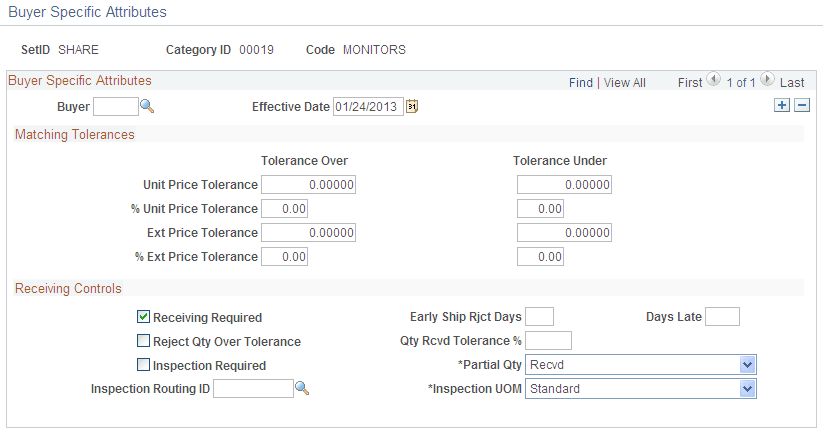
Use the Buyer Specific Attributes page (EM_ITM_CAT_BU) to define matching tolerances and receiving controls for item categories at the business unit level.
If buyers have different tolerances and controls from those defined at the SetID level, enter values on this page.
Navigation:
Click the Buyer Specific Attributes link on the Item Categories - Category Definition page.
This example illustrates the fields and controls on the Buyer Specific Attributes page. You can find definitions for the fields and controls later on this page.
| Field or Control | Description |
|---|---|
|
Buyer and Effective Date |
Specify these if a buyer uses matching tolerances and receiving controls other than those defined at the SetID level for this purchasing business unit. If you enter a buyer (business unit) and leave the tolerance fields blank, the system assumes that the buyer accepts standard tolerances. If the buyer accepts standard tolerances, do not complete any fields on this page. Note: If this page is left blank, SetID level tolerances and receiving controls appear by default. |