Verifying Externally Received Purchase Order and Receipt Data
PeopleSoft delivers several pages to enable you to view details of integrated purchase orders and receipts.
Pages Used to Verify Externally Received Purchase Order and Receipt Data
| Page Name | Definition Name | Usage |
|---|---|---|
|
EM_PO_INQ_SRCH |
View purchase orders in the system. |
|
|
EM_PO_INQ |
View purchase order line and associated receipt and invoice details. |
|
|
Review Purchase Orders - Invoice Details Page |
EM_SSINVC_DETAILS |
Review associated invoice line and payment information for a purchase order. |
|
EM_RECV_INQ_SRCH |
View receipts. |
|
|
EM_RECV_INQ |
View receipt line and associated PO and invoice details. |
|
|
EM_SSINVC_DETAILS |
Review associated invoice line and payment information for a receipt. |
Review Purchase Orders - Purchase Order Inquiry Page
Use the Review Purchase Orders - Purchase Order Inquiry page (EM_PO_INQ_SRCH) to view purchase orders in the system.
Navigation:
You can specify a particular buyer and purchase order to limit your search results. Use the fields in the Advanced Search group box to further narrow your inquiry.
Review Purchase Orders - Purchase Order Detail Page
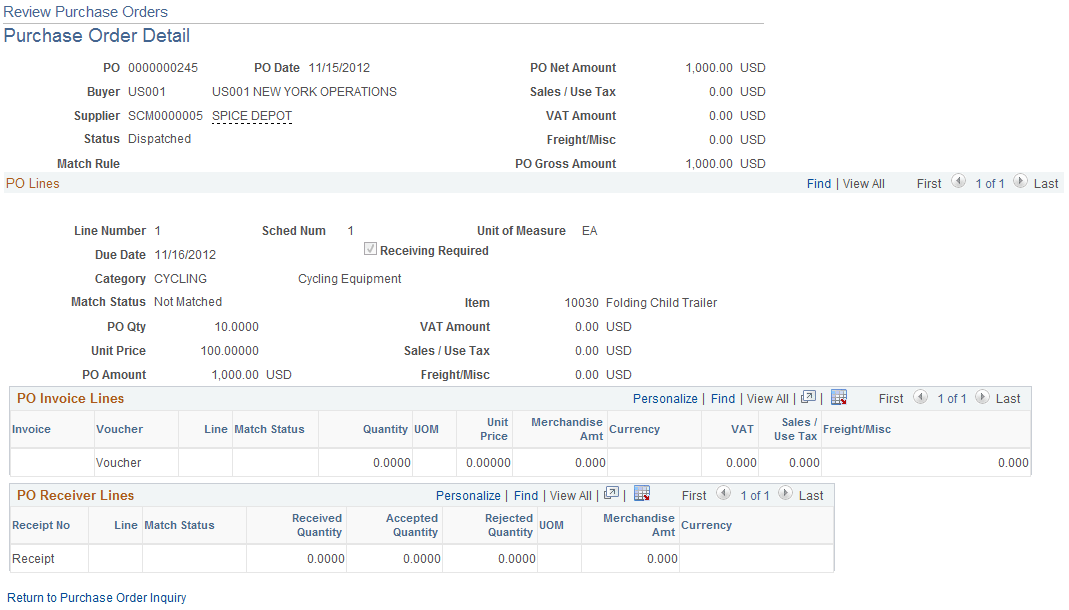
Use the Review Purchase Orders - Purchase Order Detail page (EM_PO_INQ) to view purchase order line and associated receipt and invoice details.
Navigation:
-
Click a link in the PO column on the Review Purchase Orders - Purchase Order Inquiry page.
-
Click a link in the PO column on the Review Receipts - Receipt Detail page.
To access the Review Purchase Orders - Invoice Details page, click a link in the Voucher column on the Review Purchase Orders - Purchase Order Detail page.
This example illustrates the fields and controls on the Review Purchase Orders - Purchase Order Detail page. You can find definitions for the fields and controls later on this page.
| Field or Control | Description |
|---|---|
|
Voucher |
Click a link in this column to view invoice and payment details. |
|
Receipt No (receipt number) |
Click to view receipt line details. |
Related Topics
Review Receipts - Receipt Inquiry Page
Use the Review Receipts - Receipt Inquiry page (EM_RECV_INQ_SRCH ) to view receipts.
Navigation:
This page is similar to the Review Purchase Orders - Purchase Order Inquiry page.
Review Receipts - Receipt Detail Page
Use the Review Receipts - Receipt Detail page (EM_RECV_INQ) to view receipt line and associated PO and invoice details.
Navigation:
-
Click a link in the Receipt Number column on the Review Receipts - Receipt Inquiry page.
-
Click a link in the Receipt No column on the Review Purchase Orders - Purchase Order Detail page.
This page is similar in form and function to the Review Purchase Orders - Purchase Order Detail page, but it displays the associated purchase order for the receipt.
Review Receipts - Invoice Details Page
Use the Review Receipts - Invoice Details page (EM_SSINVC_DETAILS) to review associated invoice line and payment information for a receipt.
Navigation:
Click a link in the Voucher column on the Review Receipts - Receipt Detail page.
These pages display voucher information for purchase orders and receipts.