Setting Up Business Purposes
To define business purposes, use the Business Purpose (EX_PURPOSE.GBL) component.
Page Used to Set Up Business Purposes
| Page Name | Definition Name | Usage |
|---|---|---|
|
EX_PURPOSE |
Define business purposes that justify a business expense as a corporate tax deduction. |
Understanding Business Purposes
With PeopleSoft Expenses, you can create business purposes that justify business expenses. For consistency in reporting and analysis, you can also use business purposes to sort and total expenses, which lets you see how much your company spends on meetings, trade shows, customer visits, and other items.
Business Purpose Page
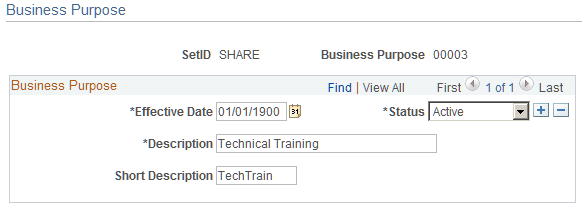
Use the Business Purpose page (EX_PURPOSE) to define business purposes that justify a business expense as a corporate tax deduction.
Navigation:
This example illustrates the fields and controls on the Business Purpose page. You can find definitions for the fields and controls later on this page.
| Field or Control | Description |
|---|---|
|
Business Purpose |
Assign this unique identifier for the type of business expense that you want to track. Because the business purpose is effective-dated, you can create more than one set of descriptions to use at predetermined times. |