Reviewing the Results of the Payment Load Process
The Payment Load Application Engine process (PAYMENT_LOAD) loads payments from source applications into Financial Gateway, regardless of the method that is used to import payments. This topic covers how to review payment requests.
Pages Used to Review the Results of the Payment Load Process
| Page Name | Definition Name | Usage |
|---|---|---|
|
PMT_REQUEST_LOG |
Review payment requests that were downloaded from source applications. This page is used primarily as an administration page to view payment requests residing in the staging tables. |
|
|
Payment Load Exceptions |
PMT_EXCEPTION_LOG |
View details of problems that occurred during attempts to load payment requests from source applications. See the Review Payment Requests Page for more information. |
Review Payment Requests Page
Use the Review Payment Requests page (PMT_REQUEST_LOG) to review payment requests that were downloaded from source applications.
This page is used primarily as an administration page to view payment requests residing in the staging tables.
Navigation:
This example illustrates the fields and controls on the Review Payment Requests page.
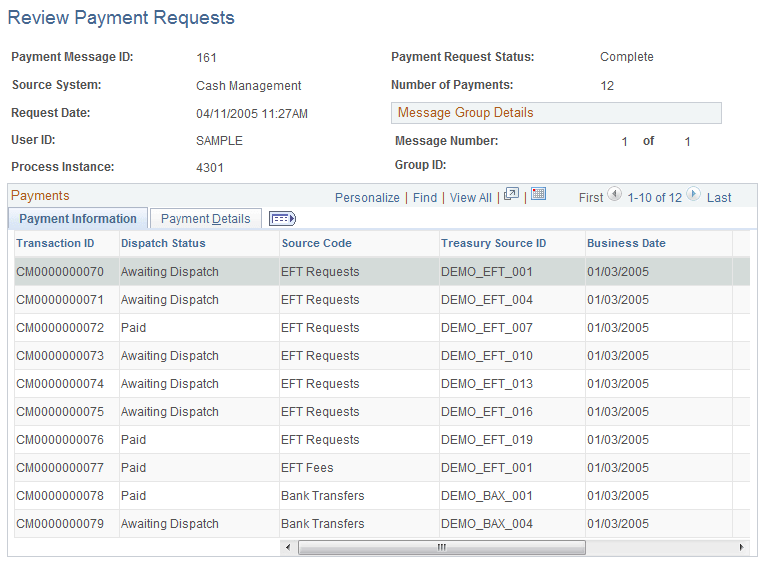
Use this page to view a listing and the status of payment requests that were made from source applications. The fields that appear in the Payments group section are source-specific key fields that were specified on the Source Registration page to appear here.
| Field or Control | Description |
|---|---|
|
View Payment Load Exceptions |
Click to access the Payment Load Exceptions page (PMT_EXCEPTION_LOG), and view details of problems that occurred during attempts to load payment requests from source applications. |
Related Topics