SEPA Direct Debit
The SEPA direct debit instrument is designed to act as a local collection instrument for SEPA regions that transcend national borders. SEPA implementation guidelines for direct debits are based on the adoption of the ISO 20022 or UNIFI standard. A SEPA direct debit pulls funds from the debtors bank account into the creditors bank account. The pull is based on a direct debit mandate provided by the debtor to the creditor.
A mandate is a form given by the debtor to the creditor that authorizes the creditor to initiate collections on a debt. The mandate allows a debit from the debtor's specified account and enables the debtor's bank to comply with the instructions in accordance with the SEPA Rulebook. The collections are separate transactions from the underlying contract on which they are based. The underlying contract is agreed on between the creditor and the debtor. PeopleSoft Financial Gateway enables the creditor to print the mandate form with a reference number assigned by the system.
Process flow for using mandates
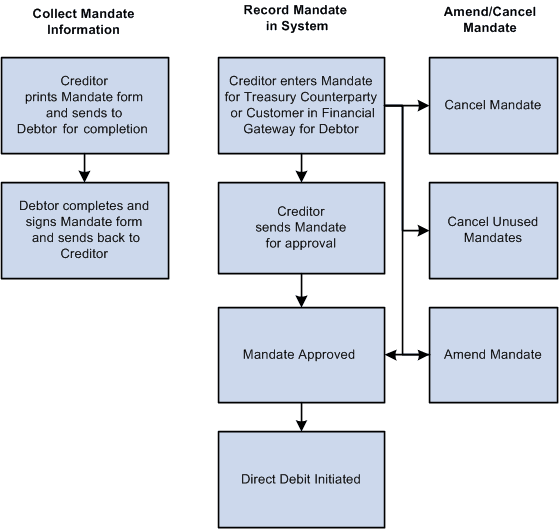
The debtor can be a Treasury counterparty or a customer. After the debtor completes and signs the mandate form, the debtor must return the completed mandate to the creditor. The creditor must enter the mandate information from the paper form in PeopleSoft Financial Gateway on the Direct Debit for Counterparties page if the debtor is a Treasury counterparty, or on the Direct Debit Mandate for Customers page if the debtor is a customer. The mandate must be signed by the debtor.
The debtor can amend the mandate form by informing the creditor of any necessary changes and state the reason for the amendment. The creditor selects a reason code on the amendment section of the form, which appears when the creditor makes the change and saves the change to the form in the system.
You can amend an approved mandate. Once you have amended the mandate, it must be approved again. Each mandate line must be approved. If you amend a mandate before it is approved, then two lines must be approved—the original line and the amended line.
You set up these pages to assist in performing SEPA direct debits:
-
Transfer Template page: Identify the SEPA Direct Debit layout where the payment method is Direct Debit, select an external account that supports direct debit, and fill in the mandate information.
-
EFT Transfer page: Select the SEPA Direct Debit Transfer Template, or you can identify payment method as Direct Debit and an external account that supports direct debit collection, and fill in the mandate information.
-
Treasury Counterparties page: View direct debit mandates and their status.
The initiating party sends the Customer Direct Debit Initiation message to the forwarding agent or creditor agent using PeopleSoft Financial Gateway. The message requests a single or bulk collection of funds from one or more of the debtor's accounts for a creditor. A prenotification of the collection must be issued fourteen days before initiating the direct debit.
Message structure for a SEPA Direct Debit
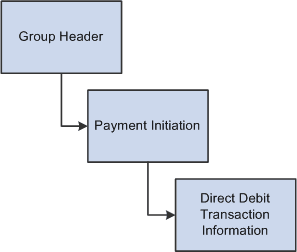
SEPA direct debits can be initiated from PeopleSoft Receivables or by creating an EFT request in PeopleSoft Cash Management, which treats direct debits as collection items. Both products must identify the SEPA direct debit layout and euro (EUR) as the currency, and capture the BIC/IBAN and mandate information.