SEPA Payment Cancellations and Reversals
PeopleSoft predefines layouts in the system to handle cancellations and reversals for SEPA credit transfers and direct debits.
-
SEPA layouts:
-
SEPA_RVSL (Payment Reversal, Pain 007.001.01)
-
SEPA_RVS_2 (Payment Reversal, Pain 007.001.02)
-
-
ISO 20022 layouts: (generic)
-
ISO_CNCL (ISO Payment Cancellation Layout)
-
ISO_RVSL (ISO Payment Reversal, Pain 007.001.01)
-
ISO_RVS_2 (ISO Payment Reversal, Pain 007.001.02)
-
See Understanding the Layout Catalog.
These layouts are used to cancel or reverse payment messages electronically as XML messages from PeopleSoft Financial Gateway.
These layout properties will be attached to the existing SEPA layouts to help identify the layouts to use for cancellation or reversal messages electronically as XML messages from PeopleSoft Financial Gateway.
In PeopleSoft Payables, you can cancel a SEPA cash transfer payment and reverse the cancellation. However, in PeopleSoft Receivables, you can reverse a SEPA direct debit, but you cannot cancel it.
Users can define their own reason codes and reasons for payment cancellation and reversals.
Statuses for AP and AR payment cancellations and reversals
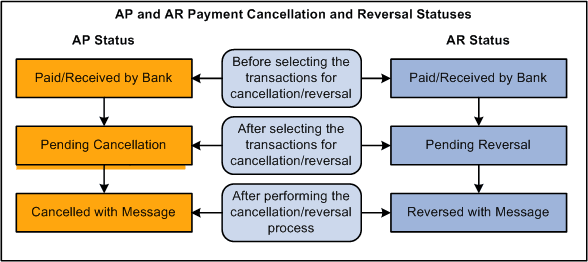
You must run the Payment Cancellation process to send the cancellation message to the bank, which will change the current status to Cancelled with Message for PeopleSoft Payables SEPA cash transfer transactions.
You must run the Payment Reversal process, which will change the current status to Reversed with Message for PeopleSoft Receivables SEPA direct debit transactions.
SEPA Payment Cancellation and SEPA Payment Reversal messages can be sent for payments received from third-party systems into Financial Gateway.
SEPA Credit Transfer Cancellation
Typically, when a SEPA cash transfer payment transaction is received by the bank and there are problems with the transactions, you use the PeopleSoft Payables cancellation process to cancel the payment. The PaymentCancellationRequest message is sent by the initiating party or any agent to the next party in the payment chain. It is used to request the cancellation of a previously sent instruction.
SEPA Direct Debit Reversal
You perform a SEPA direct debit reversal in PeopleSoft Receivables the same way you perform a non-SEPA direct debit reversal. You can cancel a direct debit with a status of Paid, which transmits a reversal to PeopleSoft Financial Gateway. This action ends the life cycle of a direct debit in PeopleSoft Receivables and you cannot change it back again. However, when a direct debit is canceled in Receivables, this reopens the item and the item can then be processed through the Direct Debit system again and generate a new direct debit, which can eventually be paid through PeopleSoft Financial Gateway.
The Direct Debit Customer Payment Reversal message is sent by the initiating party to the next party in the payment chain. It is used to reverse a payment that was previously executed. The message is exchanged between a non-financial institution customer and an agent to reverse a CustomerDirectDebitInitiation message that has been settled. The result will be a credit on the debtor's account.
Payment Status Report
PeopleSoft predefines layouts in the Layout Catalog for the document type Payment Acknowledge. This layout will be used to import the Payment Status report XML file that is sent by the bank. The file that will be imported is an acknowledgement file sent by the bank adhering to ISO 20022 XML standards.
-
PMT_STATV2 (ISO 20022 payment status V2, Pain.002.001.002)
-
PMT_STATV3 (ISO 20022 payment status V3, Pain.002.001.003)
See Understanding the Layout Catalog.
The PaymentStatusReport message is exchanged between an agent and a non-financial institution customer to provide status information on instructions previously sent. Its usage is governed by a bilateral agreement between the agent and the non-financial institution customer.
The PaymentStatusReport message provides information about the status (rejection or acceptance) of the initiation of a SEPA credit transfer, a SEPA direct debit, or other customer instructions, such as a SEPA payment cancellation or reversal request.
The Acknowledgement Files page in PeopleSoft Financial Gateway enables the user to select the bank, bank account, the PMT_STATV2 and PMT_STATV3 layouts, specific transaction ID, Payment file ID, and a date range to view this PaymentStatusReport message.