Performing Staffing Searches
This topic discusses how to perform staff searches.
Page Used to Perform Staffing Searches
| Page Name | Definition Name | Usage |
|---|---|---|
|
FO_MYSEARCH_PGLT |
Use this page to view and access staffing searches. |
Staffing Searches Pagelet
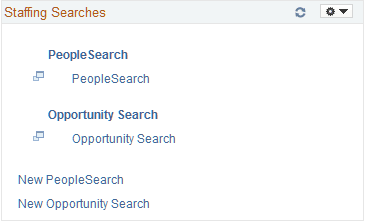
Use the Staffing Searches pagelet (FO_MYSEARCH_PGLT) to view and access staffing searches.
Navigation:
Click the Personalize Content link on the Home page, and select Staffing Searches.
This example illustrates the fields and controls on the Staffing Searches pagelet. You can find definitions for the fields and controls later on this page.
| Field or Control | Description |
|---|---|
|
PeopleSearch |
Select to access the PeopleSearch page. The system pulls the corresponding criterion into the PeopleSearch page. See PeopleSoft Staffing Front Office: Performing Searches |
|
Opportunity Search |
Select to access the Opportunity Search page. The system pulls the corresponding criterion into the Opportunity Search page. See PeopleSoft Staffing Front Office: Performing Searches |
|
New PeopleSearch |
Select to access the PeopleSearch page. The system opens the page with no search criteria. See PeopleSoft Staffing Front Office: Performing Searches |
|
New Opportunity Search |
Select to access the Opportunity Search page. The system opens the page with no search criteria. See PeopleSoft Staffing Front Office: Performing Searches |