Viewing Budget Alerts
This topic discusses how to view budget alerts, personalize the My Budget Alert pagelet, and view budget details.
Pages Used to View Budget Alerts
| Page Name | Definition Name | Usage |
|---|---|---|
|
GL_PE_03 |
View the top five alerts by the actual amount or by the percentage remaining in the budget. |
|
|
GL_PE_03_PRS |
Define default display information for the My Budget Alert pagelet. |
|
|
KK_INQ_BDT_STATUS |
The search page is populated with values from the selected ChartField. Click the Search button to display the Commitment Control Budget Details page. |
My Budget Alert Pagelet
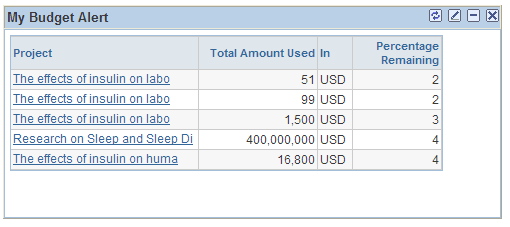
Use the My Budget Alert pagelet (GL_PE_03) to view the top five alerts by the actual amount or by the percentage remaining in the budget.
Navigation:
Click the Personalize Content link on the PeopleSoft Home page.
Select My Budget Alert.
This example illustrates the fields and controls on the My Budget Alert pagelet. You can find definitions for the fields and controls later on this page.
| Field or Control | Description |
|---|---|
|
Refresh icon |
Click to update the data that appears on the page. |
My Budget Alert Personalization Page
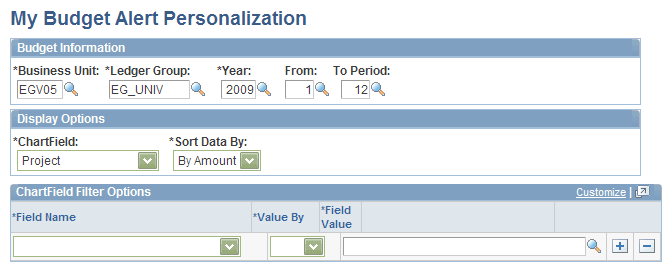
Use the My Budget Alert Personalization page (GL_PE_03_PRS) to define default display information for the My Budget Alert pagelet.
Navigation:
Click the Customize icon on the My Budget Alert pagelet.
This example illustrates the fields and controls on the My Budget Alert Personalization page. You can find definitions for the fields and controls later on this page.
| Field or Control | Description |
|---|---|
|
Ledger Group |
Select a specific Commitment Control ledger group. |
|
Sort Data By |
Select whether pagelet data is sorted By Amount or By Percent. |
Commitment Control Budget Details Page
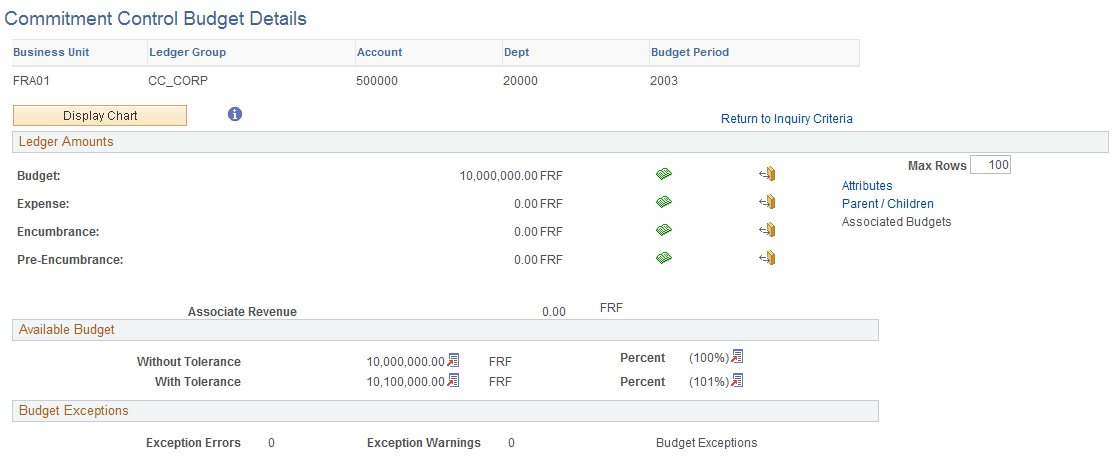
Use the Commitment Control Budget Details page (KK_INQ_BDT_STATUS) to the search page is populated with values from the selected ChartField.
Click the Search button to display the Commitment Control Budget Details page.
Navigation:
Click a ChartField value on the My Budget Alert pagelet.
This example illustrates the fields and controls on the Commitment Control Budget Details page.