Automating Journal Edit and Post
General Ledger leverages the FMS Autopilot feature to automate the batch scheduling of journal edit and post processing according to your specific business parameters. You specify the minimum and maximum wait time and the minimum and maximum transaction counts based on your assessment of the capacity of your system and the number of transactions that your system is likely to experience. For example, you can set the maximum transactions count to prevent a job from being processed during the times when it might overload your system and then run that job overnight and during hours when there is less demand on the system.
Transaction count logic is process-specific and is provided to the FMS Process Autopilot through Application Class PeopleCode specific to the process.
For Journal Edit, the transaction count is the number of journal lines with journals that meet your run control selection criteria and for which the journal header status is, "No Status – Needs to be Edited."
Journals in error (status is E) must be dealt with to resolve the cause and then be edited either by the Autopilot run journal edit process or by a manually submitted job.
For journal post, the transaction count is the number of journal lines with journals that meet your run control selection criteria and for which the journal header status is, V and are marked to be posted.
The transaction count logic for journals to be edited or posted in the Autopilot process might not result in the same numbers as the actual numbers of journal lines being processed in journal edit or journal post. This is because the actual processes have more complex logic than the Autopilot count. The transaction count for journals to be posted does not take into consideration the closed periods, so the journals that are actually posted might be fewer than those counted by the Autopilot process. These differences should not be material, but be aware that the counts can vary.
The Autopilot process submits batch processes when the conditions for wait time and transaction count are met. The following explains how the four parameters that you specify are used by the system.
-
Minimum wait time: the minimum amount of time between each scheduling of the process.
-
Maximum wait time: the maximum amount of time between each scheduling of the process.
It is ignored if maximum transaction count is exceeded.
-
Minimum transaction count: the minimum number of transactions lines that must be ready to process.
It is ignored if the maximum wait time is exceeded.
-
Maximum transaction count: the maximum number of transaction lines that you want to be processed using this scheduling technique .
The process ignores this parameter if it is set to 0 and looks only at the minimum transaction count.
The shaded area labeled Submit the Job in the following chart graphically shows the conditions under which the application processes are automatically submitted by the system for processing.
Conditions for Submitting Jobs
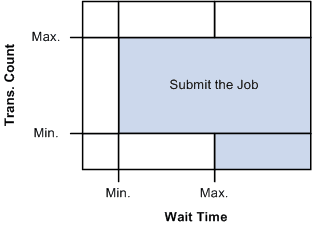
The process first looks at the minimum (Min.) specified Wait Time and if it is met or exceeded, the process then looks at the Transaction Count (Trans. Count).
If the journal line transaction count meets or exceeds the minimum, the application batch process is initiated unless the maximum (Max.) transaction count is exceeded.
Attaining the maximum Wait Time initiates the process unless the transaction count maximum is exceeded.
Maximum Transaction Count provides a ceiling to prevent jobs that are too big to be processed at certain times from being processed using the Autopilot.
When the transaction count exceeds the maximum, user intervention is necessary to make the application process recur again. You can manually process the journals or alter the journal to reduce the count so that it is under the maximum transaction count, or increase the maximum transaction count if practical.
When the maximum count is exceeded, the FMS Autopilot issues a message that is available in the Process Monitor. Check the monitor regularly when using the Autopilot.
The process also checks to see if a previously scheduled job is still running. If it is, the system does not submit the same job again even if the criteria are met.
You can also set predefined recurrence to avoid time frames when you know the system is going to be busy.