Calculate Balances Page
Use the Calculate Balances run control page (GLRN_CALCULATE_REQ) to run the GLRN_CALC Application Engine process, which updates the CALC_NET_AMT field of the GL Reconciliation table for the corresponding rows.
Navigation:
This example illustrates the fields and controls on the Calculate Balances Page.
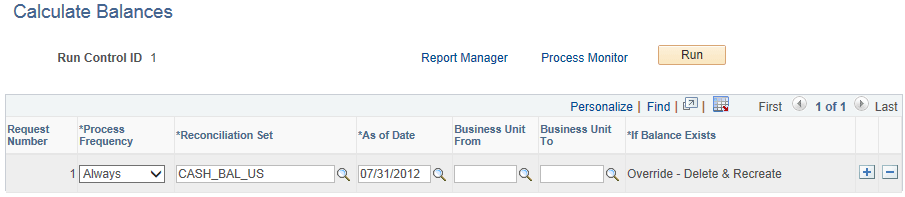
Select the Reconciliation Set(s) to process and the associated As of Dates.
| Field or Control | Description |
|---|---|
|
Business Unit From and Business Unit To |
(Optional) Enter a range of business unit values to process for the reconciliation. Business Unit values specified here can be a subset of what is specified in the Reconciliation Set. |
|
If Balance Exists |
Displays Override - Delete & Recreate, which indicates that if the balance for the reconciliation was previously calculated, then the old amount is deleted and updated with the new amount. |