Combining Steps into a Multicurrency Group
Once you have defined the steps necessary to accomplish your desired revaluation, translation, or Translate Within Ledger process, you define a multicurrency group that specifies the processing sequence for these steps.
To combine steps into a multicurrency group, use the Currency Group component (CURR_GROUP).
Page Used to Combine Steps in a Multicurrency Group
| Page Name | Definition Name | Usage |
|---|---|---|
|
CURR_GROUP |
Define a multicurrency group that combines the sequential processing steps. |
MultiCurrency Process Group Page
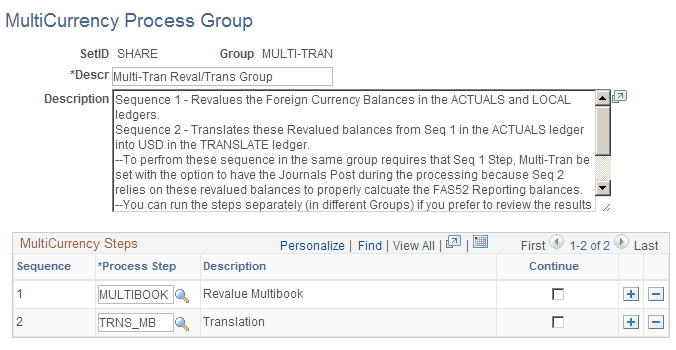
Use the MultiCurrency Process Group page (CURR_GROUP) to define a multicurrency group that combines the sequential processing steps.
Navigation:
This example illustrates the fields and controls on the MultiCurrency Process Group page. You can find definitions for the fields and controls later on this page.
| Field or Control | Description |
|---|---|
|
Sequence |
Determines the order in which the system performs the steps. Because the ledger may be updated with each step, the steps must be performed in the appropriate sequence. |
|
Process Step |
Enter the revaluation, translation, or Translate Within Ledger Process step. The system displays the description for the process step. After defining a step, you can select it for the multicurrency group sequence. You can also reuse steps from other multicurrency groups. |
|
Continue |
Click this link to indicate that even if this step fails, processing should continue to the next step. |