Express Period Roll Page
Use the Express Period Roll page (GL_PRD_UPD) to run the Express Close process (GL_OPEN_UPD).
Navigation:
From the Period Close Visualization page, select the Action button and then select Express Period Roll.
This example illustrates the fields and controls on the Express Period Roll page.
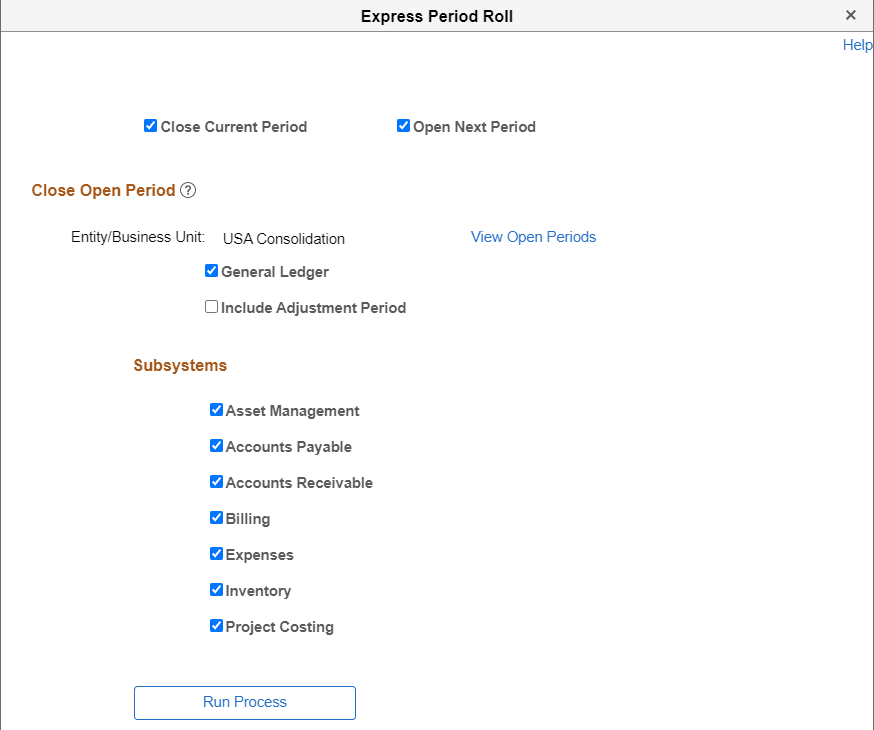
This process closes the current period, opens the next period, or both, for the selected entity or GL business unit. You can also select which subsystems to close and open, and whether to include adjustment periods.
This process increments the current open period by one period for the default Ledger Group of the selected business unit. In addition, it only rolls over the open periods for Monthly, Weekly, Period13 and Daily calendars.
When selecting the Express Close action for a particular node, the Express Close process is run for all child GL business units and the selected sub-ledger business units for the default ledger group.
Note:
PeopleSoft recommends that you run this process with the Close Current Period and the Open Next Period check boxes selected.
| Field or Control | Description |
|---|---|
|
Close Current Period |
Select to run the process to close the current period of the entity or business unit. The system increments the from period by one. |
|
Open Next Period |
Select to run the process to open the next period of the entity or business unit. If the Close Current Period is selected, the system increments the To Period of the open period by one. |
|
View Open Periods |
Select to access the Open Period Details Page. This link displays the business units where period is currently open. When the period for all business units are closed, the system displays a blank page. |
|
General Ledger |
Select to open all check boxes for Include Adjustment Period and Subsystems. |
|
Include Adjustment Period |
Select to increment the adjustment period for the GL business unit. The system increments the Adjustment year to the next year. This check box is only available when the General Ledger check box is selected. |
|
Subsystems |
Select to include the subsystem business units in the close and open process. |