Simple Journal - Lines Page
Use the Simple Journal - Lines page (SJ_JRNL_LN_FL) to review journal lines and edit details for the selected journal.
Navigation:
. Click the Search button to view the available journals for the selected Business Unit. Select required Journal ID and click Lines from the left menu.
This example illustrates the fields and controls on the Simple Journal - Lines page.
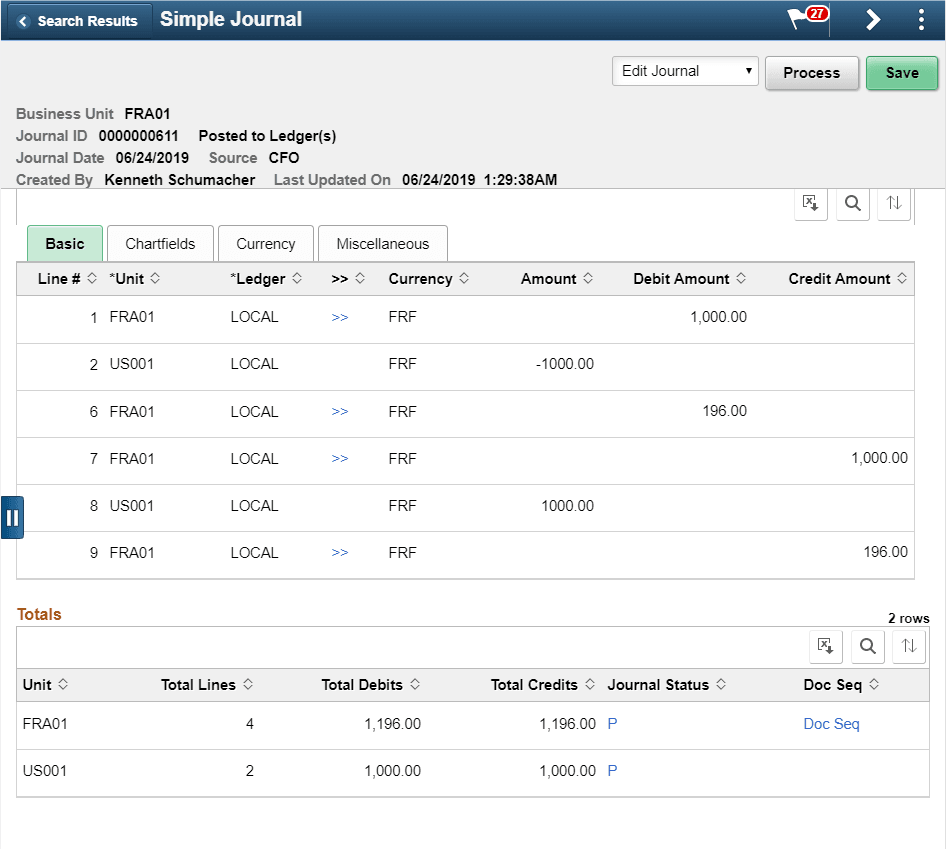
Displays all the fields configured for journal line entry. Based on the Simple Journal template, ChartFields will be displayed on this page.
| Field or Control | Description |
|---|---|
|
Totals |
Displays the combined total lines, debits, and credits for the Business Unit. |
|
Journal Status |
Click the link to view the header and line errors. Note: The Errors section is displayed only if there are errors while editing the journal. |
|
Doc Seq |
Click to view the Document Sequence details generated for the associated Business Unit. If document sequencing is not setup for the BU, this link will not appear. In the Document Sequence modal window that opens, if Document Type has to be changed then appropriate reason has to be entered. |
|
VAT |
Click to view VAT details of the simple journal. This link appears in the Miscellaneous tab of the Line Details grid, and will appear for VAT enabled line BU. |
Miscellaneous Tab
| Field or Control | Description |
|---|---|
|
Line Long Description |
Enter up to 254 characters of text. As of FSCM 9.2, Update Image 55, the Line Long Description is available to configure using the Simple Journal Template - Journal Lines Page. |
|
Reference1 through Reference5 |
Enter supplementary information or references, such as document numbers or codes. The number of Reference fields is determined on the Simple Journal Template - Journal Lines Page. As of FSCM 9.2, Update Image 55, five Reference fields are available to configure using the Simple Journal Template - Journal Lines Page. |