Simple Journal Page
Use the Simple Journal page (SJ_JRNL_ENTRY_FL) to view or enter journals associated with a particular Business Unit.
Navigation:
.
Select the Search button to view the available journals for the selected Business Unit. Select required Journal ID.
This example illustrates the fields and controls on the Simple Journal page. You can find definitions for the fields and controls later on this page.
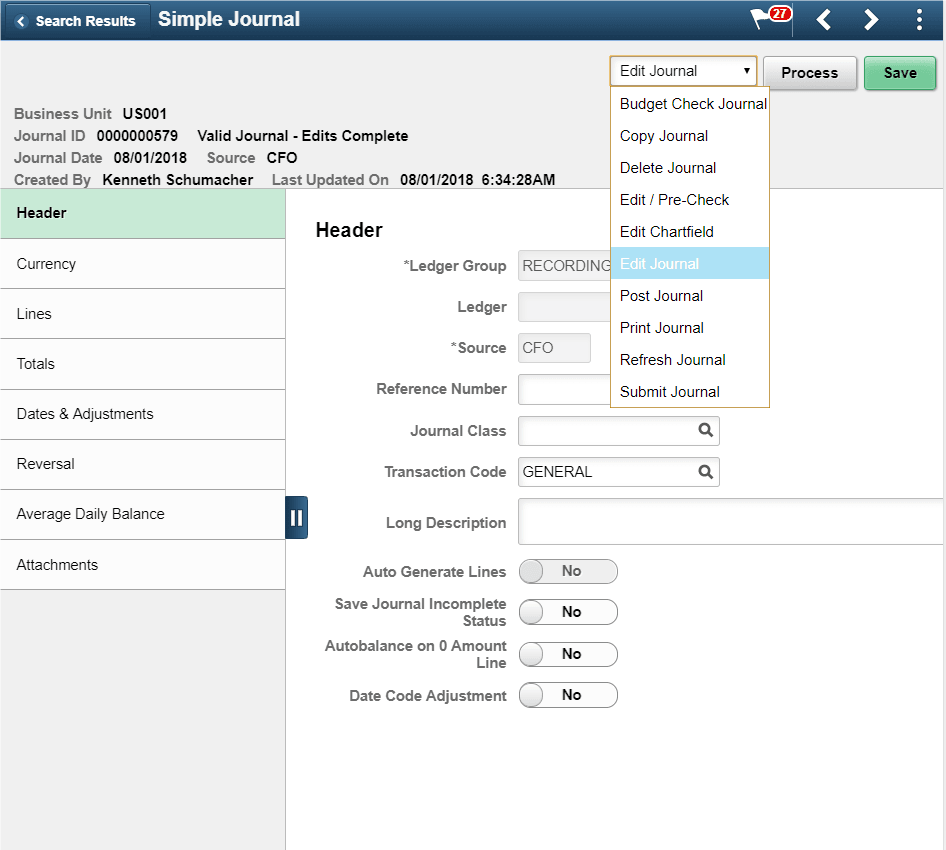
The sections displayed on the left pane depends on the journal template selected. Only those sections that are configured for the selected journal template are available for journal entry. The fields that appear in the right pane are also based on the fields configured by the corresponding journal template.
If you delete a journal that has a document sequence number assigned, the system records a deletion through an audit trail and prompts you to provide an explanation so that gaps in the transaction reports for auditors can be explained. The deleted number cannot be reused.
This page cannot be updated/edited for existing journals for users, if the particular User/Role does not have access to the journal source.
| Field or Control | Description |
|---|---|
|
Action List and Process button |
Select required action from the drop-down list and click the Process button. Available actions are:
|
|
Save |
Click to save changes made for the journal entry. |