Value Set Mapping Page
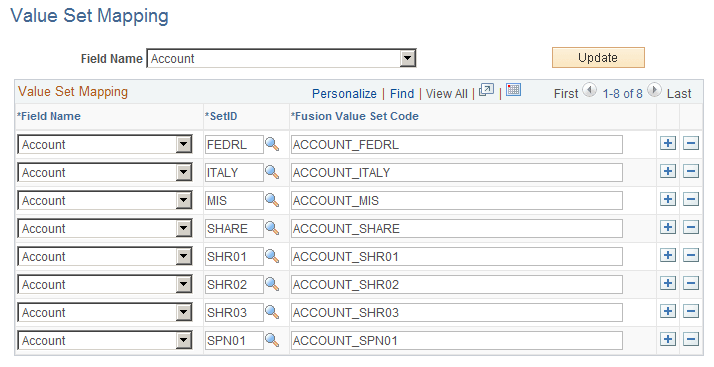
Use the Value Set Mapping page (CF_VALUESET_MAP) to maintain the ChartField to Fusion Value Set mapping. Each PeopleSoft ChartField and SetID combination maps to a unique Fusion Value Set that is used to maintain the Segment values in Fusion.
Navigation:
This example illustrates the fields and controls on the Value Set Mapping page. You can find definitions for the fields and controls later on this page.
Note:
Make sure that the Field Mapping Page is complete before beginning the Value Set Mapping. This provides the prompting values for the page.
| Field or Control | Description |
|---|---|
|
Field Name (filter) |
Select the ChartField that you want to review or update and click the Update button. The active values appear on this page |
Value Set Mapping
| Field or Control | Description |
|---|---|
|
Field Name |
Select a PeopleSoft ChartField that you want to map to a Fusion Value Set Code. |
|
SetID |
Select the PeopleSoft SetID, which, in combination with the selected PeopleSoft ChartField, maps to the corresponding Fusion Value Set Code. |
|
Fusion Value Set Code |
Enter the unique Fusion Value Set Code that maps to the corresponding PeopleSoft SetID and ChartField combination. Note: The system automatically populates the Fusion Value Set Code field with a default value, which is comprised of <ChartField Name>_<SetID> |
Once you are satisfied with the mapping of a given ChartField, save the page.
Keep the following in mind when completing the Value Set Mapping page:
-
The Fusion Value Set Code should appear precisely as it appears in Fusion (case-sensitive).
-
This mapping is used in the initial publish (load) and incremental load of PeopleSoft ChartField values to Fusion.
-
Each Fusion Value Set code row must be unique. In other words, there should not be a many (PeopleSoft) to one (Fusion) mapping on this page.
-
The affiliate and fields are excluded from this mapping.
-
Project ID is mapped as all the other ChartFields; however, other Project Costing ChartFields are excluded (Activity ID, Resource Type, Resource Category, Resource Subcategory, Analysis Type, and PC Business Unit).