WorkCenter ChartField Requests Pending My Approval Page
Use the WorkCenter ChartField Requests Pending My Approval page (GL_WC_FLD_REQ_APPR) to manage business requests that are pending approval from the current user.
Navigation:
link.
This example illustrates the fields and controls on the WorkCenter Manage Business Request Approval page. You can find definitions for the fields and controls later on this page.
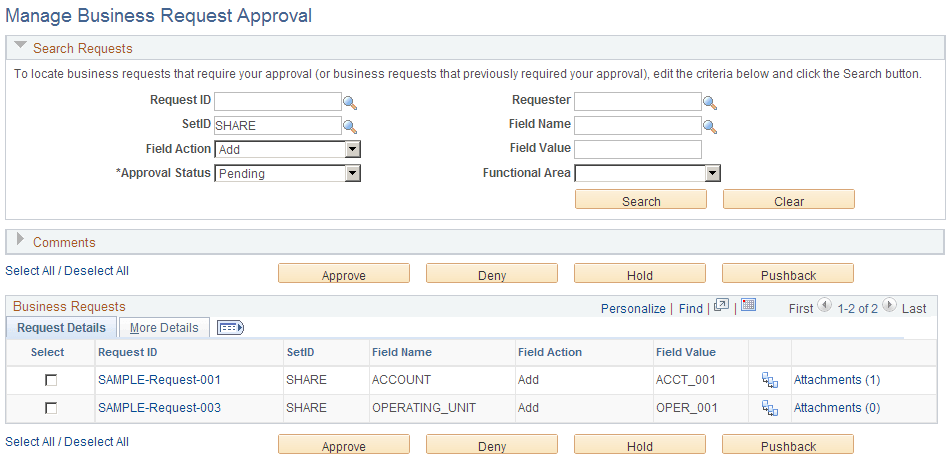
Use the fields on this page as you would on the Manage Business Request Approval page.
For information on ChartField requests and field details, see Application Fundamentals: Understanding the Business Request and Approval Process.
| Field or Control | Description |
|---|---|
|
Refine Filter Criteria link |
Click this link to edit the filter criteria that is used to retrieve the data that you want to see for the ChartField Requests Pending My Approval page. This page uses the Field Request Approval filter (GLFLDAPPR). Supply or change any of the filter values as needed and click OK. See Maintaining and Personalizing the PeopleSoft Classic General Ledger WorkCenter. For more information, see Enterprise Components: Setting Up Filter Definitions as a System Administrator. Note: There are no required fields or restricted operands for this filter page. |
|
|
Click this icon to refresh the grid data to reflect any changes. |
