Setting Up CNAO2 Audit Files
Pages Used to Set Up CNAO2 Audit Files
| Page Name | Definition Name | Usage |
|---|---|---|
|
CNAO_ACCTG_BK_PG |
Define all required information for each GL business unit that needs CNAO2 reporting in the electronic accounting book section of the shared information file. |
|
|
CNAO_GLRL_DEF_PG |
Define basic general ledger rules. |
|
|
CNAO_ADJ_PERIOD_PG |
Define start and end dates for the adjustment period. |
|
|
CNAO_JRNL_CTG_PG |
Define CNAO journal categories and map each journal category to the appropriate document sequencing journal code. |
|
|
CNAO_CSFL_ITEM_PG |
Define cash flow items to be used for CNAO reporting. |
|
|
CNAO_MAP_CFI_DSDT |
Define mappings between Cash Flow Items and Document Sequencing Document Types. |
|
|
CNAO_CSFL_RPT_PG |
Define sequences in which cash flow items appear in the cash flow statement, along with the calculation sequence and the logic to calculate derived cash flow items. |
|
|
CNAO_DOC_TRX_TY_PG |
Specify CNAO Document Type, corresponding Document Sequencing Journal Types, and CNAO Transaction Types. |
|
|
CNAO_SUBSI_ITM_PG |
Configure Subsidiary Items delivered as system data. |
|
|
CNAO_ACCT_PG |
Define all information required for CNAO accounts. |
|
|
CNAO_FA_DPR_FML_PG |
Define fixed asset depreciation equation or formula. |
Electronic Accounting Book Page
Use the Electronic Accounting Book page (CNAO_ACCTG_BK_PG) to define all required information for each GL business unit that needs CNAO2 reporting in the electronic accounting book section of the shared information file.
Navigation:
This example illustrates the fields and controls on the Electronic Accounting Book Page . You can find definitions for the fields and controls later on this page.
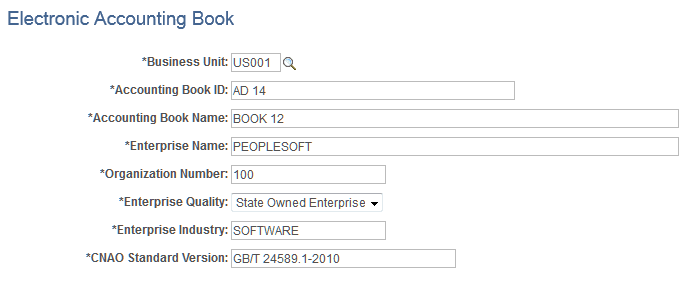
| Field or Control | Description |
|---|---|
|
Business Unit |
Displays the GL Business Unit for which the Electronic Accounting Book is to be defined. |
|
Accounting Book ID |
Displays the ID or number of the Electronic Accounting Book. |
|
Accounting Book Name |
Enter the name of the Electronic Accounting Book. |
|
Enterprise Name |
Enter the name of the reporting organization. |
|
Organization Number |
Enter the Unique Organization Number of the reporting organization. |
|
Enterprise Quality |
Select the type of enterprise that is providing the CNAO audit files from the drop-down list. |
|
Enterprise Industry |
Specify the industry that the organization represents. |
|
CNAO Standard Version |
Enter the version of the CNAO standard. |
Basic General Ledger Rules Page
Use the Basic General Ledger Rules page (CNAO_GLRL_DEF_PG) to define basic general ledger rules.
Navigation:
This example illustrates the fields and controls on the Basic General Ledger Rules Page. You can find definitions for the fields and controls later on this page.
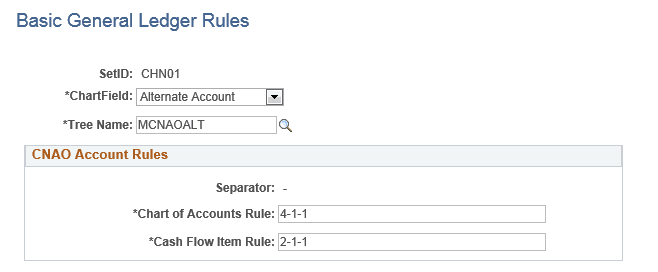
| Field or Control | Description |
|---|---|
|
SetID |
Displays the SetID. |
|
Chartfield |
From the drop-down list, select the Chartfield used to report the Chart of Accounts. |
|
Tree Name |
Specify a tree to load the CNAO account. |
|
Separator |
Displays a hyphen used to separate string values to be used for the CNAO report. |
|
Chart of Accounts Rule |
Specify a string that consists of the length of the segment for each level separated by a hyphen, the value of which is reported in the XML file. |
|
Cash Flow Item Rule |
Specify a string that consists of the length of the segment for each level separated by a hyphen, the value of which is reported in the XML file. |
Set Up Adjustment Period for CNAO Report Page
Use the Set Up Adjustment Period for CNAO Report page (CNAO_ADJ_PERIOD_PG) to define start and end dates for the adjustment period.
Navigation:
This example illustrates the fields and controls on the Set Up Adjustment Period for CNAO Report Page. You can find definitions for the fields and controls later on this page.
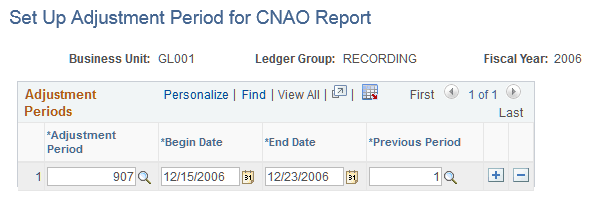
| Field or Control | Description |
|---|---|
|
Business Unit |
Displays the GL Business Unit. |
|
Ledger Group |
Displays the ledger group to be used in the CNAO report. |
|
Fiscal Year |
Displays the accounting year of the CNAO report. |
|
Adjustment Period |
Select the adjustment period to be used in the CNAO report. |
|
Begin Date |
Enter the first accounting date of the adjustment period to be used in the CNAO report. |
|
End date |
Enter the last accounting date of the adjustment period to be used in the CNAO report. |
|
Previous Period |
Select the period previous to the current adjustment period; the value can be a regular or adjustment period. |
Journal Categories Page
Use the Journal Categories page (CNAO_JRNL_CTG_PG) to define CNAO journal categories and map each journal category to the appropriate document sequencing journal code.
Navigation:
This example illustrates the fields and controls on the Journal Categories Page. You can find definitions for the fields and controls later on this page.
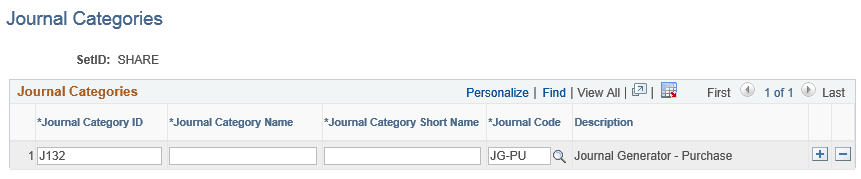
| Field or Control | Description |
|---|---|
|
SetID |
Displays the SetID for which the journal categories are being defined. |
|
Journal Category ID |
Enter the journal category identifier. |
|
Journal Category Name |
Enter the name of the journal category. |
|
Journal Category Short Name |
Enter the short name of the journal category. |
|
Journal Code |
Select the document sequencing journal code to which the journal category is being mapped. |
|
Description |
Displays the description for the document sequencing journal code. |
Cash Flow Items Page
Use the Cash Flow Items page (CNAO_CSFL_ITEM_PG) to define cash flow items to be used for CNAO reporting.
Navigation:
This example illustrates the fields and controls on the Cash Flow Items Page. You can find definitions for the fields and controls later on this page.
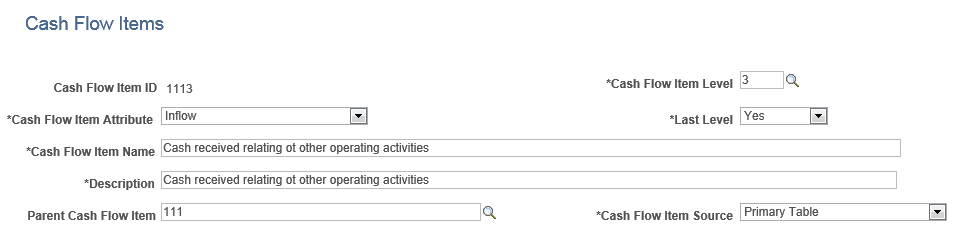
| Field or Control | Description |
|---|---|
|
Cash Flow Item ID |
Displays the identifier for the CNAO cash flow item. |
|
Level |
Enter the level for the CNAO cash flow item. |
|
Attribute |
Select the attribute for the cash flow item from the drop-down list. |
|
Last Level |
Indicates whether the cash flow item is derived directly from journals or not. |
|
Name |
Enter a name for the CNAO cash flow item. |
|
Description |
Enter a description for the CNAO cash flow item. |
|
Parent Cash Flow Item |
Select the parent cash flow item. |
|
Data Source |
Select a value from the data source drop-down list. |
Cash Flow Item Mapping Page
Use the Cash Flow Item Mapping page (CNAO_MAP_CFI_DSDT) to define mappings between cash flow items and document sequencing document types.
Navigation:
This example illustrates the fields and controls on the Cash Flow Item Mapping Page. You can find definitions for the fields and controls later on this page.
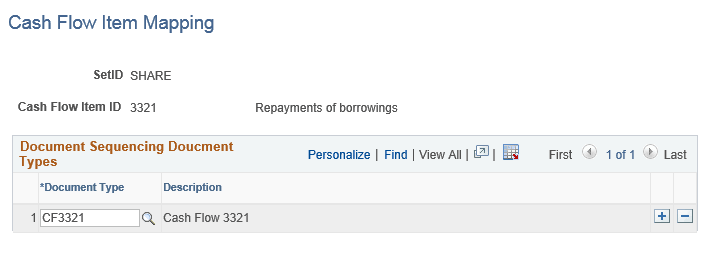
| Field or Control | Description |
|---|---|
|
SetID |
Displays the associated SetID. |
|
Cash Flow Item ID |
Displays the identifier and name for the CNAO cash flow item. |
|
Document Type |
Select the document sequencing document type for the set control value Set ID. |
|
Description |
Displays the description for a document sequencing document type. |
Cash Flow Report Definition Page
Use the Cash Flow Report Definition page (CNAO_CSFL_RPT_PG) to define sequences in which cash flow items appear in the cash flow statement along with the calculation sequence and the logic to calculate derived cash flow items.
Navigation:
This example illustrates the fields and controls on the Cash Flow Report Definition Page. You can find definitions for the fields and controls later on this page.
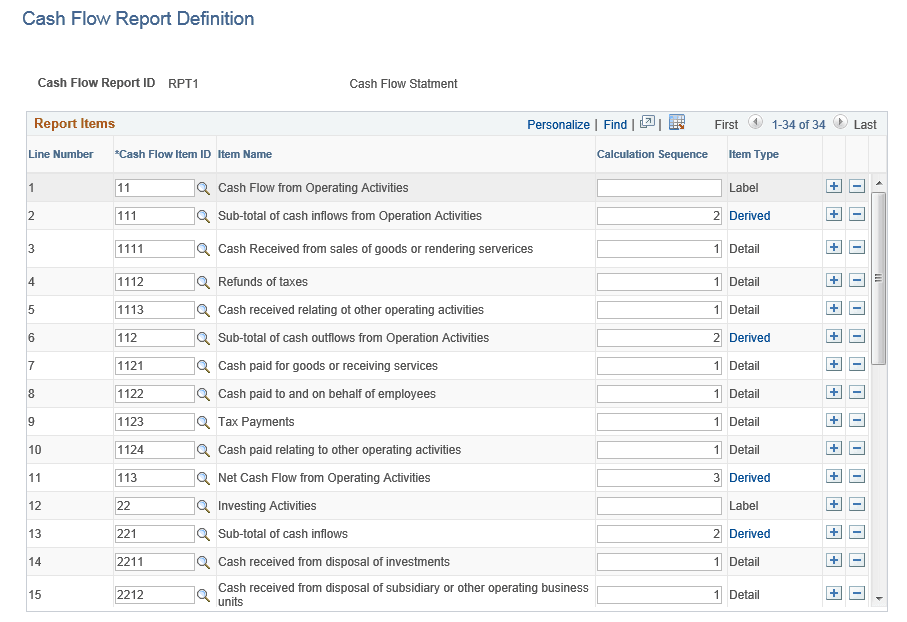
| Field or Control | Description |
|---|---|
|
Report ID |
Displays the report definition ID and name. |
|
Line |
Displays the line number in the report. |
|
Item Number |
Select the cash flow item number. |
|
Item Name |
Displays the predefined name of the cash flow item. |
|
Calculation Sequence |
Enter the sequence value in which detail and derived items are calculated; the value must be numeric and starting from 1. |
|
Item Type |
Displays whether the cash flow item is a label, detail or derived item. Note: If the item is derived, the text in the Derived field is a link to the deriving logic page. |
This example illustrates the fields and controls on the Deriving Logic for Line 2 Page. You can find definitions for the fields and controls later on this page.
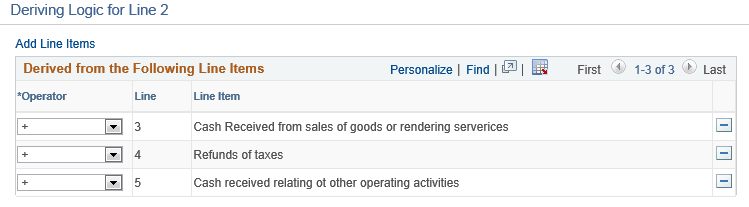
| Field or Control | Description |
|---|---|
|
Add Line Items |
Click this link to Select Line Items to be Added to Line 2 Page |
|
Operator |
Displays operators that indicate whether the line value is to be added or subtracted. |
|
Line |
Displays the line number in the report. |
|
Line Item |
Displays the name of the item for a given report line. |
This example illustrates the fields and controls on the Select Line Items to be Added to Line 2 Page. You can find definitions for the fields and controls later on this page.
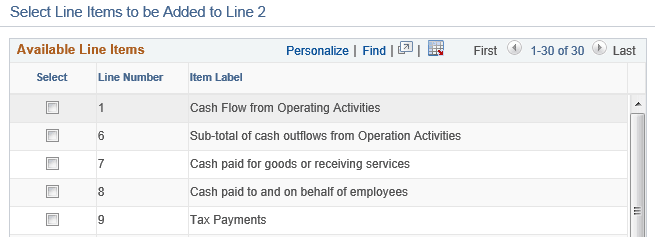
| Field or Control | Description |
|---|---|
|
Select |
Select one or more lines. |
|
Line Number |
Reports line numbers not currently selected. |
|
Item Label |
Displays the cash flow item name. |
CNAO Document and Transaction Types Page
Use the Document and Transaction Types page (CNAO_DOC_TRX_TY_PG) to specify CNAO Document and corresponding Document Sequencing Journal Types.
Navigation:
This example illustrates the fields and controls on the CNAO Document and Transaction Types Page. You can find definitions for the fields and controls later on this page.
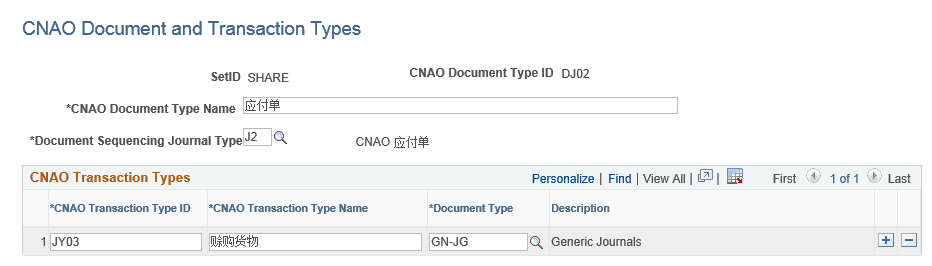
| Field or Control | Description |
|---|---|
|
SetID |
Displays the SetID for which the CNAO Document Types are defined. |
|
CNAO Document Type ID |
Displays the identifier for the CNAO Document Type. |
|
Name |
Enter a name for the CNAO Document Type. |
|
Document Sequencing Journal Type |
Select a Document Sequencing journal type linked to the CNAO Document Type. The system displays a description of the journal type selected. |
|
Document Sequencing Journal Type |
Displays a description for the Document Sequencing Document Type. |
|
CNAO Transaction Type ID |
Enter an identifier for the CNAO Transaction Type. |
|
Name |
Enter a name for the CNAO Transaction Type. |
|
Document Sequencing Document Type |
Select a Document Sequencing Document Type that appears on transactions. |
|
Description |
Displays a description for the Document Sequencing Document Type. |
Subsidiary Item Master Page
Use the Subsidiary Item Master page (CNAO_SUBSI_ITM_PG) to configure Subsidiary Items delivered as system data.
Navigation:
This example illustrates the fields and controls on the Subsidiary Item Master Page. You can find definitions for the fields and controls later on this page.
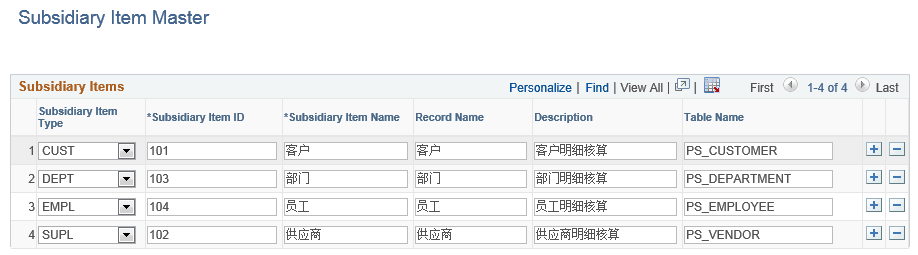
| Field or Control | Description |
|---|---|
|
Subsidiary Type |
Select the identifier for the subsidiary item type from the drop-down list. |
|
Subsidiary Item ID |
Enter the identifier for the subsidiary item. |
|
Name |
Enter the name of the subsidiary item. |
|
Record Name |
Enter the record corresponding to the subsidiary item. |
|
Description |
Enter a description for the subsidiary item. |
|
Table Name |
Enter the name of the actual PeopleSoft table. |
Set Up Accounts for CNAO Reporting Page
Use the Set Up Accounts for CNAO Reporting page (CNAO_ACCT_PG) to define all information required for CNAO accounts.
Navigation:
This example illustrates the fields and controls on the Set Up Accounts for CNAO Reporting Page. You can find definitions for the fields and controls later on this page.
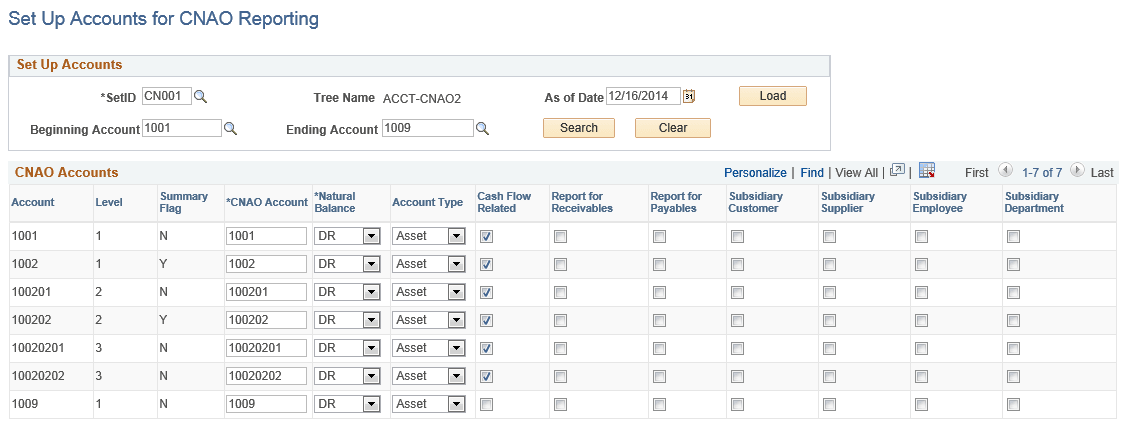
| Field or Control | Description |
|---|---|
|
SetID |
Select the SetID for the group of accounts to be set up. |
|
Tree Name |
Displays the CNAO Account Tree |
|
As of Date |
Specify an effective date for CNAO accounts to load from tree. |
|
Load |
Click this button to trigger the account load process. |
|
Beginning Account |
Specify a start account number from which to set up the range of accounts. |
|
Ending Account |
Specify an end account number for the range of accounts to be set up from. |
|
Account |
Displays the corresponding GL account number. |
|
Level |
Displays the level of the account. |
|
Summary Flag |
Displays account information and whether it is summary or detail. |
|
CNAO Account |
Specify the account to be used for CNAO reporting. |
|
Natural Balance |
Select the natural balance for account from the drop-down list. |
|
Account Type |
Select the account type to be used for CNAO reporting from the drop-down list. |
|
Cash Flow Related |
Select to indicate if the account is a type of cash account. |
|
Report for Receivables |
Select this check box to indicate whether the accounting entries posted against the account need to be included in the receivables and payables report. |
|
Report for Payables |
Select this check box to indicate whether the accounting entries posted against the account need to be included in the receivables and payables report. |
|
Subsidiary Customer |
Select this check box to specify whether customers should be reported for the account. |
|
Subsidiary Supplier |
Select this check box to specify whether suppliers should be reported for the account. |
|
Subsidiary Employee |
Select this check box to specify whether employee should be reported for the account. |
|
Subsidiary Department |
Select this check box to specify whether department should be reported for the account. |
Fixed Asset Depreciation Formula Page
Use the Define Fixed Asset Depreciation Formula page (CNAO_FA_DPR_FML_PG) to define a fixed asset depreciation equation or formula.
Navigation:
This example illustrates the fields and controls on the Fixed Asset Depreciation Formula Page. You can find definitions for the fields and controls later on this page.

| Field or Control | Description |
|---|---|
|
Depreciation Method |
Displays the depreciation method code and name. |
|
Depreciation Equation |
Enter a formula for the depreciation equation. |