Setting Up Items for Tax Processing
To set up items for tax processing, use the Item Tax Applicability component (ITEM_MASTER_EXS) and the Item BU Tax Applicability component (ITEM_BU_EXS).
This section discusses how to set up items for Tax Processing.
Note:
Setting up items for tax processing for customs duty is shared unless otherwise specified.
Pages Used to Set Up Items for Tax Processing
| Page Name | Definition Name | Usage |
|---|---|---|
|
ITEM_MASTER_EXS |
Define customs duty applicability details for items. |
|
|
ITEM_BU_EXS |
Define business unit-level customs duty applicability details for items. |
Item Tax Applicability Page
Use the Item Tax Applicability page (ITEM_MASTER_EXS) to define customs duty applicability details for items.
Navigation:
This example illustrates the fields and controls on the Item Tax Applicability page. You can find definitions for the fields and controls later on this page.
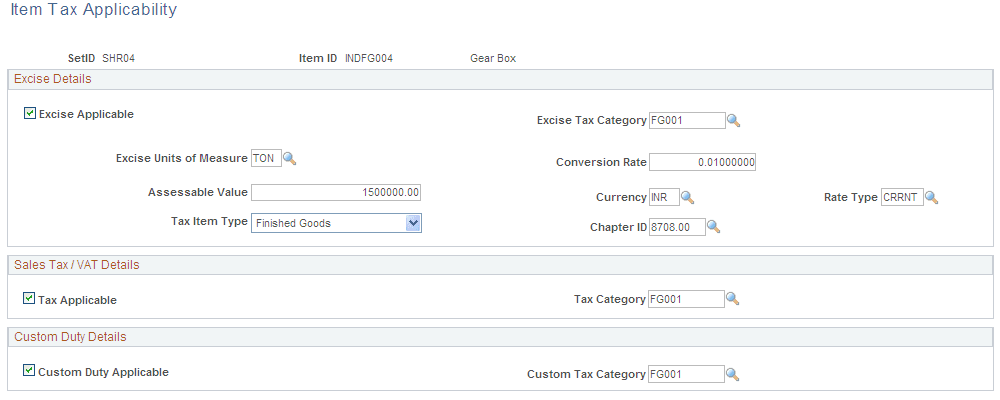
Custom Duty Details
| Field or Control | Description |
|---|---|
|
Custom Duty Applicable |
Select if customs duty is applicable to the item. This option is deselected by default. |
|
Custom Tax Category |
Select a tax category for the item. Values are defined on the Tax Category page: however, only tax categories that are associated with the item usage type are available for selection. |
Item Business Unit Tax Applicability Page
Use the Item Business Unit Tax Applicability page (ITEM_BU_EXS) to define business unit-level customs duty applicability details for items.
Navigation:
This example illustrates the fields and controls on the Item Business Unit Tax Applicability page.
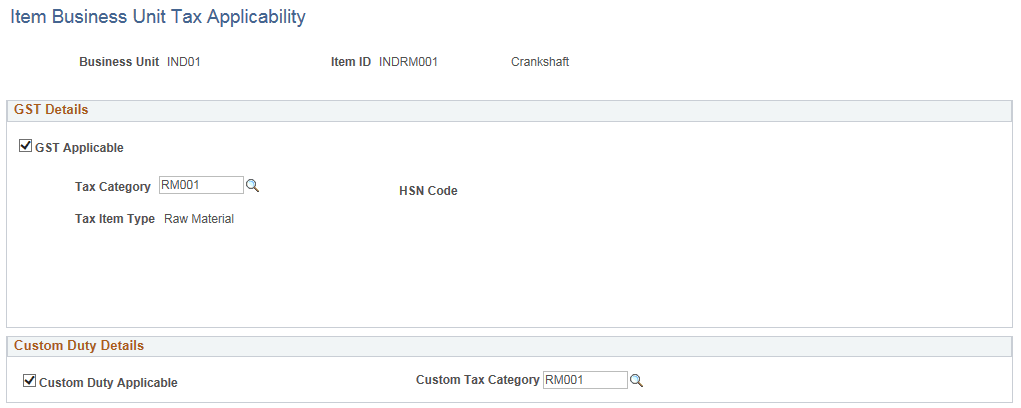
The Item Business Unit Tax Applicability page is identical to the Item Tax Applicability page. You define the customs duty applicability details for items at the business unit level.