Copying Protocols and Versions
This topic provides overviews of how to copy a protocol and how to renew an approved protocol, and discusses how to copy a protocol.
Pages Used to Copy Protocols and Versions
| Page Name | Definition Name | Usage |
|---|---|---|
|
GM_PCL_CPY |
Copy a protocol. |
|
|
GM_PCL_VRSN_CPY |
Copy a protocol version. |
Understanding How to Copy a Protocol
Copy functionality enables you to have information automatically transferred to a new protocol or version, thereby avoiding duplicate manual entry. Choose from two options: 1) copy one protocol with its current version to a new protocol and version or 2) copy one version within a protocol to another version within that same protocol. The following table explains the rules by which you can copy values for protocol and version copying functionality:
| Fields | Copy Protocol From | Copy Protocol To | Copy Version From | Copy Version To |
|---|---|---|---|---|
|
Version |
All versions can be copied. Select the version from the search page. |
Next system-generated version ID. |
The most current version (highest ID number) is automatically supplied as the copy from version. |
Next system-generated version ID. |
|
Status |
All can be copied. |
Draft only. |
Only Approved statuses can be copied. |
Draft only. |
|
Phase Type |
All can be copied. |
New only. |
All can be copied. |
Any phase type. |
|
Start/End Dates |
Copied as is. |
Copied as is. |
||
|
Next CR Date |
Copied as is. |
If the phase type is CR, the system will not copy the FROM version's CR date, but it will automatically increment to the next CR date. |
||
|
Submitted on Date |
Will not be copied. Blank value initially. |
Will not be copied. Blank value initially. |
||
|
Comments |
Will be copied as is. |
Will be copied as is. |
||
|
Attachments |
Will not be copied. |
Will not be copied. |
Understanding How to Renew an Approved Protocol
When a project is extended or you are approved for more funding you may need to renew an approved protocol. You do this by copying the approved protocol to a Renewal type version, making the necessary updates and resubmitting. The protocol undergoes the regular protocol creation and submission process, however it is treated as a renewal.
Copy Protocol Page
Use the Copy Protocol page (GM_PCL_CPY) to copy a protocol.
Navigation:
This example illustrates the fields and controls on the Copy Protocol page. You can find definitions for the fields and controls later on this page.
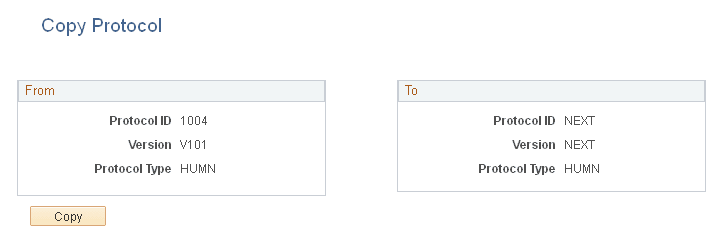
From
| Field or Control | Description |
|---|---|
|
Protocol ID |
Displays the protocol ID that is selected on the search page. |
|
Version |
Displays the version that is selected on the search page. |
|
Protocol Type |
Displays the protocol type of the current open protocol. |
To
| Field or Control | Description |
|---|---|
|
Protocol ID |
Displays NEXT to indicate the system-generated new ID number. |
|
Version |
Displays NEXT to indicate the system-generated new version number. |
|
Protocol Type |
Displays the protocol type. Note: Restrictions apply to copying a protocol version. A protocol is copied to a brand new protocol within the same protocol type. For example, animal to animal and human to human. |
Copy Protocol Version Page
Use the Copy Protocol Version page (GM_PCL_VRSN_CPY) to copy a protocol version.
Navigation:
-
-
Click the Copy Version button on the Maintain Protocol page.
This example illustrates the fields and controls on the Copy Protocol Version page. You can find definitions for the fields and controls later on this page.
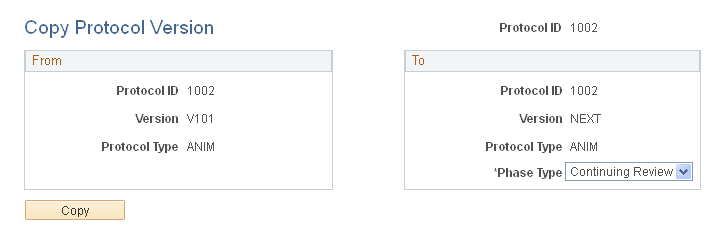
From
| Field or Control | Description |
|---|---|
|
Protocol ID |
Displays the protocol ID that is selected on the search page. |
|
Version |
Displays the version that is selected on the search page. |
|
Protocol Type |
Displays the protocol type. |
To
| Field or Control | Description |
|---|---|
|
Protocol ID |
Displays the same protocol ID as the one that is selected on the Search page. |
|
Version |
Displays NEXT to indicate the system-generated new version number. |
|
Protocol Type |
Displays the protocol type. |
|
Phase Type |
Select Modified, Renewal, or Continuing Review. |