Maintaining Subrecipients
This topic provides an overview of subrecipient setup and discusses how to set up and maintain subrecipient data using the Subrecipients (GM_VENDOR_DATA) component.
Pages Used to Maintain Subrecipients
| Page Name | Definition Name | Usage |
|---|---|---|
|
VNDR_ID1_SUM |
View summary information about the subrecipient. |
|
|
VNDR_ID1 |
Maintain identifying information about the subrecipient who receives funds under a primary award. |
|
|
VNDR_ADDRESS |
Maintain address information about the subrecipient. |
|
|
VNDR_LOC |
Maintain location information about the subrecipient. |
|
|
VNDR_CNTCT |
Maintain information about the people whom you contact on a regular basis. |
|
|
GM_VENDOR_ID |
Add subrecipient-specific information that is not part of the Supplier ID panel. |
|
|
GM_VNDR_CERT_COMPL |
Add information about subrecipient certifications. |
|
|
GM_VNDR_ATTRIBUTES |
Add information about subrecipient attributes. |
|
|
VNDR_DEFL_MASTER |
Enter information for single-payment suppliers. |
|
|
VNDR_FEDERAL |
Specify U.S. federal-only supplier information. |
Understanding Subrecipient Setup
Subrecipients receive pass-through funds under a primary award. In the PeopleSoft environment, they are treated similarly to suppliers. Subrecipient records and pages support the grants application process. During the pre-award phase of a proposal, you can enter subrecipient or supplier information into the subrecipient tables.
Note:
When you are establishing a subrecipient in the PeopleSoft FMS database, you must enter data in two places: First, you must define the initial subrecipient information using the Supplier pages (select ). After you establish this initial information, you must complete the PeopleSoft Grants-specific data using the PeopleSoft Grants subrecipient pages.
Before you enter the subrecipient information, gather all of the information that you want to track for the entity with which you are doing business.
This information includes:
-
Identifying information that tells you what kind of supplier you're entering—status, class, and other basic business information.
-
Address details, including primary and remittance addresses.
-
Procurement defaults that tell the system how to handle shipping and matching to invoices.
-
Payment terms that establish defaults for processing payments.
Subrecipient - Summary Page
Use the Subrecipient - Summary page (VNDR_ID1_SUM) to view summary information about the subrecipient.
Navigation:
This example illustrates the fields and controls on the Subrecipient - Summary page. You can find definitions for the fields and controls later on this page.
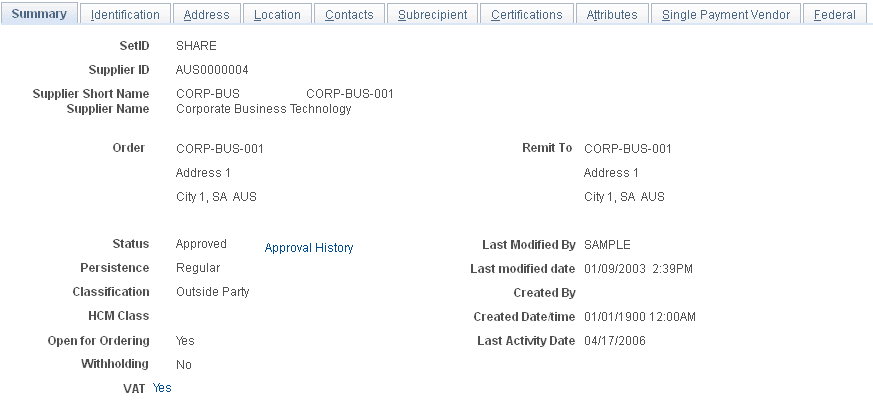
Instructions for viewing subrecipient summary information appear in the PeopleSoft Source to Settle Common Information documentation.
Subrecipient - Identification Page
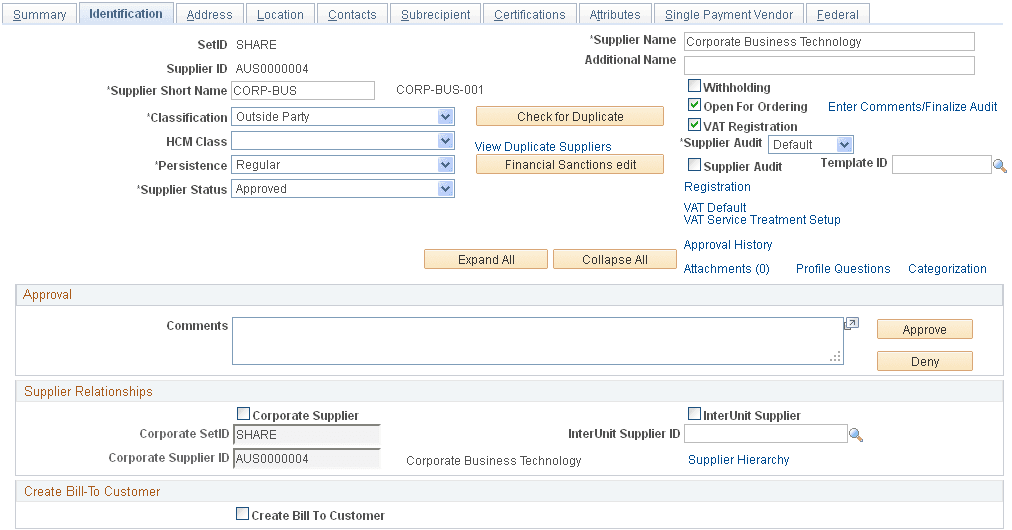
Use the Subrecipient - Identification page (VNDR_ID1) to maintain identifying information about the subrecipient who receives funds under a primary award.
Navigation:
This example illustrates the fields and controls on the Subrecipient - Identification page (1 of 2). You can find definitions for the fields and controls later on this page.
This example illustrates the fields and controls on the Subrecipient - Identification page (2 of 2). You can find definitions for the fields and controls later on this page.
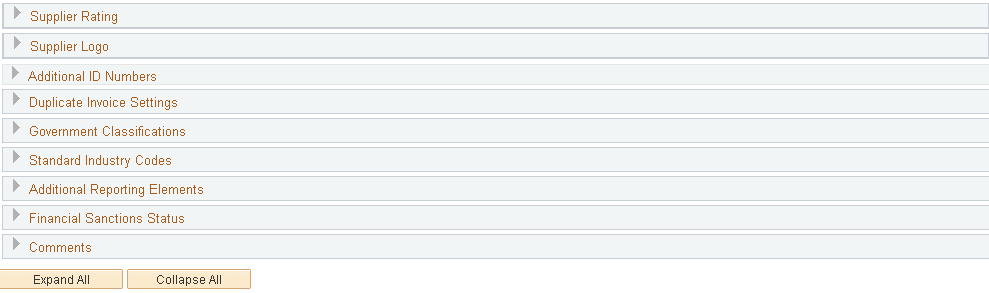
Instructions for establishing subrecipient identifying information appear in the PeopleSoft Source to Settle Common Information documentation.
Subrecipient - Address Page
Use the Subrecipient - Address page (VNDR_ADDRESS) to maintain address information about the subrecipient.
Navigation:
This example illustrates the fields and controls on the Subrecipient - Address page. You can find definitions for the fields and controls later on this page.
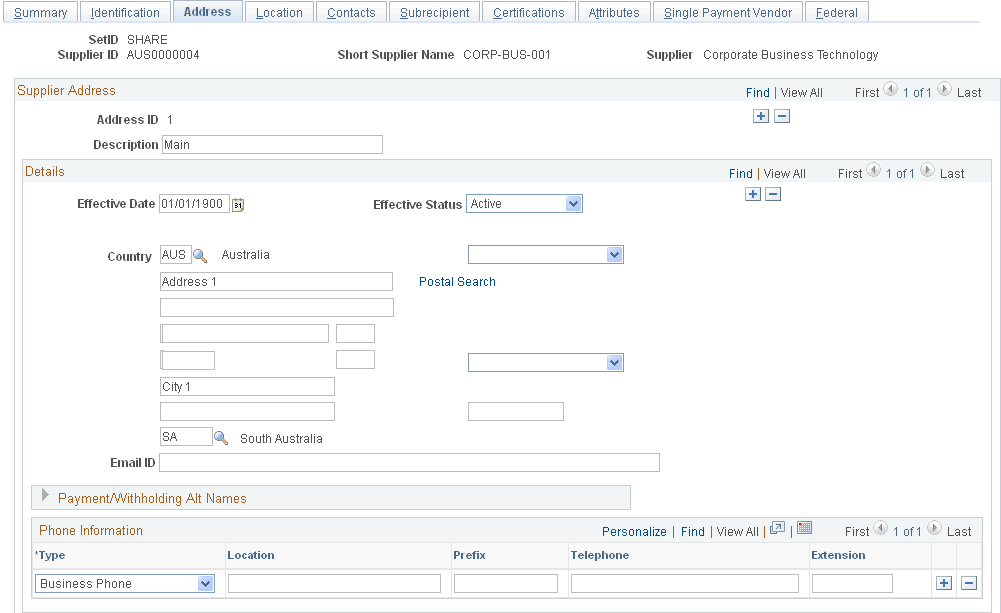
Instructions for entering subrecipient addresses appear in the PeopleSoft Source to Settle Common Information documentation.
Subrecipient - Location Page
Use the Subrecipient - Location page (VNDR_LOC) to maintain location information about the subrecipient.
Navigation:
This example illustrates the fields and controls on the Subrecipient - Location page. You can find definitions for the fields and controls later on this page.
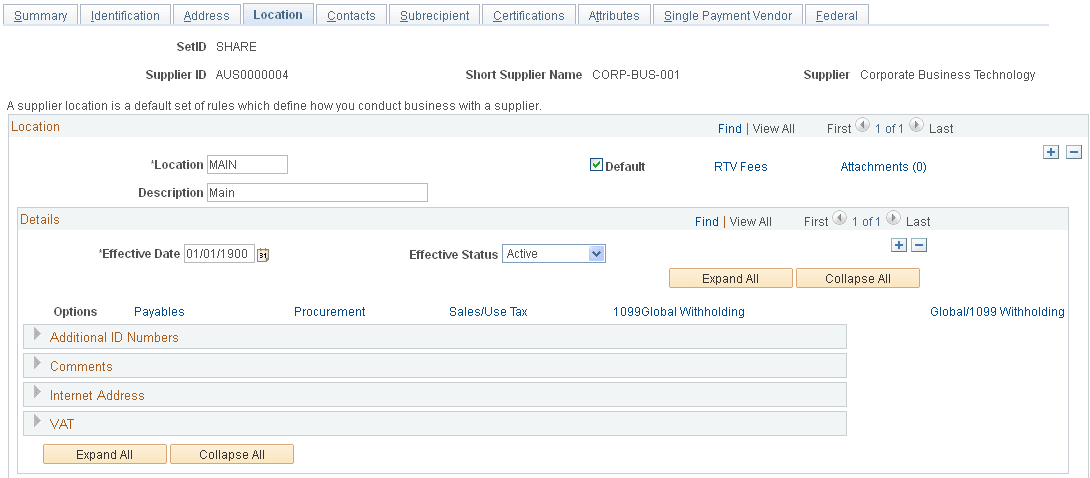
Instructions for entering subrecipient locations appear in the PeopleSoft Source to Settle Common Information documentation.
Subrecipient - Contacts Page
Use the Subrecipient - Contacts page (VNDR_CNTCT) to maintain information about the people whom you contact on a regular basis.
Navigation:
This example illustrates the fields and controls on the Subrecipient - Contacts page. You can find definitions for the fields and controls later on this page.
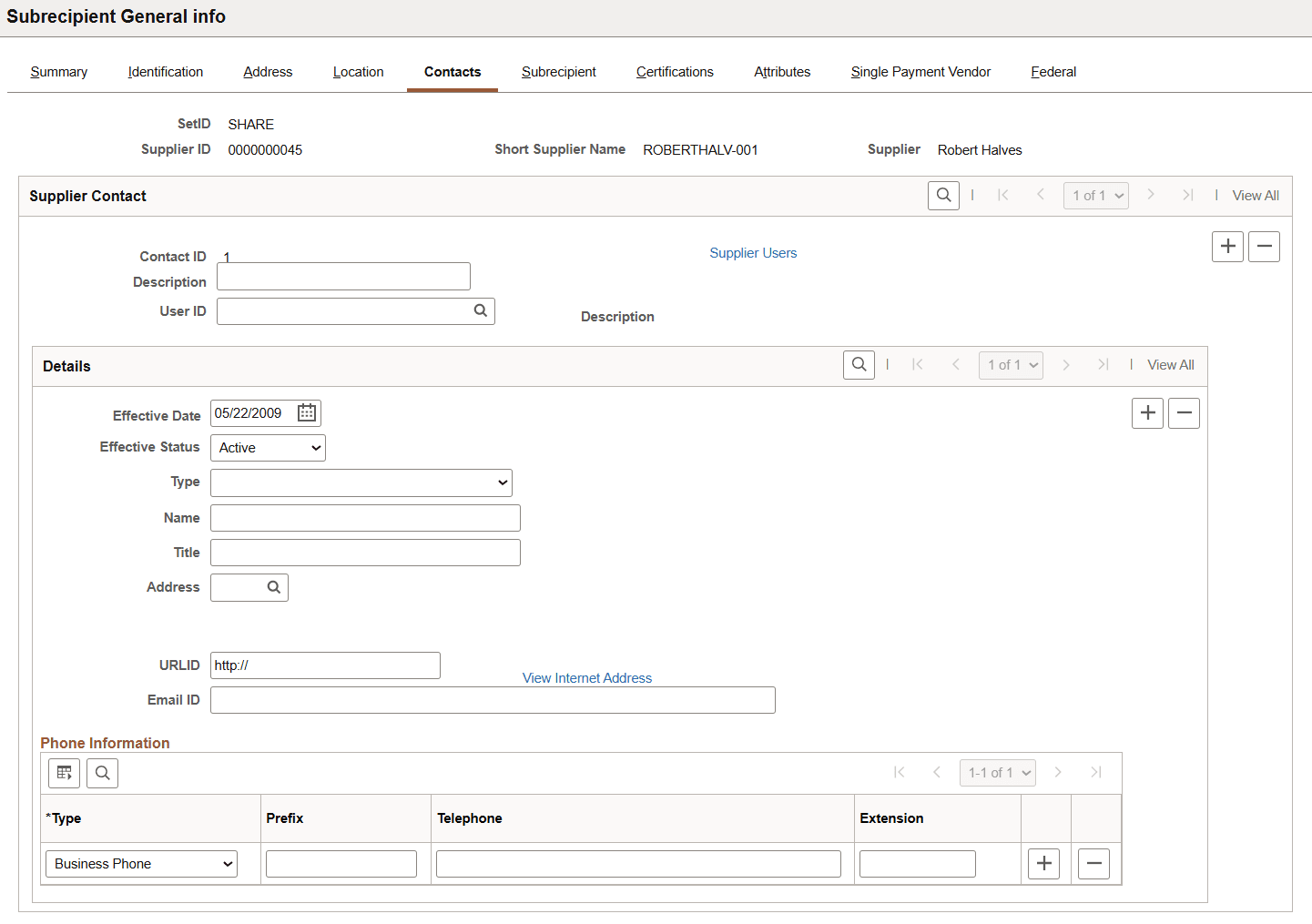
Instructions for entering subrecipient contacts appear in the PeopleSoft Source to Settle Common Information documentation.
Subrecipient - Subrecipient Page
Use the Subrecipient - Subrecipient page (GM_VENDOR_ID) to add subrecipient-specific information that is not part of the Supplier ID panel.
Navigation:
This example illustrates the fields and controls on the Subrecipient - Subrecipient page. You can find definitions for the fields and controls later on this page.
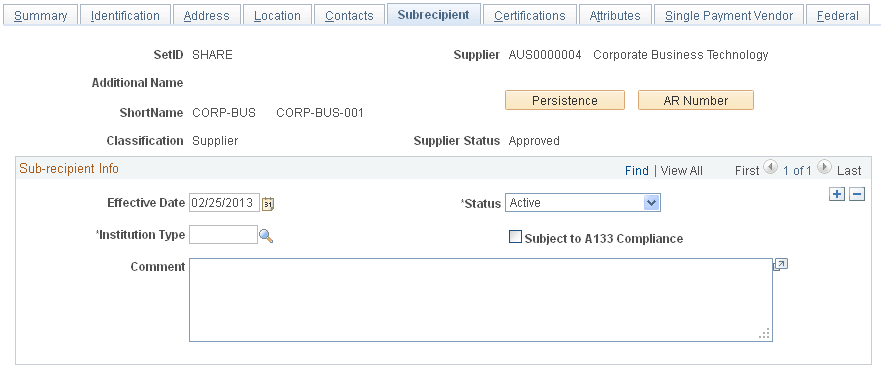
Select an institution type, such as Corporation, Federal Institution, or University Hospital.
The subrecipient page stores subrecipient-specific information that is not part of the Supplier component.
Values in the SetID, Supplier, Name 2 (if one exists for the organization), ShortName, Classification, and Supplier Status fields appear by default on the page.
| Field or Control | Description |
|---|---|
|
Subject to A133 Compliance |
Select if the subrecipient is subject to A133 audits. Circular No. A-133, which is issued by the Office of Management and Budget, sets forth standards for obtaining consistency and uniformity among federal agencies for the audit of states, local governments, and nonprofit organizations expending federal awards. |
|
Persistence |
Click to view customer ID and number. |
|
AR Number |
Click to view uniform resource locator (URL). |
Subrecipient - Certifications Page
Use the Subrecipient - Certifications page (GM_VNDR_CERT_COMPL) to add information about subrecipient certifications.
Navigation:
This example illustrates the fields and controls on the Subrecipient - Certifications page. You can find definitions for the fields and controls later on this page.
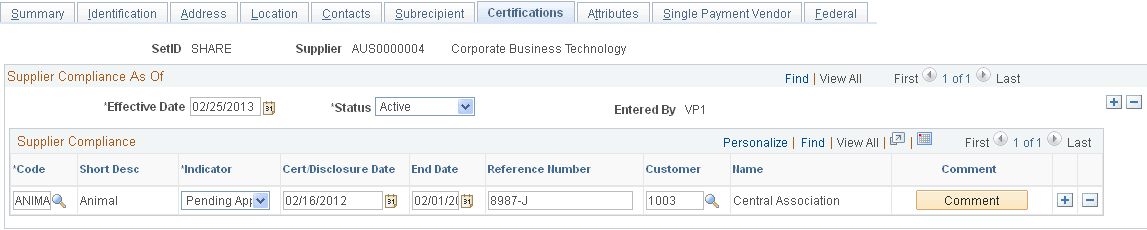
| Field or Control | Description |
|---|---|
|
Effective Date |
Select an effective date. For each effective date, you can enter multiple certification and compliance rows. |
|
Code |
Select a certification code. Certification codes come from the certifications control table. |
|
Cert/Disclosure Date (certification/disclosure date) |
Select the date that the certification was issued or disclosed. This date cannot be greater than the effective date. |
|
Customer |
Select the name of the subrecipient's customer who issued the certification. |
|
Comments |
Click to add comments. |
Subrecipient - Attributes Page
Use the Subrecipient - Attributes page (GM_VNDR_ATTRIBUTES) to add information about subrecipient attributes.
Navigation:
This example illustrates the fields and controls on the Subrecipient - Attributes page. You can find definitions for the fields and controls later on this page.
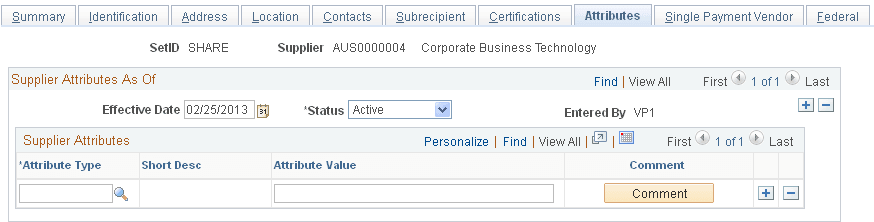
| Field or Control | Description |
|---|---|
|
Attribute Type |
Select an attribute. The Attributes Control table stores the codes that appear here. |
|
Attribute Value |
Enter an attribute value to represent the selected attribute. You can enter an attribute value up to 80 characters in length. |
|
Comments |
Click to add an explanation or information about each attribute. |
Subrecipient - Single Payment Supplier Page
Use the Subrecipient - Single Payment Supplier page (VNDR_DEFL_MASTER) to enter information for single-payment suppliers.
Navigation:
This example illustrates the fields and controls on the Subrecipient - Single Payment Supplier page. You can find definitions for the fields and controls later on this page.
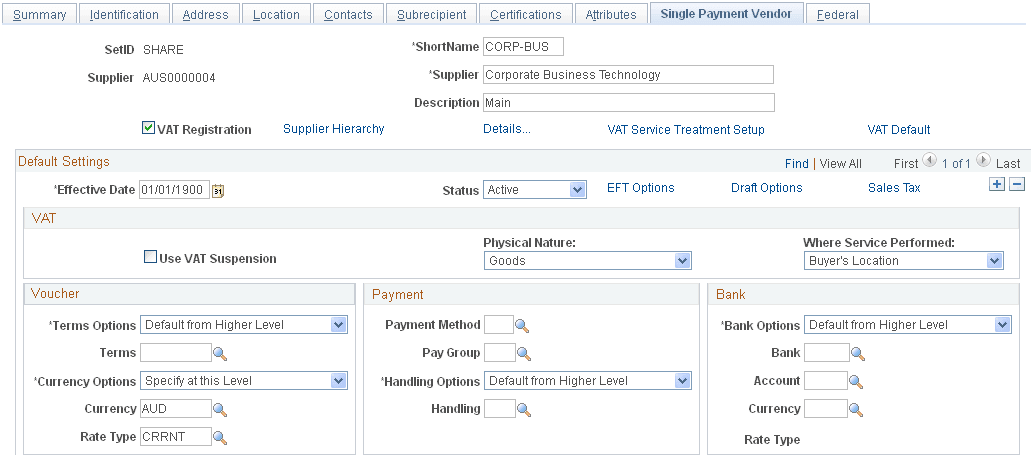
Instructions for entering information for single payment suppliers appear in the PeopleSoft Source to Settle Common Information documentation.
Subrecipient - Federal Page
Use the Subrecipient - Federal page (VNDR_FEDERAL) to specify U.
S. federal-only supplier information.
Navigation:
This example illustrates the fields and controls on the Subrecipient - Federal page. You can find definitions for the fields and controls later on this page.
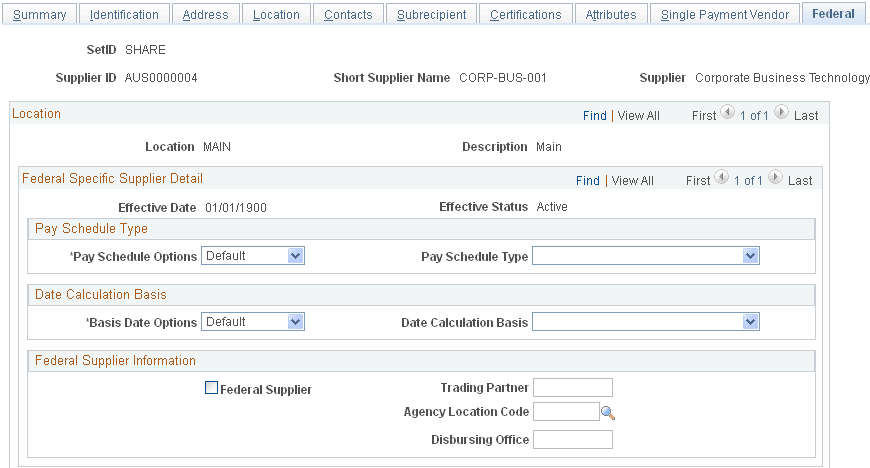
Instructions for specifying U.S. federal-only supplier information appear in the PeopleSoft Source to Settle Common Information documentation.