Setting Up and Maintaining Sponsored Projects
This topic provides an overview of sponsored projects setup and maintenance, and discusses how to set up and maintain the sponsored projects office (SPO) using the Sponsored Projects Office (GM_SPO_OFFICIAL) component.
Page Used to Set Up and Maintain Sponsored Projects Office
| Page Name | Definition Name | Usage |
|---|---|---|
|
GM_SPO_OFFICIAL |
Set up and maintain the sponsored projects office. Enter a description, employee contact, and authorized representative information for the SPO. |
Understanding Sponsored Projects Setup and Maintenance
Define the sponsored projects offices to be used by institution. Workflow uses the email address established here.
Sponsored Projects Office Page
Use the Sponsored Projects Office page (GM_SPO_OFFICIAL) to set up and maintain the sponsored projects office.
Enter a description, employee contact, and authorized representative information for the SPO.
Navigation:
This example illustrates the fields and controls on the Sponsored Projects Office page. You can find definitions for the fields and controls later on this page.
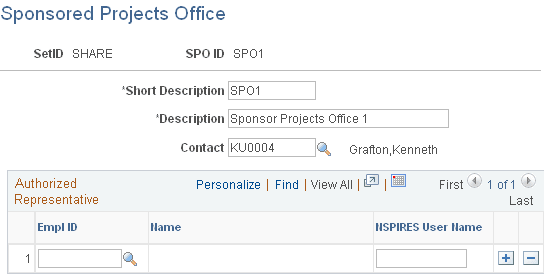
Identify an SPO and a contact person for that office. This SPO office is associated with one or more departments. On the General Information page you associate the value that you establish with the department. This information is displayed on the Proposal Project page.
If you are registered with NSPIRES (NASA Solicitation and Proposal Integrated Review and Evaluation System), enter your user name.