Creating Radio Frequency Identification Tags
Radio frequency identification (RFID) tags have an Electronic Product Code (EPC) number on the tag, and are comprised of a silicon chip and an antenna. The tag is attached to an item or its packaging and used by a scanning device for inventory management. Creating a RFID tag requires special printers that encode data onto the physical tag. PeopleSoft supports third-party vendors in the creation of the actual RFID tag by sending information that is needed to create the RFID tag.
This diagram illustrates the PeopleSoft service operations that are sent to a third-party supplier; including, Customer Sync, Item Sync, and Order Release:
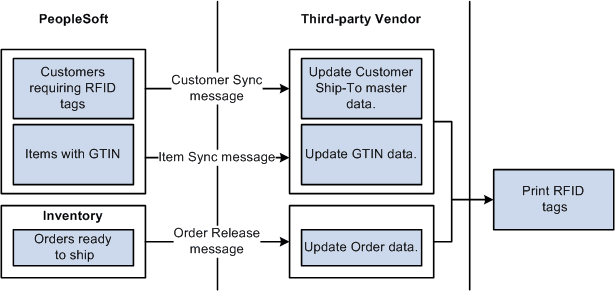
The customer sync service operations notifies the third-party supplier that the Ship-to customer requires RFID tags. The RFID Enabled option must be selected, for each customer, on the General Information - General Info page. You have the option of utilizing this service operation to keep this option consistent between the two systems, maintain it manually in the third-party supplier system, or only send order information for RFID-enabled destinations to the third-party system.
The item sync service operation provides item information that links the item and unit of measure to a specific Global Trade Item Number (GTIN) for the third-party supplier.
The Shipping Order Release service operation provides information about the order that is being shipped. You can choose to create the data transaction for specific customers, or utilize the RFID-enabled flag in the third-party software to screen out orders not destined for a RFID-enabled customer. The RFID-enabled flag is maintained on the header of the message attached to the service operation. In addition, the GTINs assigned to the items associated with the demand lines on the Order Release process page are also provided on the order release line segment of the message attached to the service operation. The manufacturer ID used for creation of the EPC label is also included (MFG_ID).
Pages Used to Create Radio Frequency Identification Tags
| Page Name | Definition Name | Usage |
|---|---|---|
|
UPN_TYPE_CD |
Create a universal item identifier type for GTINs. |
|
|
MANUFACTURER |
Create an EAN/UCC Company prefix. |
|
|
ITM_MFG_UPN |
Assign the GTIN to the item-UOM combination. |
|
|
PeopleSoft Order to Cash Common Information: Customer Information - General Info Page |
CUST_GENERAL1 |
In the Address Locations group box, select the RFID Enabled check box to indicate that the customer requires RFID tags. |
|
RUN_IN_FULFILL_RLS |
Run to generate the Shipping Order Release EIP. |
|
|
PeopleSoft Supply Chain Management Integration: Publish Outbound Message Page |
IN_RUN_PUB_MSG |
Initiate the outbound data publish process for outbound PeopleSoft Supply Chain Management (PeopleSoft SCM) service operations that use the batch publish design pattern. |
Setting Up RFID Tag Creation
To set up your system for RFID tag creation:
-
Create a universal item identifier type for a GTIN.
-
Create an EAN/UCC Company prefix.
-
Assign the GTIN to the item-UOM combination.
-
Select the RFID Enabled option on the General Information - General Info page for each customer.
-
Synchronize the RFID-enabled flag on the customer with the customer data in the third-party supplier.
The customer sync service operation is used to maintain customer information on the third-party system.
-
Synchronize the GTINs with those in the third-party supplier.
Use the item sync service operation to maintain GTIN information on the third-party supplier system.
See PeopleSoft Managing Items: Sending Outbound Item Data with the Item Loader Process.