Defining the Order Release Run Control
Access the Order Release Request process page (Inventory, Fulfill Stock Orders, Picking, Order Release Request):
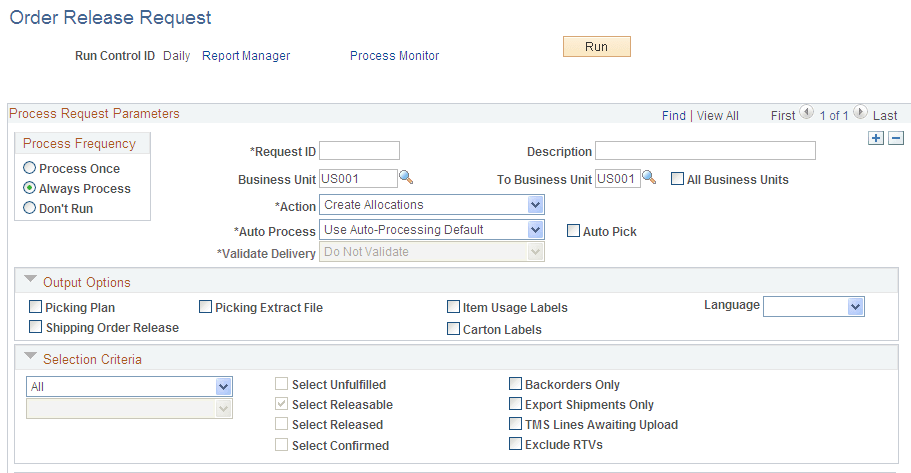
This example illustrates the fields and controls on the Order Release Request process page. You can find definitions for the fields and controls later on this page.
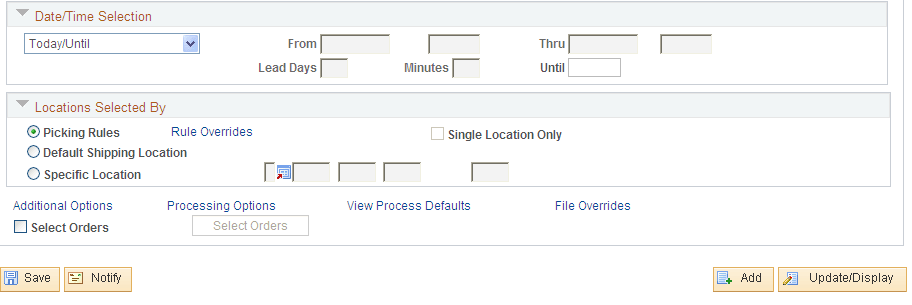
This example illustrates the fields and controls on the Order Release Request process page (2 of 2). You can find definitions for the fields and controls later on this page.
On the Order Release Request page, define a new run control to be used for auto processing (auto-ship). You name this run control AUTO_SHIP and give it the following settings:
-
The Action field uses the option of Create Allocations, Make Suggestions, or Release Only.
-
The Auto Process field uses the option, Advance to Shipped.
-
The Auto Pick check box is selected.
-
The Output Options group box is used to select picking output. Select the Picking Plan check box to generate a pick plan report listing the material storage locations to be picked.
-
The Locations Selected By group box can be used to determine the manner in which the Order Release process suggests material storage locations from which to pick stock.
-
The Additional Options link can be used to define picking plan options and bar code information.
-
The File Overrides link can be used to review or change the file directory and file name for the picking extract file, item usage labels, or carton labels.
The fulfillment engine does not use any selection criteria defined on this run control, including:
-
The Selection Criteria group box.
-
The Date/Time Selection group box.
-
The Select Orders section at the bottom of the run control.