Defining the Run Control ID for Front-End Shipping
Access the Front-End Shipping Requests process page (Inventory, Fulfill Stock Orders, Shipping, Front-end Shipping Requests):
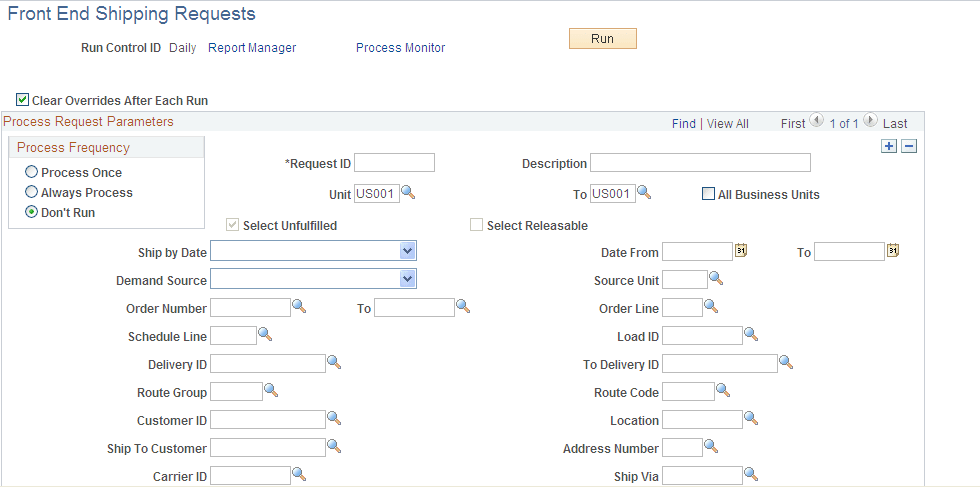
This example illustrates the fields and controls on the Front End Shipping Requests process page (page 1 of 2). You can find definitions for the fields and controls later on this page.
This example illustrates the fields and controls on the Front End Shipping Requests process page (page 2 of 2). You can find definitions for the fields and controls later on this page.
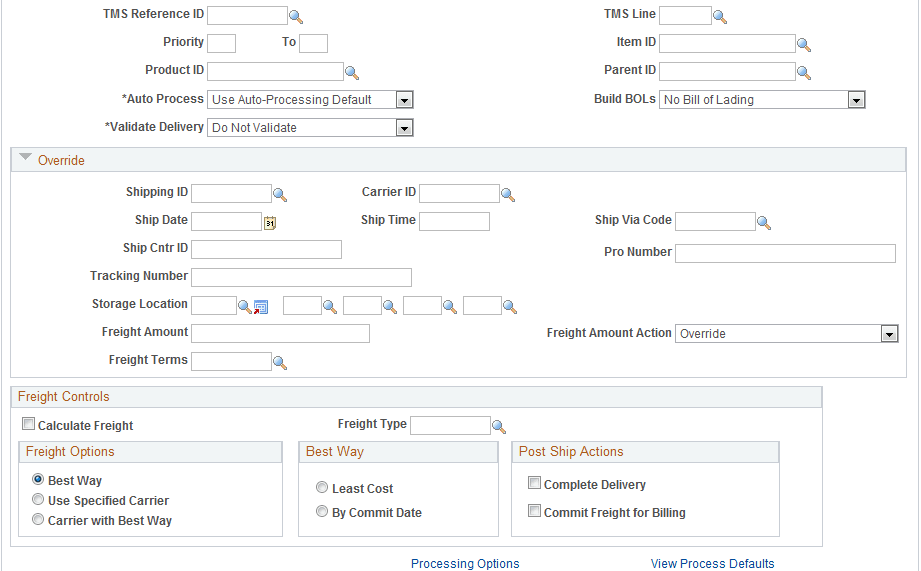
Define a new run control ID for the Front-End Shipping Requests process page. Users will enter the selection criteria from the Business Unit field to the Parent ID field. In the Override group box, notice that the From States are unavailable for change, the Select Unfulfilled check box is clear, and the Select Releasable check box is selected. These settings are derived from the Setup Fulfillment - Fulfillment Engine Options: From States page or the Fulfillment Engine Options: From States page.
In addition, you can use the Auto Process field to enable auto-processing from the Shipped state to the Depleted state. You can select :
-
Advance to Depleted: To enable auto-processing to the Depleted state for just this run control ID.
-
No Auto-Processing: To keep the demand lines in the Shipped state.
-
Use Auto-Processing Default: To use the default settings established on the Setup Fulfillment - Fulfillment Engine Options: Auto-Processing Options page (business unit level) or the Fulfillment Engine Options: Auto-Processing Options page (SetID).