Restricting the Front-End Shipping Requests to the Releasable State
In this example, the orders are always shipped from a Releasable state and you do not want the users to be able to select demand lines in the Unfulfilled state. This enables users to work with their procedures without being concerned about erroneously shipping orders that are not available for shipment. For the Front-End Shipping Request page, you need to set the correct From State and prevent state overrides using either the:
-
Setup Fulfillment - Fulfillment Engine Options: From States page
The settings are applied at the inventory business unit level.
-
Fulfillment Engine Options: From States page.
The settings are applied at the SetID level to apply to multiple inventory locations. This page is only used by the system when there are no default settings defined at the inventory business unit level.
Defining Settings for one Inventory Business Unit
Access the Setup Fulfillment - Fulfillment Engine Options: From States page (Inventory, Fulfill Stock Orders, Fulfillment Rules, Setup Fulfillment, Fulfillment Tasks. Select the Fulfillment Task Options link and then select the From States tab.)
This example illustrates the fields and controls on the Defining settings at the inventory business unit level (partial). You can find definitions for the fields and controls later on this page.
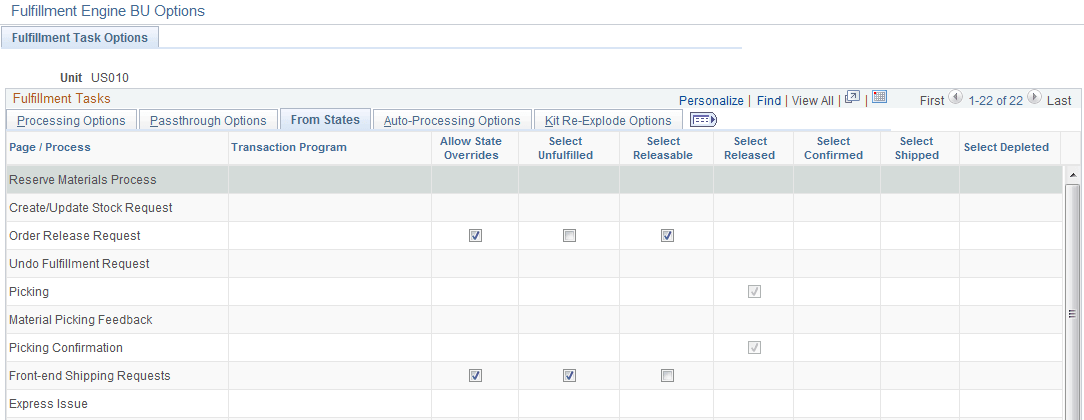
The settings on the Setup Fulfillment - Fulfillment Engine Options component are applied only to the inventory business unit identified at the top of the page.
For this scenario, restrict the users of the Front-End Shipping Requests process page to demand lines within the Releasable fulfillment state. On the Setup Fulfillment - Fulfillment Engine Options: From States page, locate the row for the Front-end Shipping Requests and apply the following default settings:
-
Deselect the Allow State Overrides check box to prevent a user from changing fulfillment states on the Front-End Shipping Requests process page.
-
Deselect the Select Unfulfilled check box.
-
Select the Select Releasable check box.
When looking for the settings, the system looks first to the Setup Fulfillment - Fulfillment Engine Options component defined for the PeopleSoft Inventory business unit. If a default is not defined at this level for a particular option, then the system looks to the SetID level.
Defining Settings for Multiple Locations
Access the Fulfillment Engine Options: From States page (Set Up Financials/Supply Chain, Product Related, Inventory, Fulfillment Engine Options. Select the From States tab).
This example illustrates the fields and controls on the Defining settings at the SetID level (partial). You can find definitions for the fields and controls later on this page.
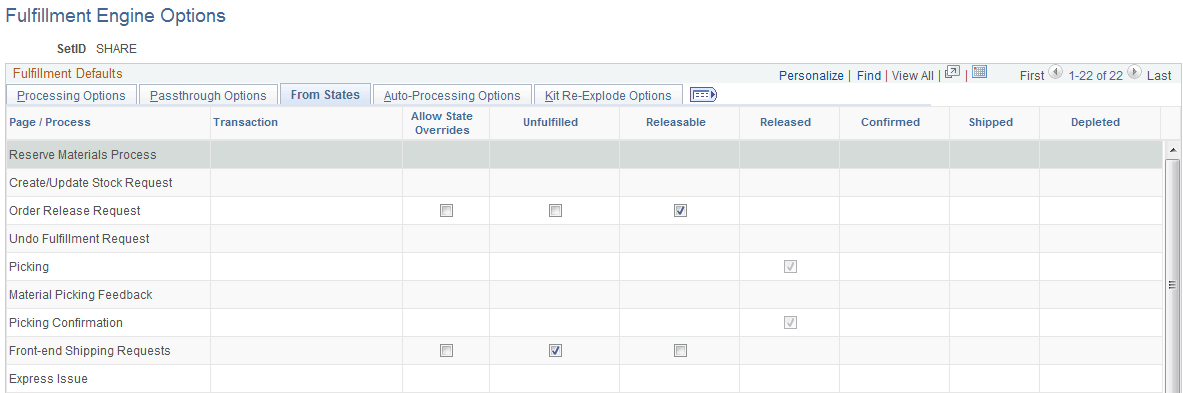
Use the Fulfillment Engine Options: From States page to apply the settings at the SetID level. This SetID is linked to one or more PeopleSoft Inventory business units on the TableSet Control - Record Group page using the record group, IN_17, Fulfillment Engine Options. The most specific default settings are used; therefore, the settings on this page are only used if there are no settings defined on the Setup Fulfillment - Fulfillment Engine Options: From States page (business unit level).
Locate the row for the Front-end Shipping Requests and apply the following default settings:
-
Deselect the Allow State Overrides check box.
-
Deselect the Select Unfulfilled check box.
-
Select the Select Releasable check box.