Lot Trace Transfer Page
Use the Lot Trace Transfer page (INV_LOT_TRC_POPUP) to access associated inquiry pages to view additional information for the component item-lot combination and for its lot-controlled parent items.
Navigation:
Click the Page Links button on the Review Lot Trace/Composition - Lot Trace page.
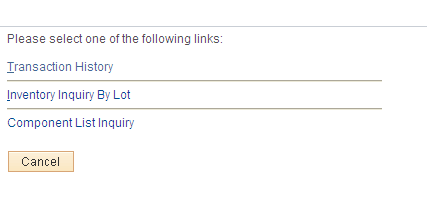
This example illustrates the fields and controls on the Lot Trace Transfer page. You can find definitions for the fields and controls later on this page.
Primary Access Links
| Field or Control | Description |
|---|---|
|
Item Lot Information |
Click this link to access the Lot Trace - Item Lot Information page, where you can view basic information for the lot-controlled parent or end item in a selected business unit. Lot trace functionality searches up one level at a time, when you are tracing where a component is used or shipped, you are viewing its end-use or parent-item details—no further component information is visible at this level. |
|
Parent Lot Information |
Click to access the Parent Lot Information page to view more information about a lot-controlled parent item in a selected business unit. |
|
Multiple Output Information |
Click to access the Multiple Output Information page to view production details for all output for the production ID. |
Navigation Links
| Field or Control | Description |
|---|---|
|
Inventory Inquiry by Lot |
Click to access the Inventory Inquiry by Lot page to view current inventory information by parent item and lot. |
|
Component List Inquiry |
Click to access the Production Selection page to view component list details for the parent item-lot combination. |
|
Output List Inquiry |
Click to access the Displaying Production Output Mix Information page to view output list details for the production ID. |
|
Transaction History |
Click to access the Transaction History inquiry page to view all inventory transactions for the lot-controlled parent item at the business unit level. |