Review Lot Trace/Composition- Lot Trace (inquiry) Page
Use the Review Lot Trace/Composition- Lot Trace (inquiry) page (INV_LOT_TRACE_INQ) to view where a specific item-lot combination has been used, shipped, or issued across all of the inventory and manufacturing business units.
Navigation:
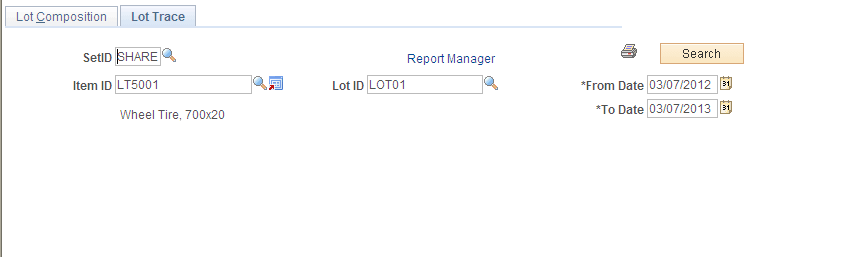
This example illustrates the fields and controls on the Review Lot Trace/Composition - Lot Trace inquiry page. You can find definitions for the fields and controls later on this page.
If the installation includes PeopleSoft Manufacturing, you can display the parent item information for a specific lot-controlled component item.
The grid displays data from all of the inventory shipment and issue transactions across your enterprise, including; customer, interunit, VMI, work order, and return-to-vendor shipments, plus material issued to the shop floor.
If a search from this page returns data that includes lot-controlled parent items, you can click the parent's lot ID link to access the Review Lot Trace/Composition - Lot Composition page (without losing the original lot trace search results) and perform a concurrent lot composition search that displays one level of component item information. The Lot Composition page is populated with component item data for the lot-controlled parent item. To return to the original lot trace search results, select the Lot Trace tab or click the Lot Trace link. Alternatively, you can perform a new lot trace search for another item-lot combination row and the system discards the previous search results.
The transaction group name appears for each tab on this page. The following table lists which transaction groups are included as data sources for lot trace inquiries:
| Transaction | Transaction Group |
|---|---|
|
Return to Vendor |
012 |
|
Return to Vendor From Inspection |
013 |
|
Usages & Shipments |
030 |
|
InterBU Transfer Shipments |
031 |
|
Ship on Behalf of Other BU |
034 |
|
InterCompany Transfers |
035 |
|
VMI Interunit shipment |
037 |
|
Component Kit |
220 |
|
Component Consumption |
230 |
|
Work Order Usage |
231 |
| Field or Control | Description |
|---|---|
|
Production ID |
Identifies a specific production or work order for production tracking purposes or for managing discrete orders or batches. This ID appears if the component is manufactured or assembled using PeopleSoft Manufacturing. |
|
To Production ID |
Indicates that the production ID was routed to another production ID rather than being put away into inventory. |
|
Multi O/P Flg (multiple output flag) |
Indicates that the component item that you are tracing has either a co-product or a by-product associated with it. You can view further details when you click the Transfer button on the same line to access the Lot Trace Transfer page, where you can access the Multiple Output Information page. |
Note:
When an item is manufactured or assembled using a production schedule (rather than a production ID), the Production ID field is blank. Adjustments made to a component list for a given production ID after the completion process has run are not included in the lot trace inquiry's search results.
Note:
When a component is part of a multiple output for a parent production ID, the quantity for the parent production ID reflects the total quantity output related to the component. To view the actual breakdown of item output quantities, use the Multiple Output Item Lot Detail page.
| Field or Control | Description |
|---|---|
|
Parent Item ID |
Populated when the item-lot combination for which you searched is a component, indicating another level for inquiry. |
|
Parent Lot ID |
Lot-controlled items that are also parent item assemblies display a parent lot ID. Click the value in this column to perform a lot composition inquiry for the parent lot ID. |
|
Parent/Routed Quantity |
The number of parent items completed. |
|
UOM |
The UOM for the parent item completions. |