Setting Up and Running Full Synchronization
Follow the below mentioned steps to setup and run a full synchronization:
-
From the FSCM database, set up the Full Data Publish Rules for the COPY_ASSET_SUBTYPE message (Enterprise Components, Integration Definitions, Full Data Publish Rules, Full Table Publish Rules):
This example illustrates the fields and controls on the Full Table Publish Rules page (COPY_AM_SUBTYPE). You can find definitions for the fields and controls later on this page.
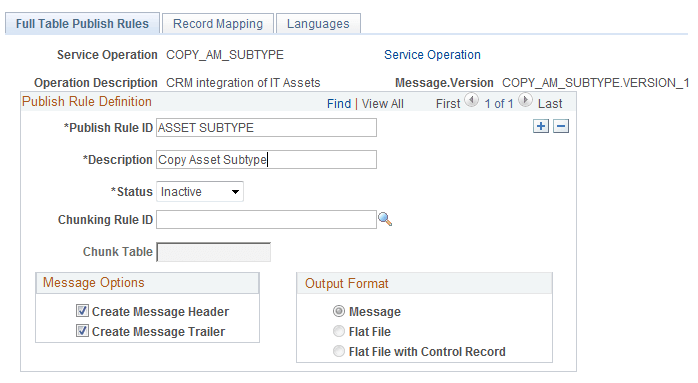
Complete Publish Rule ID, supply a description and activate as pictured.`
-
From the FSCM database, set up the Full Data Publish Rules for the MANUFACTURER_FULLSYNC message (Enterprise Components, Integration Definitions, Full Data Publish Rules, Full Table Publish Rules):
This example illustrates the fields and controls on the Full Table Publish Rules page (MANUFACTURER_FULLSYNC).
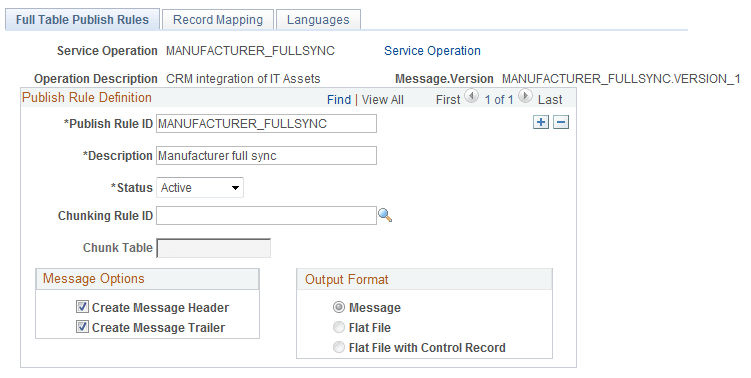
Complete Publish Rule ID, supply a description and activate as pictured.
-
From the FSCM database, set up the Full Data Publish Rules for the COPY_IT_ASSET message (Enterprise Components, Integration Definitions, Full Data Publish Rules, Full Table Publish Rules):
This example illustrates the fields and controls on the Full Table Publish Rules page (COPY_IT_ASSET).
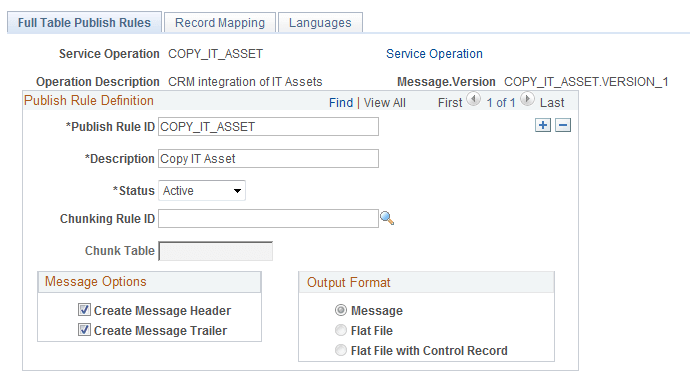
Complete Publish Rule ID, supply a description and activate as pictured.
-
From FSCM, set up Map Chunking Rules for the business unit (Enterprise Components, Integration Definitions, Map Chunking Rules, Business Units):
This example illustrates the fields and controls on the BusUnit Mapping page.
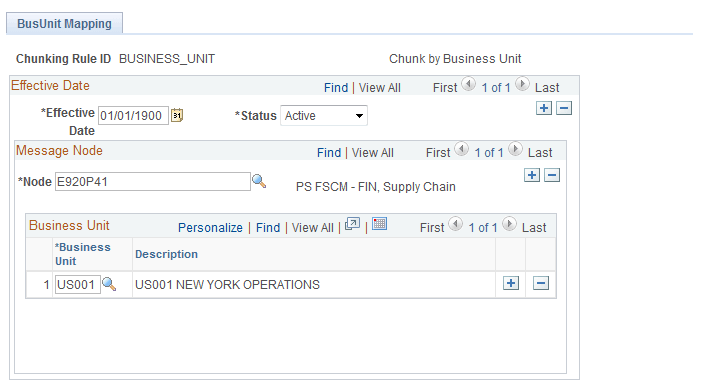
Supply the FSCM local node and add the business unit or units that are involved.
-
Review association of Chunking Rule to the business unit (Enterprise Components, Integration Definitions, Map Chunking Rules, BU to Chunk Rule/Node, Quick Map):
This example illustrates the fields and controls on the Quick Map page.
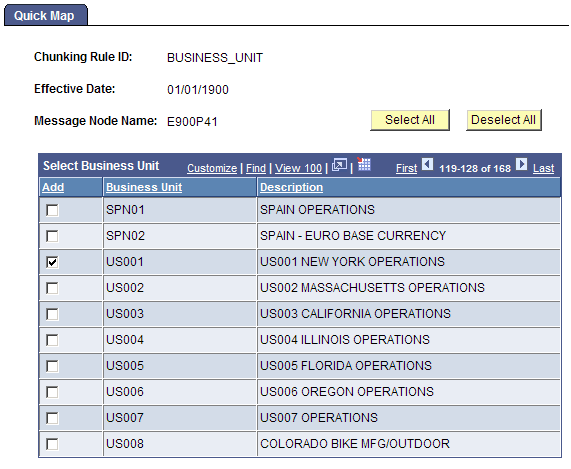
Make sure your business unit is selected.
-
Run the full synchronization of Asset Subtypes, launch the Full Table Data Publish Application Engine program, EOP_PUBLISHT (Enterprise Components, Integration Definitions, Initiate Processes, Full Data Publish):
This example illustrates the fields and controls on the Full Data Publish (AMFULLSYNC).
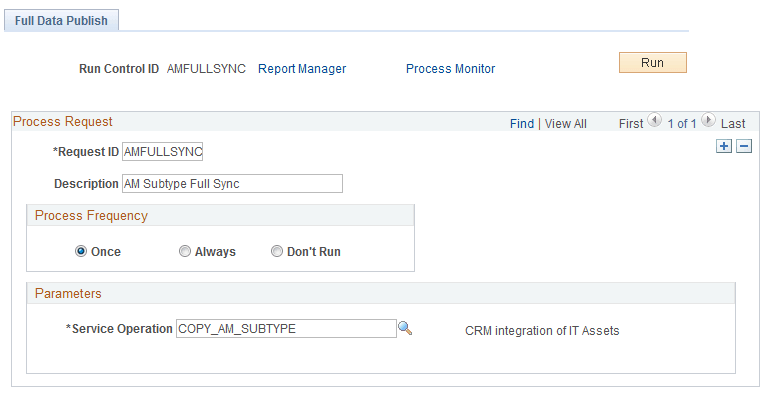
Create a Run Control ID and complete as pictured. Save and run.
-
Run the full synchronization of Manufacturer IDs, launch the Full Table Data Publish Application Engine program, EOP_PUBLISHT (Enterprise Components, Integration Definitions, Initiate Processes, Full Data Publish):
This example illustrates the fields and controls on the Full Data Publish page (MFG_FULLSYNC).
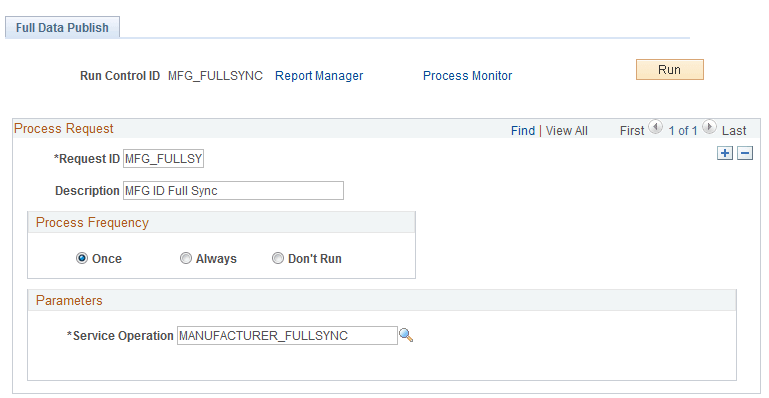
Create a Run Control ID and complete as pictured. Save and run.
-
Run the full synchronization of IT Assets, launch the Full Table Data Publish Application Engine program, EOP_PUBLISHT (Enterprise Components, Integration Definitions, Initiate Processes, Full Data Publish):
This example illustrates the fields and controls on the Full Data Publish page (HW_ASSETS).
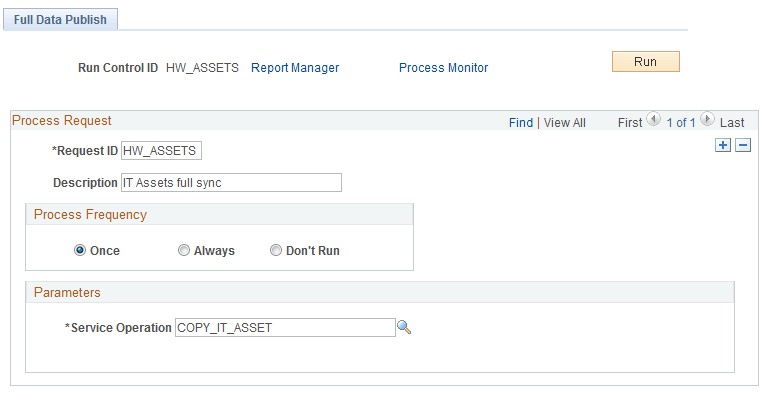
Create a Run Control ID and complete as pictured. Save and run.