Understanding Data Integration
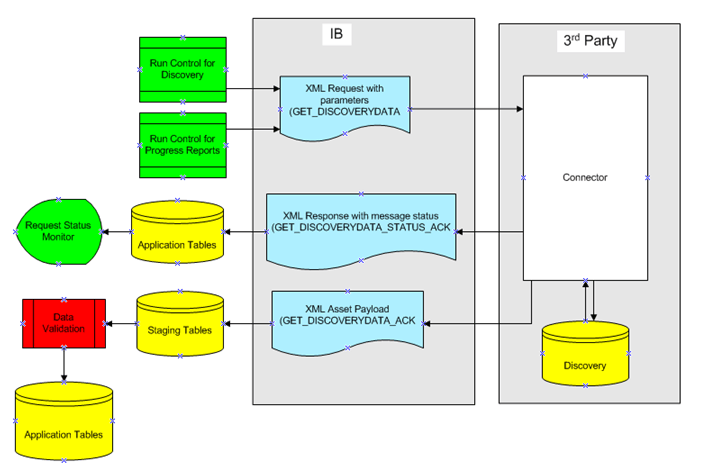
PeopleSoft IT Asset Management is set up to communicate with the third-party inventory database using XML messages. The XML messages are handled through Integration Broker. The process flow for requesting third party inventory data consists of the following steps:
-
PeopleSoft IT Asset Management sends an XML message to the third-party software requesting inventory data.
-
The third-party software returns an XML response message indicating that the request was received or if there was a problem processing the request in the third-party system.
-
The third-party software returns the requested data in an XML file formatted for PeopleSoft IT Asset Management.
-
Once that response is received, an application engine Load process, IT_LOAD_PROC, is initiated to process the data that is returned from the third party. The Load process validates the data and interprets the actual values converting them into meaningful values that the Asset Repository can understand.
There are alternatives to this Request/Response model to integrate data from third-party discovery applications into PeopleSoft ITAM. The Agnostic Integration model provides alternatives to integrate inventory data without employing the Request/Response model. Agnostic Integration is designed to leverage open interface tables called pre-staging tables. This eliminates the need to build a tightly-coupled XML connector, which is required for the Request/Response model. Agnostic Integration provides efficiency for those organizations that are implementing ITAM as well as flexibility for those who rely on a third party's connector. The data still needs to be integrated into a delivered web service or directly into the pre-staging tables.
See Implementing Agnostic Integration.
The following diagram illustrates the process flow for requesting third party inventory data: