Working with Software License Inventory
This topic discusses how to work with software license inventory.
Page Used to Work with the Software License Inventory
| Page Name | Definition Name | Usage |
|---|---|---|
|
IT_SFTWR_ASTQTY |
View the number of licenses for specific software titles. |
Software License Inventory Page
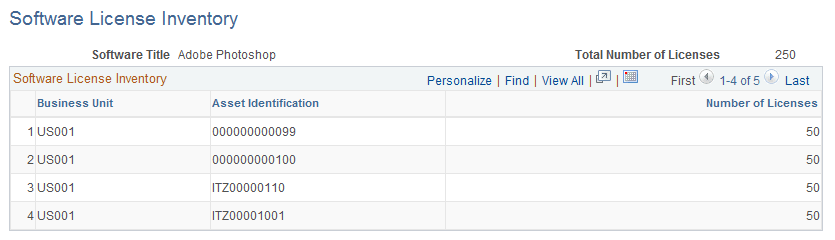
Use the Software License Inventory page (IT_SFTWR_ASTQTY) to view the number of licenses for specific software titles.
Navigation:
This example illustrates the fields and controls on the Software License Inventory page. You can find definitions for the fields and controls later on this page.
| Field or Control | Description |
|---|---|
|
Asset Identification |
Displays the Asset ID that is associated with a specific purchase of licenses that are defined by this software title. |
|
Number of Licenses |
Specifies the total count of licenses that are granted in the transaction that is specified under the asset ID. This count is calculated from the Software Attributes page as the product of the quantity (number of units (SKUs) purchased) for the asset and the number of licenses per purchasing unit (SKU). |