Contracts Business Unit Setup
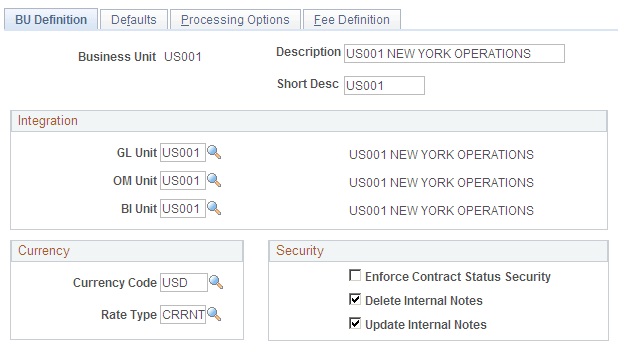
On the Contracts Business Unit – BU Definition page, you must enter a valid BI Unit.
Access the Contracts Business Unit – BU Definition page (Set Up Financials/Supply Chain, Business Unit Related, Contracts, Contracts Definition)
This example illustrates the fields and controls on the Contracts Business Unit – BU Definition page. You can find definitions for the fields and controls later on this page.
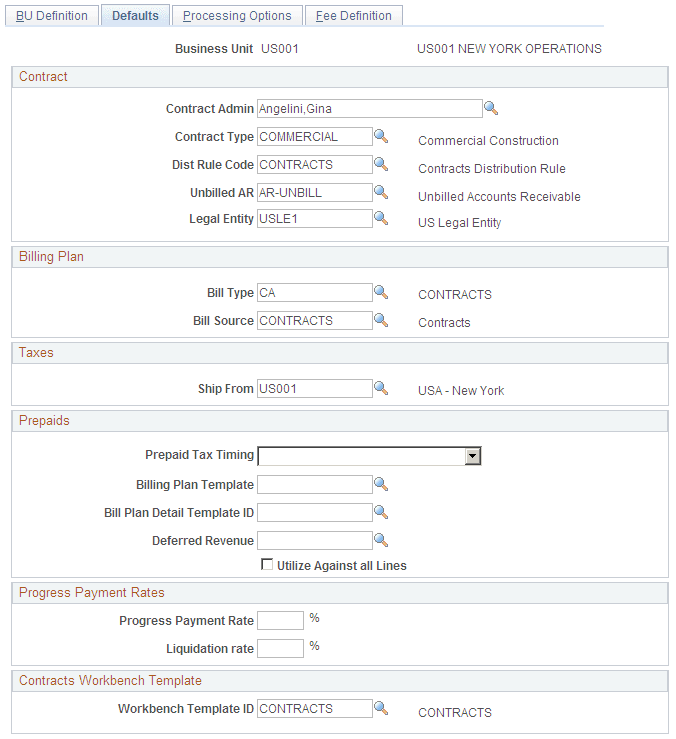
On the Contracts Business Unit – Defaults page, select REALESTATE for the Bill Source value.
The bill source is used to create the bill plan for the contract that is created when a receivables lease is activated. This bill plan is used by the transaction billing processor to perform bill processing for Lease Administration transactions for the lease. It does not need to be a specific value, but a value must be selected for this field, either in the Contracts business unit setup or in the Lease Administration business unit setup. If no values for the Bill Type and Bill Source are found in the Lease Administration business unit setup then the values setup in the Contracts business unit setup will be used. If the Bill Type is not setup, an error will occur when the lease is activated.
Access the Contracts Business Unit – Defaults page (Set Up Financials/Supply Chain, Business Unit Related, Contracts, Contracts Definition, Defaults)
This example illustrates the fields and controls on the Contracts Business Unit – Defaults page. You can find definitions for the fields and controls later on this page.