Lease Administration Business Unit Setup
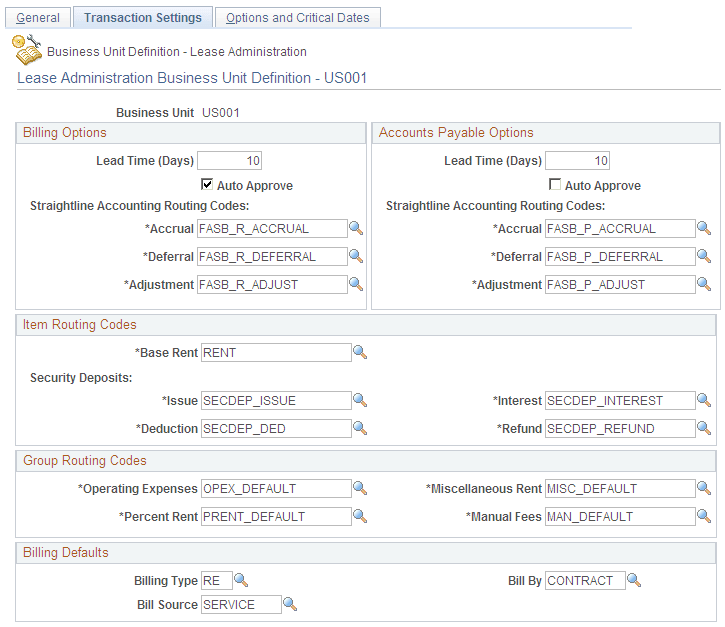
There are three fields to be setup in RE Business Unit under billing defaults:
-
Billing Type: This value is prompted from PeopleSoft Billing setup. If this value is left blank, this value will be populated from the PeopleSoft Contracts business unit setup. If you do not enter this value in the PeopleSoft Contracts business unit setup, the system will raise an error when the user activates the lease.
-
Bill Source: This value is prompted from PeopleSoft Billing setup. If this value is left blank, this value will be populated from the PeopleSoft Contracts business unit setup. If you do not enter this value in the PeopleSoft Contracts business unit setup, the system will raise an error when the user activates the lease.
-
Bill By: This value is prompted from PeopleSoft Billing setup. This value can be blank on the PeopleSoft Contracts business unit setup also.
Access the Lease Administration Business Unit – Transaction Settings page (Set up Financials/Supply Chain, Business Unit Related, Lease Administration, LA Business Unit Definition, Transaction Settings)
This example illustrates the fields and controls on the Lease Administration Business Unit – Transaction Settings page. You can find definitions for the fields and controls later on this page.