Defining User-Defined Fields
To define user-defined fields, use the User Defined Fields components (RE_USER_DEF_FLDS).
This topic provides an overview of user-defined fields and discusses how to define user-defined fields.
Page Used to Define User-Defined Fields
| Page Name | Definition Name | Usage |
|---|---|---|
|
RE_USR_DEF_FLD |
Define user-defined fields. Create a new user-defined field to capture additional reporting data as required by your organization. |
Understanding User-Defined Fields
Because not all businesses have the same reporting needs, PeopleSoft Lease Administration enables you to define additional fields (up to 10) to meet your reporting requirements. When you establish a user-defined field, the field is populated on your Clauses page in the PeopleSoft Lease Administration system, enabling you to enter the information that you want to track.
Note:
User-defined fields are used for information or reporting purposes only.
User Defined Fields Page
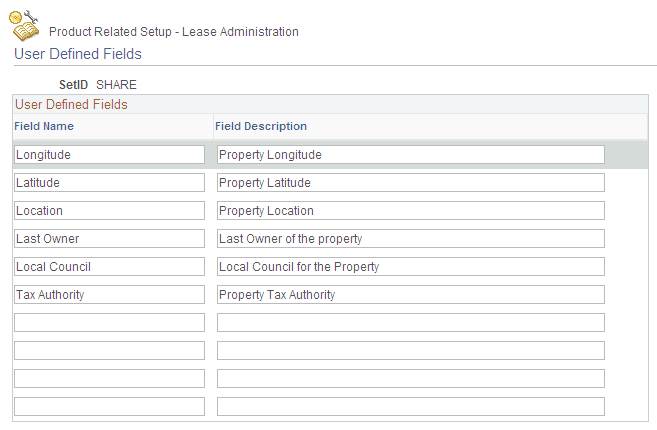
Use the User Defined Fields page (RE_USR_DEF_FLD) to define user-defined fields.
Create a new user-defined field to capture additional reporting data as required by your organization.
Navigation:
This example illustrates the fields and controls on the User Defined Fields page. You can find definitions for the fields and controls later on this page.
| Field or Control | Description |
|---|---|
|
Field Name |
Identify the label name that should appear on the Clauses page. |
|
Description |
Enter the description for your user-defined field. The description defines how the field is used. |