Setting Up Supplemental Data
To set up supplemental data, use the following components:
-
Register Record (FS_SD_REG_REC).
-
Register Component (FS_SD_REG_COMP).
-
Define Record (FS_SD_RECDEFN).
-
Define Display Group (FS_SD_GRPDEFN).
-
Assign Display Group (FS_SD_PAGE_GRP).
This topic discusses how to set up supplement data.
Pages Used to Set Up Supplemental Data
| Page Name | Definition Name | Usage |
|---|---|---|
|
SD_REG_REC |
Register the supplemental database record and optionally register the record that saves the search criteria for the base record. |
|
|
SD_REG_COMP |
Register and enable the component and the pages for supplemental data. |
|
|
SD_RECDEFN |
Define the supplemental data record to associate with the base record and identify where to store this record. |
|
|
SD_RECFLD |
Map fields to the data storage fields. |
|
|
SD_RECFLD_DTL |
Define detail information for a field. |
|
|
SD_GRPDEFN |
Define a display group and associate any records and fields, as well as identify the order in which the fields appear on the page. |
|
|
SD_PAGE_GRP |
Assign one or more display groups to a supplemental data-enabled component and page. |
Register Record Page
Use the Register Record page (SD_REG_REC) to register the supplemental database record and optionally register the record that saves the search criteria for the base record.
Navigation:
This example illustrates the fields and controls on the Register Records page. You can find definitions for the fields and controls later on this page.
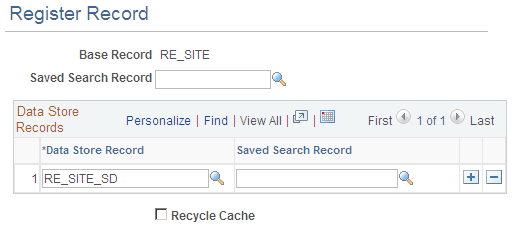
| Field or Control | Description |
|---|---|
|
Base Record |
Select a base record on the Define Record page to associate with this supplemental data record. |
|
Data Store Record |
Select one of the data store records that you previously registered that you want to use to store this supplemental data record. |
Register Component Page
Use the Register Component page (SD_REG_COMP) to register and enable the component and the pages for supplemental data.
Navigation:
This example illustrates the fields and controls on the Register Component page. You can find definitions for the fields and controls later on this page.
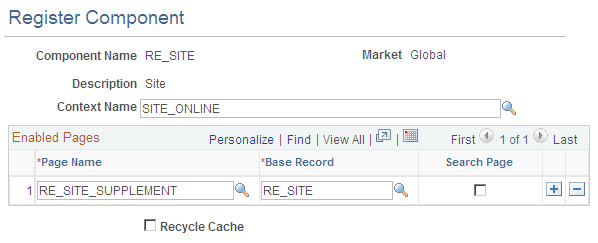
You can enter components on this page.
Record Page
Use the Record page (SD_RECDEFN) to define the supplemental data record to associate with the base record and identify where to store this record.
Navigation:
This example illustrates the fields and controls on the Record page. You can find definitions for the fields and controls later on this page.
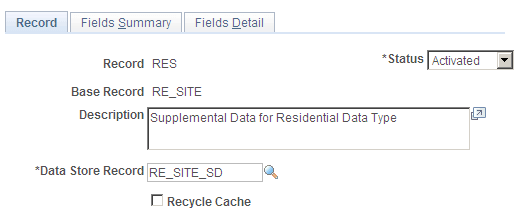
| Field or Control | Description |
|---|---|
|
Status |
Select either In Design or Activated. |
|
Data Store Record |
Select one of the data store records that you previously registered that you want to use to store this supplemental data record. |
Fields Summary Page
Use the Fields Summary page (SD_RECFLD) to map fields to the data storage fields.
Navigation:
This example illustrates the fields and controls on the Fields Summary page. You can find definitions for the fields and controls later on this page.
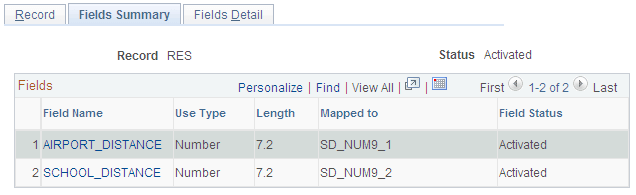
Values must be entered on the Fields Detail page before you can map the field to a value.
Fields Detail Page
Use the Fields Detail page (SD_RECFLD_DTL) to define detail information for a field.
Navigation:
This example illustrates the fields and controls on the Fields Detail page. You can find definitions for the fields and controls later on this page.
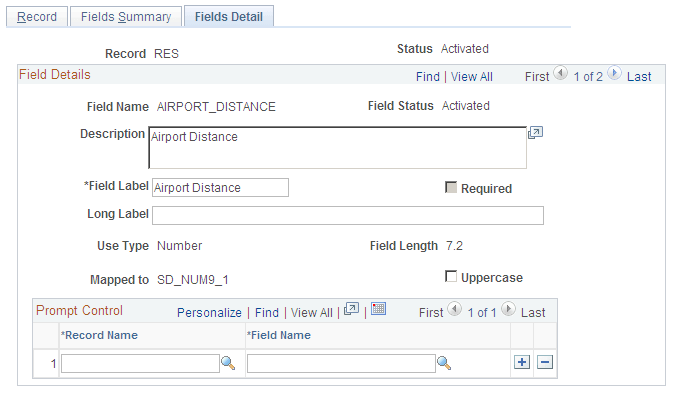
| Field or Control | Description |
|---|---|
|
Field Name |
Enter a name for the supplemental data field and a description of the field. |
|
Field Label |
Enter the a label to display on the page for this field. |
|
Use Type |
Values selected here affect the display of columns on the Fields Summary page and values displayed on this page. Values are:
|
|
Field Length |
Depending on what value you select as a use type, this field becomes editable or is populated with predefined values. If you select the Number or Signed use type, select either 15.4, 7.2, or 9. If you select the Text use type, select 20, 4, or 50. |
|
Mapped To: |
Select the data store field to which you want to map this field. |
Codes
If you select the use type of Code, the Codes group box appears.
| Field or Control | Description |
|---|---|
|
Sequence |
Enter a number to represent the order in which you want to see these codes listed in a drop-down list box or lookup page. |
|
Field Value |
Enter each valid code in this list. |
|
Translate Long Name |
Enter the text that you want to appear on the list when the drop-down list box appears. |
Define Display Group Page
Use the Define Display Group page (SD_GRPDEFN) to define a display group and associate any records and fields, as well as identify the order in which the fields appear on the page.
Navigation:
This example illustrates the fields and controls on the Define Display Group page. You can find definitions for the fields and controls later on this page.
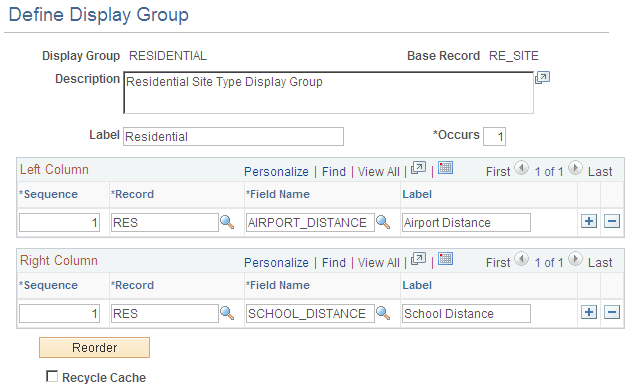
| Field or Control | Description |
|---|---|
|
Label |
Enter a label for the display group data group box. |
|
Occurs |
Enter the number of rows of data to display in the group box. |
|
Sequence |
Enter a sequence number to determine the order in which the fields appear on the page for each column. |
|
Field Name |
Don't forget to provide a definition. |
|
Label |
Enter a label that you want to appear on the page for the field name for each supplemental data field. |
Assign Display Group Page
Use the Assign Display Group page (SD_PAGE_GRP) to assign one or more display groups to a supplemental data-enabled component and page.
Navigation:
This example illustrates the fields and controls on the Assign Display Group page. You can find definitions for the fields and controls later on this page.
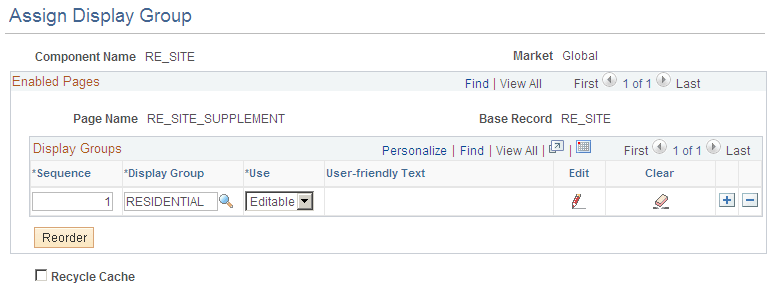
| Field or Control | Description |
|---|---|
|
Sequence |
Enter the sequence you want the group to display. |
|
Display Group |
Add a supplemental data display group that you want to associate with this component and this page. |
|
Edit |
Select whether you want the text associated with the display group to be Editable or Read-only. |