PeopleSoft Maintenance Management Integrations
The following diagram illustrates how PeopleSoft Maintenance Management integrates with numerous PeopleSoft applications: Applications that integrate directly with Maintenance Management are PeopleSoft CRM and third party help desk applications, Microsoft Project, external condition monitoring systems, PeopleSoft Inventory and Cost Management, PeopleSoft Purchasing, PeopleSoft eProcurement, PeopleSoft Accounts Payable, PeopleSoft Asset Management, PeopleSoft Human Capital Management (HCM), PeopleSoft Program Management, PeopleSoft Project Costing, PeopleSoft Expenses, ESRI ArcGIS Online and Mobile Web Services. Products that indirectly integrate with PeopleSoft Maintenance Management are Centerstone (CAFM) by way of PeopleSoft HCM, and PeopleSoft General Ledger, which is used to update all accounting values coming from Inventory, Purchasing, Accounts Payable, and PeopleSoft Maintenance Management and PeopleSoft Project Costing
Note:
The integration with ESRI ARCGIS (Geographic Information System) and Asset Lifecycle Management is no longer supported as of FSCM Update Image 9.2.055.
how PeopleSoft Maintenance Management integrates with numerous PeopleSoft applications
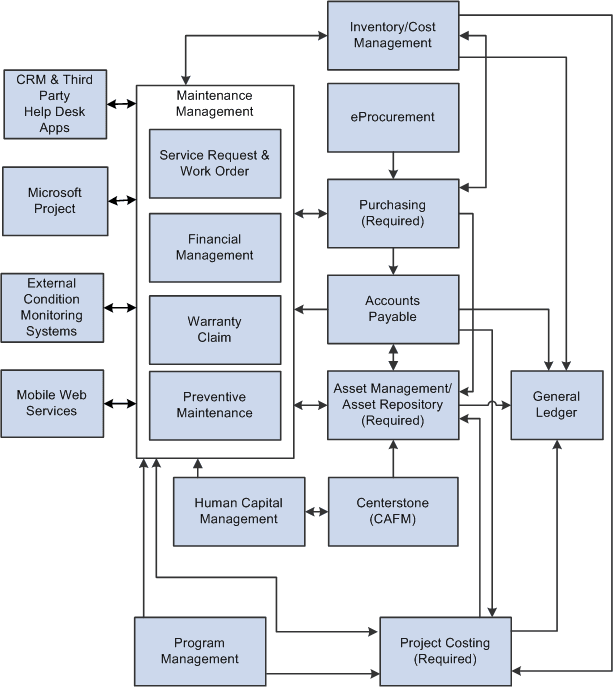
You are required to install three PeopleSoft applications to use PeopleSoft Maintenance Management, which include:
-
PeopleSoft Asset Management
-
PeopleSoft Project Costing
-
PeopleSoft Purchasing
Other PeopleSoft applications that are normally used, but are not required, with PeopleSoft Maintenance Management are:
-
PeopleSoft Inventory.
-
PeopleSoft ALM (Asset Lifecycle Management) Portal Pack.
-
PeopleSoft Program Management.
-
PeopleSoft CRM (Customer Response Management) and Third-party Help Desk Applications.
-
PeopleSoft eProcurement.
-
PeopleSoft Expenses.
-
PeopleSoft Time and Labor.
-
PeopleSoft North American Payroll.
-
External Condition-based Monitoring Systems
-
Mobile Web Services.
-
ESRI ArcGIS Online.
You have access to much of the functionality of PeopleSoft Resource Management and some of the time reporting functionality of the PeopleSoft Expenses module in PeopleSoft Maintenance Management. However, all of this functionality exists in PeopleSoft Maintenance Management, which means that you do not need to install PeopleSoft Resource Management and PeopleSoft Expenses to use PeopleSoft Maintenance Management. If you choose to enter personal time (non-work order related) time on the Technician Workbench and you want to track these expenses, then you must set up PeopleSoft Time and Labor. You can also set up PeopleSoft Northern Payroll so that PeopleSoft Time and Labor can send these expenses to payroll for processing and posting.
External Condition Monitoring Systems can also integrate with PeopleSoft Maintenance Management to enable the creation of condition-based work orders.
You can integrate with PeopleSoft Help Desk and other third-party help desk applications to create a corresponding work order and receive automatic updates as the work order progresses. In addition, you can locate a work order or asset on a map based on the integration between PeopleSoft Maintenance Management and ESRI ArcGIS Online.
PeopleSoft Maintenance Management provides a set of dedicated web services that enable mobile device integration with any third party suppliers or any system that supports web services integration. An integrated mobile device enables a maintenance technician to effectively and efficiently record and complete work order assignments.