Reviewing Crew Rescheduling History
This section discusses how to update the rescheduling history for a crew.
Pages Used to Review the Crew Rescheduling History
| Page Name | Definition Name | Usage |
|---|---|---|
|
WM_RESCHED_HST |
Review and update the rescheduling history for a crew. |
|
|
Reschedule Comment Page |
WM_RESCHED_COMMENT |
Enter a detailed explanation for the rescheduling of a specific work order task line. |
Rescheduling History Page
Use the Rescheduling History page (WM_RESCHED_HST) to review and update the rescheduling history for a crew.
Navigation:
This example illustrates the fields and controls on the Rescheduling History page. You can find definitions for the fields and controls later on this page.
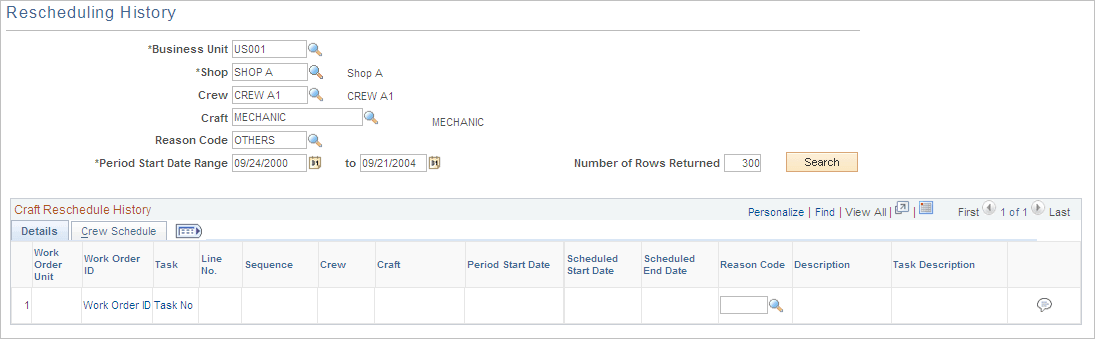
At a minimum, you must enter the business unit, shop, and period start date and click the Search button to display all of the work order tasks, which were rescheduled for a crew in the Craft Reschedule History grids. The search field enables you to narrow your search.
Crew Reschedule History Details Grid
The Details tab has a grid that lists the details of work order tasks assigned to a crew that were rescheduled. It also shows the reason codes and the descriptions for the rescheduling action.
| Field or Control | Description |
|---|---|
|
Reason Code |
Select another reason code to override the code in the field, if desired. |
|
|
Click the Comment icon to access the Reschedule Comment page, where you can add a more complete explanation of why a task line was rescheduled for this crew. |

Craft Reschedule History Crew Schedule Grid
Select the Crew Schedule tab on the Rescheduling History page to review the crew schedule status, scheduled hours, crew completed hours, and carryover hours for a rescheduled task.