Ad Hoc Receipts
Ad hoc receipts are receipts without a purchase order and provide you the capability to track a package from receipt to delivery. For example, if a salesperson ships samples to a doctor's office, a purchase order or accounts payable transaction is not generated, but the samples are received and delivered.
Another example might be when a department orders supplies using a credit card. In this case, there is not a purchase order and an invoice is not sent to accounts payable. When these items arrive, the receipt needs to be recorded and the items delivered to the appropriate person or department.
Note:
To use the ad hoc receipt transaction, ensure that the Change Non PO Receipt Price check box is selected on the Receive Setup page for your user preferences. To access the check box, select:
This diagram illustrates the process flow to receive an item and create an ad hoc receipt. It highlights the part of the flow where you use Mobile Receiving:
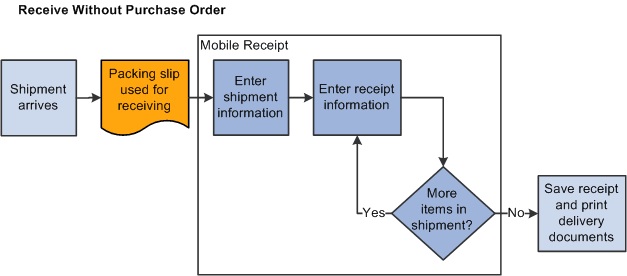
Using ad hoc receipts, you can provide basic information about the receipt, add multiple items to the receipt, and save the receipt into the PeopleSoft system where you can review and update the receipt. The receipt is also available to a mobile device so that Mobile Delivery can complete the delivery of the received items.