Copying Large Sales Orders
The topic discusses how to copy large sales orders and large order lines.
Pages Used to Copy Large Sales Orders
| Page Name | Definition Name | Usage |
|---|---|---|
|
ORD_COPY_SELECTION |
Use this page to run the Copy Sales Order/Quote process to copy large sales orders or quotations into a new sales order. |
|
|
ORD_COPYLN_SELECT |
Use this page to run the Copy Sales Order/Quote process to copy large sales orders or quotation lines into a new sales order. |
Select Order to Copy Page
Use the Select Order to Copy page (ORD_COPY_SELECTION) to use this page to run the Copy Sales Order/Quote process to copy large sales orders or quotations into a new sales order.
Navigation:
Note:
If you attempt to use the Select Order to Copy page from the header menu on the order entry form and either the line maximum or schedules per line maximum is exceeded for the order or quote, you are directed to use the Sales Order/Quote Copy process (ORD_COPY) to copy the order.
This example illustrates the fields and controls on the Select Order to Copy page. You can find definitions for the fields and controls later on this page.
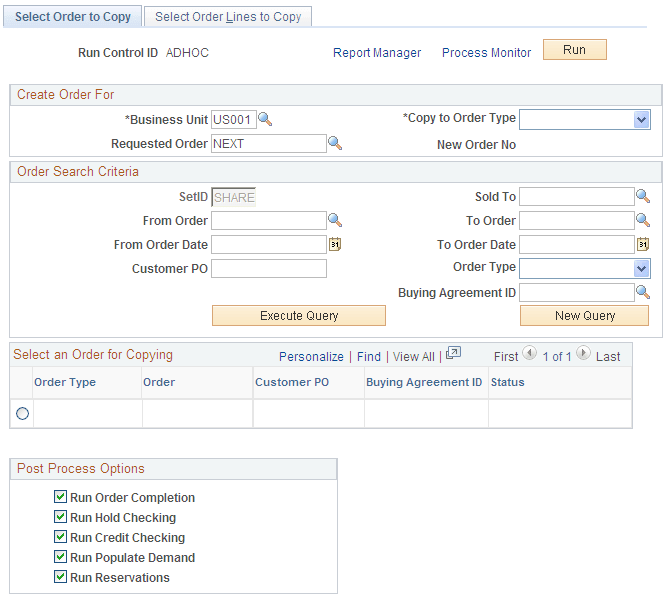
| Field or Control | Description |
|---|---|
|
Copy to Order Type |
Select a new order type. This applies when copying from a quote to a sales order. |
|
Selection Criteria |
Enter values to search for the orders to copy. |
|
Run Order Completion and Run Hold Checking and Run Credit Checking and Run Populate Demand and Run Reservations |
Select the additional processes to run after the Order Copy process is run. Note: Any processes selected execute in the order displayed and run as part of this process. |
Select Order Lines to Copy Page
Use the Select Order Lines to Copy page (ORD_COPYLN_SELECT) to use this page to run the Copy Sales Order/Quote process to copy large sales orders or quotation lines into a new sales order.
Navigation:
Note:
If this page is not accessed, all eligible lines are copied.
| Field or Control | Description |
|---|---|
|
Select All |
Select individual lines or use the link to select all of the lines to copy. |