Sales Order Holds and Inventory Processing
When a new sales order schedule is saved in the Open status and it goes on hold, order information is not passed to PeopleSoft Inventory. When the underlying hold is removed by the Automatic Hold Check or Automatic Credit Check process, the Populate Demand process should be run. The exception to this rule is for hold conditions that are not severe enough to prevent order fulfillment. In these cases, you can determine which state to process through by checking the Pass to Unfulfilled, Pass to Releasable, Pass to Released, Pass to Picked/Confirmed, or Pass to Shipped options on the Hold Processing Page. When any of these items are checked, at the specified state, processing proceeds even when the order violates the hold parameter.
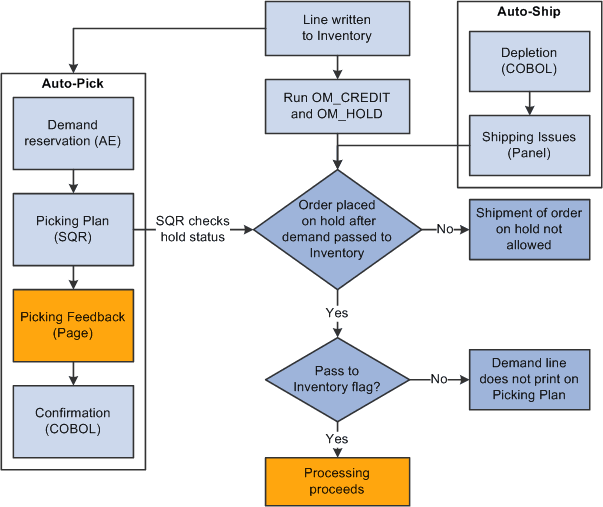
Sales orders can be put on hold after the demand line is sent to PeopleSoft Inventory. The inventory system checks for holds at two points in the fulfillment cycle:
-
When the Picking Plan process runs.
-
When an order is selected for shipment on the Shipping/Issues - Order Summary page.
If the Picking Plan process determines that a hold is applied to an order, the demand line is not printed on the picking plan. If you select an order that is on hold from the Shipping/Issues component, the system prevents shipment of the order.
Note:
Orders must be released from hold in PeopleSoft Order Management or the Order Hold Workbench. Inventory personnel are unable to remove the hold for sales orders.
Note:
Run the Automatic Credit Check process and the Automatic Hold Check process in PeopleSoft Order Management to re-evaluate the status of orders that are put on hold after demand data is sent to PeopleSoft Inventory.
Note:
If you are working with large volume orders, it is important to run the Automatic Credit Check and Automatic Hold Check process frequently to ensure that orders that exceed the maximum line/schedule thresholds are updated for hold and credit checking.
The following diagram outlines the effect of sales order holds on PeopleSoft Inventory order fulfillment:
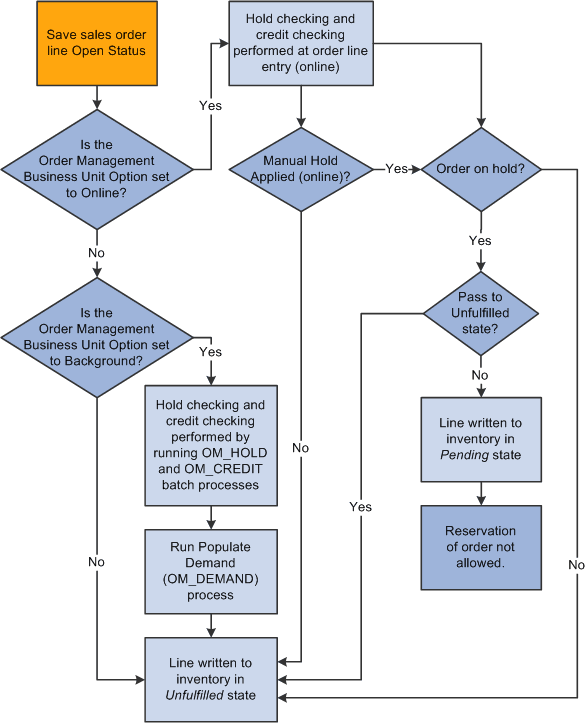
Flow chart — Effect of sales order holds on Inventory
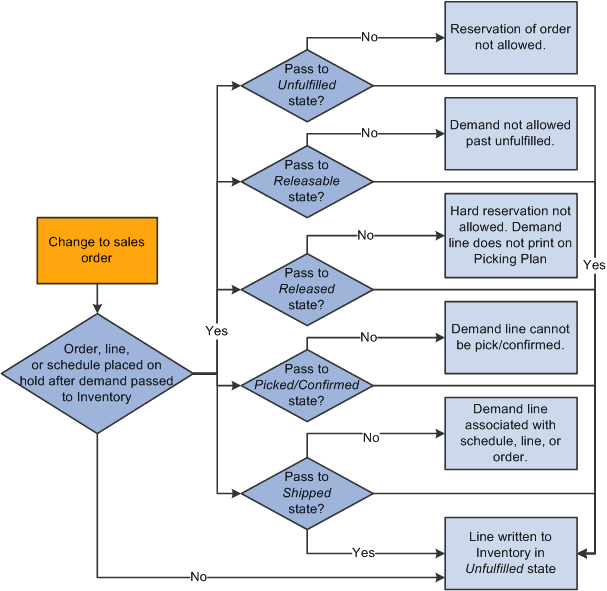
Flow chart —Effect of sales order holds on Inventory
Note:
Whenever a hold is updated, the row is written to the ORD_HOLD_AUDIT table capturing the event.