Business Unit Setup for RMA Processing
If you have a separate facility for processing returns, it may make sense to set up the facility as a separate PeopleSoft Order Management Business Unit for the entry of RMAs that is distinct from the business unit for entering sales orders.
You must make the correct PeopleSoft Billing Business Unit links to record sales order activity and returns in the same PeopleSoft Billing Business Unit because you can bill by PeopleSoft Inventory Business Unit instead of PeopleSoft Order Management Business Unit. Link the PeopleSoft Inventory Business Unit and the PeopleSoft Order Management RMA Business Unit to the same PeopleSoft Billing Business Unit.
Process Flow — Billing RMA activity by Order Management Business Unit
Example 1
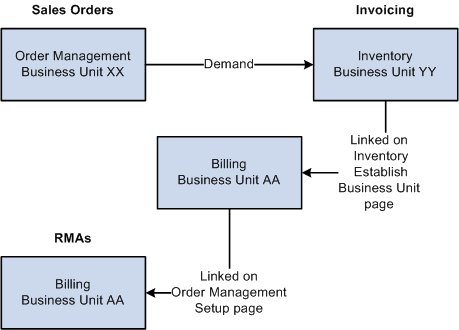
You create sales orders in PeopleSoft Order Management Business Unit XX but have chosen to bill sales activity by Inventory business unit YY. To do this, you associated Inventory business unit YY with Billing business unit AA on the Inventory Definition - Business Unit Definition page. It is not necessary to link Order Management business unit XX to Billing business unit AA. If you do link XX to AA, the system still uses the Inventory business unit billing defaults that you record on the Inventory Definition - Business Unit Options: Revenue and Billing Defaults page.
You have a separate location (Order Management business unit ZZ) where you enter RMAs, sell spare parts, and perform other service-related activities. You must link business unit ZZ with Billing business unit AA.
Keep in mind that the RMA adjustments process in PeopleSoft Billing uses the restock product ID, bill type ID, and bill source ID that you record on the Accounting and Billing page. Therefore, you must link the Order Management business unit where you are entering RMAs to a Billing business unit on the Order Management Definition - Order Management Setup page. If you are billing by Inventory business unit and select the Inventory business unit in the RMA Adjustments Billing Source field on the Accounting and Billing page, you'll use the restock ID for the Inventory business unit. Similarly, if you are billing by Order Management business unit and you select the Order Management business unit in the RMA Adjustments Billing Source field on the Accounting and Billing page, you'll use the restock ID for the Order Management business unit.
Note:
If the RMA Adjustments Billing Source field is set to No RMAs, you can not enter RMAs in the Order Management Business Unit.
This diagram illustrates how Order Management business units are linked to RMAs:
Example 2
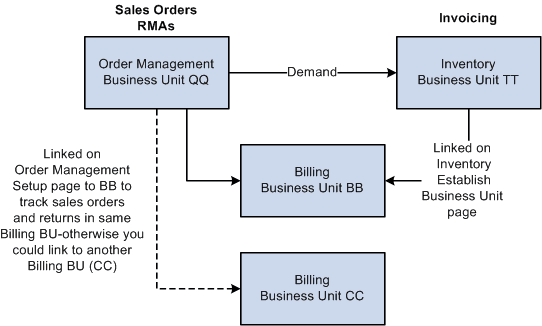
You enter sales orders and RMAs in the same Order Management business unit QQ, but you bill sales activity by Inventory business unit TT. You linked Inventory business unit TT to Billing business unit BB. You must also link Order Management business unit QQ to a Billing business unit; use BB to track sales orders and return transactions in the same Billing business unit.
The following diagram illustrates the linkage between RMAs and Billing business units.
Process Flow — Billing RMA activity by Inventory Business Unit