Corporate Customers
PeopleSoft Receivables supports three types of corporate customer structures:
-
A related customer structure, which you define on the General Information or Corporate Customer page and which the maintenance and payment worksheets use.
-
A single parent with multiple children hierarchy structure that you define with the Tree Manager and use for specialized inquiry purposes. While these corporate customer trees can provide a visual representation of logical groups of child customers, the parent–child customer relationships defined in the customer record are not strictly enforced.
-
A multilevel parent and child hierarchy structure that provides a three hundred sixty degree view of your customers to enable you to perform multiple tasks specific to credit and collection activities without using Tree Manager.
Note:
PeopleSoft Order Management uses the related customer structure.
Suppose, for example, that you have a corporate customer group with three basic levels:
-
Local offices
-
Regional headquarters
-
Corporate headquarters
The levels are different in each customer structure. You can use one or both of these structures for corporate accounts.
The Related Customer Structure
The related structure is useful for customers who have multiple accounts with you or for customers who have more than one customer ID.
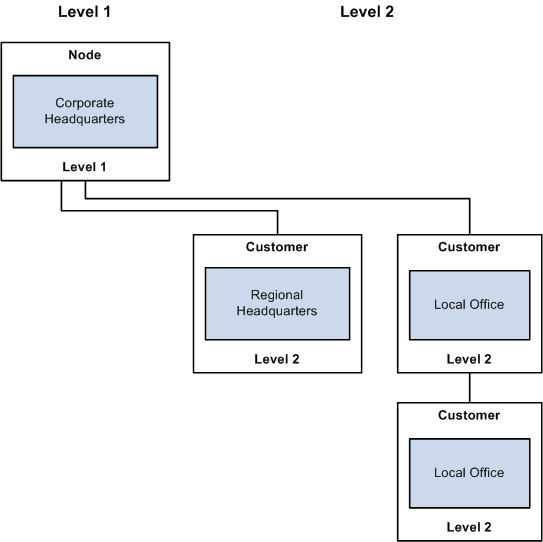
To create a related structure with two levels:
-
Add each local office as a customer.
-
Add each regional headquarters as a customer.
-
Add the corporate headquarters as a customer.
The following diagram illustrates that level 2 customers all point to the corporate headquarters as the level 1 corporate customer.
Process Flow — Related customer structure with two levels
The Single Parent with Multiple Children Hierarchy Structure
Customers can create trees to display hierarchical relationships. These trees can show logical groupings for child customers that have been defined for a corporate or level one customer. This relationship that is defined between customers is considered a two level hierarchy. This hierarchy enables you to establish a corporate customer as the parent customer and to add customers related to this corporate customer as children of the parent customer. This type of hierarchy does not allow you to establish more than one parent customer in the hierarchy.
The single parent with multiple children structure is useful for large corporate accounts. In this structure, you add each local office as a customer. However, you can but are not required to add the regional headquarters or the corporate headquarters as a customer.
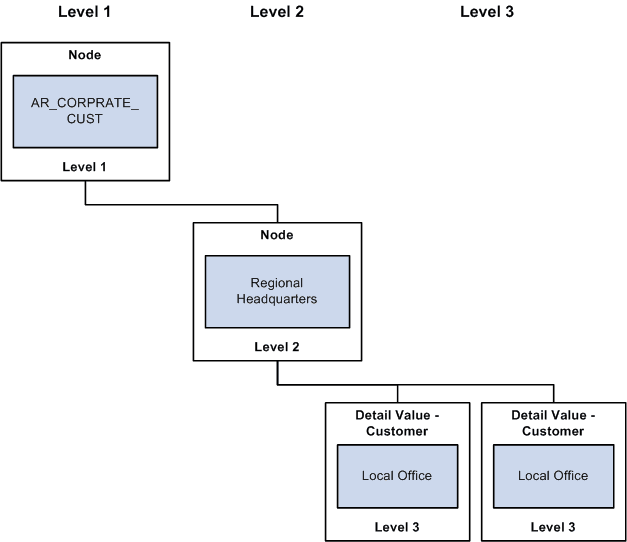
The following diagram illustrates that in the tree structure, the local offices are detail values (level 3 customers only), and the regional (level 2) and corporate headquarters (level 1) groupings are nodes that are used to organize detail values into corporate groups.
Single parent with multiple children hierarchy structure with three levels defined in Tree Manager.
Note:
The related structure can contain customers in different SetIDs, whereas the tree structure cannot.
The Multilevel Parent and Child Hierarchy Structure
This hierarchy enables a customer that is a child of a corporate customer to be a parent customer of another customer. This multilevel customer hierarchy enables you to view and mange your customers more effectively with regard to collections and credit analysis. A core characteristic of this feature is a graphical representation of the customer hierarchy which shows the multilevel hierarchy that is defined in the customer records. This graphical representation appears on the Customer Hierarchy page, the PeopleSoft Receivables Collections Workbench, and the Customer General Information component.
You can set up a multilevel customer hierarchy from the Customer
You can build a multilevel customer hierarchy on the Customer, General Information page for a correspondence, remit from, or corporate customer relationship. If a customer relationship (Correspondence, Remit From, or Corporate) check box is not selected, you can select the customer SETID and the CUST_ID that you want to appear in the customer hierarchy. The SETID and the CUST_ID uniquely identify a customer. The CORPORATE_SETID and CORPORATE_CUST_ID identify the customer's parent. Any customer that has the same value populated for SETID and CORPORATE_SETID and the same value populated for the CUST_ID and CORPORATE_CUST_ID will be a parent of a hierarchy. Once you select these two values and save your changes, you can click the (Correspondence, Remit From, or Corporate) Selection link to view the new hierarchy on the Customer Hierarchy page.
The following table shows how the corporate customer data will be stored to represent the multi-level hierarchy.
| SETID | CUSTOMER ID | CORPORATE SETID | CORPORATE CUSTOMER ID | COMMENTS |
|---|---|---|---|---|
|
SHARE |
1001 |
SHARE |
1001 |
Parent |
|
SHARE |
CWBUSD1001 |
SHARE |
1001 |
|
|
SHARE |
CWBUSD2001 |
SHARE |
CWBUSD1001 |
|
|
SHARE |
CWBUSD3001 |
SHARE |
CWBUSD1001 |
|
|
SHARE |
CWBUSD1002 |
SHARE |
1001 |
|
|
SHARE |
CWBUSD2002 |
SHARE |
CWBUSD1002 |
After entering the values in the previous table using the customer SetID and customer ID fields for a Corporate Customer on the Customer's General Information page and clicking the Corporate Selection link, the Customer Hierarchy below displays for corporate customer 1001.
Corporate Customer Hierarchy
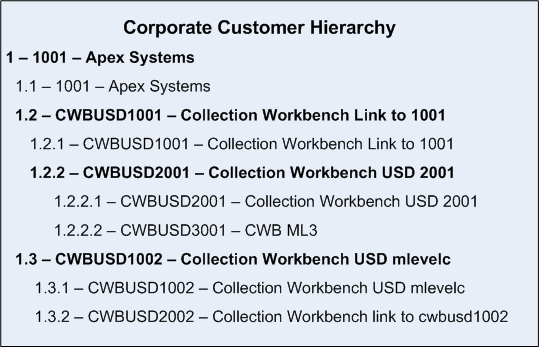
Every level includes itself in the hierarchy so that you can view the data on the hierarchy for the individual level, as well as a value rolled up into a higher level of the hierarchy. These values appear when you select the Customer Hierarchy page (Accounts Receivable, Customer Accounts, Customer Information, Customer Hierarchy) or the Customer Hierarchy tab in the Collections Workbench (Accounts Receivable, Customer Accounts, Collection Workbench) for customer 1001.
Collection Workbench Customer Hierarchy
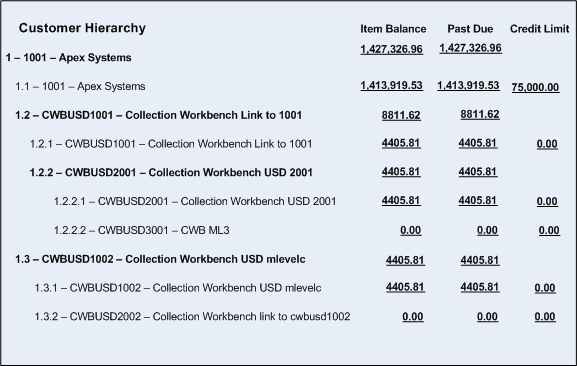
The graphical display of the Customer Hierarchy page is based on the setup of the Hierarchy Display Options page The Customer Hierarchy page that displays in the Collections Workbench and appears on the Customer Hierarchy page displays an Item Balance summary, a Past Due balance summary, and entered credit limits for each customer in the Customer Hierarchy.
See PeopleSoft Receivables: Understanding the Collections Workbench
Related Topics