Customer Roles
Customer roles determine the functional use of the customer ID. Customer information is associated with specific customer roles. You can use the customer General Information component to maintain information that applies to multiple customer roles and to select those roles. You can use the pages with role designations to enter processing attributes and additional information that are unique to the customer's function.
PeopleSoft Order Management shares the customer master file with:
-
PeopleSoft Billing
-
PeopleSoft Contracts Administration
-
PeopleSoft Inventory
-
PeopleSoft Receivables
-
PeopleSoft Grants Administration
-
PeopleSoft Pay/Bill Management
-
PeopleSoft Staffing Front Office
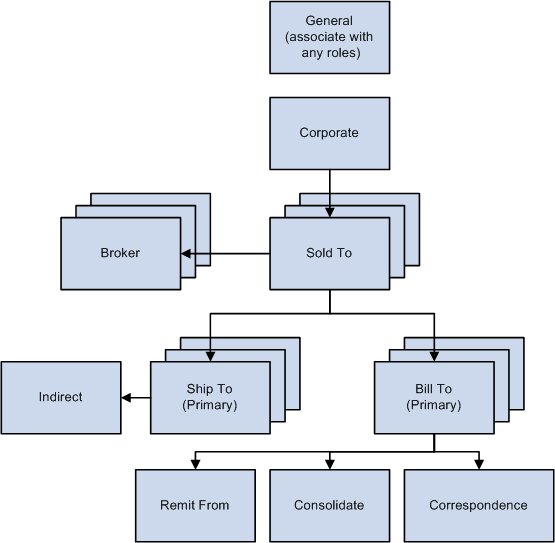
The following diagram illustrates the various customer roles. PeopleSoft Order Management uses the corporate, sold to, ship to, bill to, broker, and indirect customer roles. PeopleSoft Contracts Administration, Billing, and Receivables use all customer roles except sold to, broker, indirect, and ship to.
Note:
The ship to customer role and the ship to address are called Worksite customer role and Worksite customer address when Staffing Front Office or Pay/Bill Management is being used based on installation options.
Process Flow — Customer roles